Time based routing for on call rotation
Is there a way to route calls to 3 users based on an on-call rotation?
Show less
Zoomtopia is here. Unlock the transformative power of generative AI, helping you connect, collaborate, and Work Happy with AI Companion.
Register nowEmpowering you to increase productivity, improve team effectiveness, and enhance skills.
Learn moreKeep your Zoom app up to date to access the latest features.
Download Center Download the Zoom appDownload hi-res images and animations to elevate your next Zoom meeting.
Browse Backgrounds Zoom Virtual BackgroundsEmpowering you to increase productivity, improve team effectiveness, and enhance skills.
Zoom AI CompanionUser groups are unique spaces where community members can collaborate, network, and exchange knowledge on similar interests and expertise.
Help & Resources is your place to discover helpful Zoom support resources, browse Zoom Community how-to documentation, and stay updated on community announcements.
The Events page is your destination for upcoming webinars, platform training sessions, targeted user events, and more. Stay updated on opportunities to enhance your skills and connect with fellow Zoom users.
The community will still be accessible, however, the creation of any new discussions or replies will be temporarily unavailable. We appreciate your patience during this time.
Zoom's enterprise phone software is the scalable cloud phone solution for businesses of all sizes. Explore the Zoom Community's Recent Activity below to join the Phone System conversation and connect with other members. If you're still looking for support, browse our Zoom Phone System support articles or start a new discussion below!
Is there a way to route calls to 3 users based on an on-call rotation?
Show less
Ich verwende Zoom-Phone sowohl über die mobile App für das Handy, als auch am PC. In den Einstellungen zu Zoom-Phone über das WebInerface sollte sich bei den Einstellungen zur Anrufbehandlung bei den Geschäftszeiten eigentlich einstellen lassen, welche Geräte/Programmversionen klingeln sollen, wenn ein Anruf eingeht. Hier erscheint jedoch nur die Zoom-Anwendung als einzige Auswahloption, während die Mobile App überhaupt nicht angezeigt wird. Das Problem ist schon seit unserem Umstieg auf Zoom Phone vor 3 Monaten immanent und wurde mir von mehreren Kollegen/innen rückgemeldet. Danke für die Hilfe. __________________________________________________________________________________________________________ I use Zoom-Phone both via the mobile app for the mobilephone and on the PC. In the settings for Zoom-Phone via the WebInerface, it should actually be possible to set which devices/program versions should be ringing, when a call is received in the settings for call handling during business hours.
However, only the Zoom application appears as the only selection option, while the mobile app is not showing up at all. This problem has been with us since we switched to Zoom Phone 3 months ago and has been reported to me by several colleagues.
Thanks for the help.
Show less
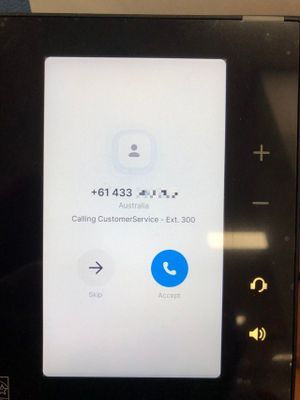
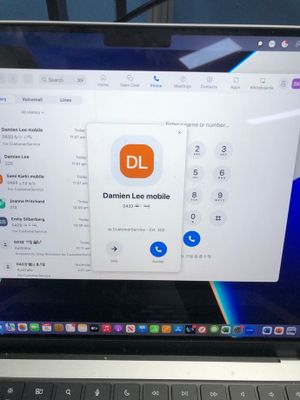
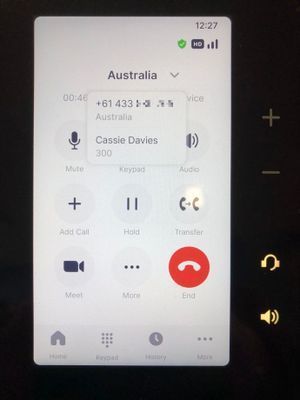
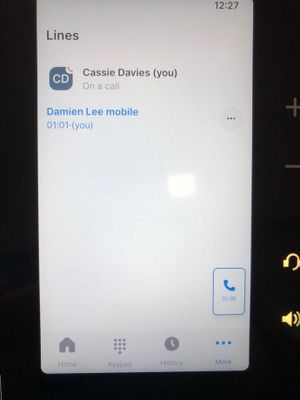
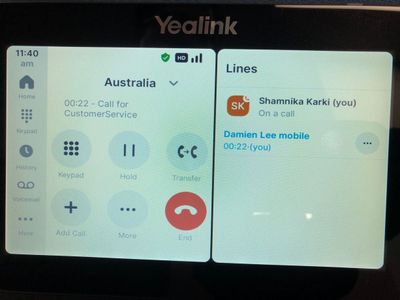
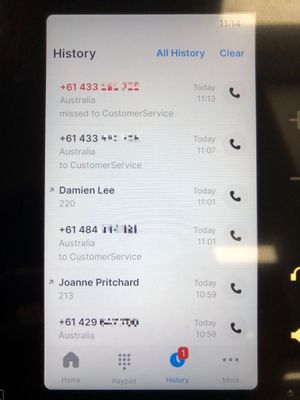
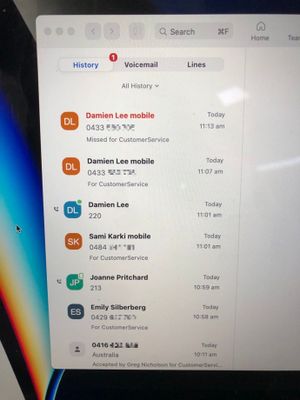
Hi, I'm having problems that the Zoom Phone Appliance (ZPA) does not resolve the caller phone number to the external contact list. - Seen both on the Poly CCX 400 and Yealink MP56, both with version 5.12.2 - External Contacts have been imported into Zoom Phone->Company Info->External Contacts If an external call comes in we only see the phone number on the ZPA (see below) but in the desktop client the number gets resolved to the external contact. While on call you only see the country the caller is from, pressing the country gives you the calling number but not much else: But if you go to the More->Lines you can see the phone number gets resolved to a contact name The Yealnk with its bigger screen which shows the Line screen beside it is a bit better, so after you answer the call it will display the name. And the History Log doesn't show it as well, you have to press the number and then it will show the name of the caller, unlike the desktop client. The Zoom Client on the computers resolves all these external numbers to contacts instantly, so why can't the Zoom Phone Appliance? We were promised this when we enquired about Zoom Phone and its one of the factors we moved from our ageing PABX, which could add names to phone numbers as soon as the call came in before it even got answered, and kept it all the way through the call. Our customer service people seem to prefer the traditional handsets better than using their computers, so it would be good to know how to fix this. Poly CCX 400
Desktop
Poly CCX 400
CCX 400
Desktop
Show less
Basically what the title says. We use Zoom for our reception and contacting our leads. Potential clients call our sales rep but 10 seconds in and the call suddenly gets dropped. Even when the connection is stable. When a sales rep has to transfer to another sales rep it doesn't go through. Any insights would be helpful. Thanks.
Show less
Bonjour,
J'essaie de configurer mon compte mais je ne trouve pas ma ville. Comment l'ajouter?
Merci.
When we offboard a user, our process is usually deactivating a user via Okta, and that in turn removes their zoom account and it become inactive. However, our current process also states that we manually go into the phone system to "Remove all Packages" if they have a zoom phone number. Is this required or can we leave it as is when a user is inactive? What are the downsides of leaving it vs not?
Show less
I'm new to Zoom Phone. I personally use an Android phone. When I add my cell phone # to my call handling, my phone will pop up when someone calls me, but I get the regular Android phone face and can't access any Zoom Options. If I remove my phone number from the call handling, my Android will ring, but there is no pop up and I have to unlock my phone and go into the Zoom App to accept it. Am I doing something wrong? My business partner uses an Iphone and it works perfect. Any suggestions?
Show less
I would like the option of playing a message to callers blocking their number is this possible BEFORE we drop them?