Zoom Meetings
cancel
Showing results for 
Search instead for 
Did you mean: 
Weekly Leaderboard

What are Zoom Meetings?

Zoom Meetings are a simplified video conferencing solution for an optimized virtual meeting experience. Explore the Zoom Community's Recent Activity below to join the Meetings conversation and connect with other members. If you're still looking for support, browse our Zoom Meetings support articles or start a new discussion below!

Recent Activity

Resolved! Multiple Host Logins?

I currently access zoom with a group of others where it has been decided to allow several people at one time to login as host, but this seems incorrect to me. As during a meeting when another person logs in with the paid account as admin if I'm alrea... Show more

I currently access zoom with a group of others where it has been decided to allow several people at one time to login as host, but this seems incorrect to me. As during a meeting when another person logs in with the paid account as admin if I'm already in as host I get a message to say I have been logged out and a pop up to regain host and I seem to loose control of normal host controls


In another group, always there is one assigned Host, who then passes on co-host privs, and there is never an issue. Or even if the original host leaves and passes on Host to another, control remains smooth and trouble free.


Can I assume the first situation above is incorrect?

Do you have any recommendations for groups that meet where people come and go and the original host may leave and need to pass to another.

Thanks


Show less

reply-icon Latest Reply - 

Pull a report after hosting a zoom meeting

Is there an option for where I can run a report/list of all the attendees that participated in a Zoom meeting that I hosted after the meeting ended?


reply-icon Latest Reply - 

Program

I am pre-recording a program, would like the presenter to be in active speaker mode, but like the only the "MC" video shown in the upper right corner while the presenter is performing. What view should I select? Another question: Is shared screen onl... Show more

I am pre-recording a program, would like the presenter to be in active speaker mode, but like the only  the "MC" video shown in the upper right corner while the presenter is  performing.  What view should I select?  Another question:  Is shared screen only needed when presenting something on the screen, as oppose to individuals doing  a performance.  So I am clear, I only  need to select shared screen if I decide to play a video in between the performers?  Thank you.


Show less

reply-icon Latest Reply - 

Grandpad Connection Issue

Has anyone had an issue connecting the Grandpad from Consumer Cellular to a Zoom Meeting that requires a passcode?

reply-icon Latest Reply - 

Facebookライブ配信の公開設定を友達限定から全体公開に変更する方法

zoomからFacebookライブ配信すると、いつも公開が友達限定になります。初期設定で全体公開に変更したくて。変更方法知ってる方いたら教えてもらえたら嬉しいです。

reply-icon Latest Reply - 

Restricting who can join a meeting from Android SDK Version 5.9

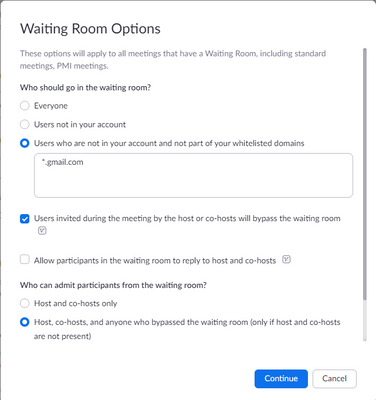
I’d like to be able to schedule meetings that only allow specific email addresses. I saw the document that covers restricting who can join a meeting to email address domains in Waiting room optionsI set Users who are not in your account and not part ... Show more

I’d like to be able to schedule meetings that only allow specific email addresses. I saw the document that covers restricting who can join a meeting to email address domains in Waiting room options
I set Users who are not in your account and not part of the allowed list with domain
*.gmail.com
Waiting Room – Zoom Support

but I’d like to use user not sign in from android sdk version 5.9 to join the meeting without Host admit to join

How can i do ?
Thank you.

waiting_room.png

join_android.png


Show less

reply-icon Latest Reply - 

Zoom add in - auto updates?

Hi,

I would like to know how the Zoom Meeting Add-in client is managed and maintained to be kept up to date? Are there auto updates for the client or is up to the user to ensure the add in is kept up to date?

reply-icon Latest Reply -