Obtaining attendee reports
I can't get the report of the attendees as "reports" tab is not shown. How can I get the list of attendees?
Zoomtopia is here. Unlock the transformative power of generative AI, helping you connect, collaborate, and Work Happy with AI Companion.
Register nowEmpowering you to increase productivity, improve team effectiveness, and enhance skills.
Learn moreKeep your Zoom app up to date to access the latest features.
Download Center Download the Zoom appDownload hi-res images and animations to elevate your next Zoom meeting.
Browse Backgrounds Zoom Virtual BackgroundsEmpowering you to increase productivity, improve team effectiveness, and enhance skills.
Zoom AI CompanionUser groups are unique spaces where community members can collaborate, network, and exchange knowledge on similar interests and expertise.
Help & Resources is your place to discover helpful Zoom support resources, browse Zoom Community how-to documentation, and stay updated on community announcements.
The Events page is your destination for upcoming webinars, platform training sessions, targeted user events, and more. Stay updated on opportunities to enhance your skills and connect with fellow Zoom users.
The community will still be accessible, however, the creation of any new discussions or replies will be temporarily unavailable. We appreciate your patience during this time.
Zoom Meetings are a simplified video conferencing solution for an optimized virtual meeting experience. Explore the Zoom Community's Recent Activity below to join the Meetings conversation and connect with other members. If you're still looking for support, browse our Zoom Meetings support articles or start a new discussion below!
I can't get the report of the attendees as "reports" tab is not shown. How can I get the list of attendees?
The Zoom update crashed my laptop on starting to record an interview. I got the other party to send me a fresh invite, and accepted on my iPad. They made me host and I selected cloud recording. No sign of the recording on the Zoom website, or the iPad. Did Zoom lose my interview?
Show less
I'm trying to set up a poll that is not anonymous. When I did a test with my iPhone, the download .csv showed the username to be "iPhone". I renamed myself to something that would uniquely identify me, and did another poll. However, the username in the .csv still said "iPhone". I left the zoom, renamed myself within the zoom app, re-entered the meeting, and reran the poll, but the .csv still showed "iPhone". The only way to change my name so that it would appear in the .csv was to stop the meeting for everybody, then change my name in the zoom app (before joining), and then re-start the meeting. This is not an acceptable workaround... The host shouldn't have to stop/leave a meeting and restart it so that folks can rename themselves for a poll.
Show less
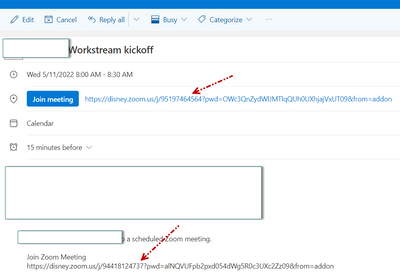
When adding an appointment and select zoom to add , it will require to sign to SSO
When clicking SSO the error is shown in the attached.
OS is MAC big Sur
TS done:
- Reinstalled Zoom add-in
- Reboot laptop
- OWA also shows the same error
Hi, i feel like i have all the quality settings maxed out, but i'm still only getting 32khz files. Is there a higher quality download, maybe 44.1 or something like that with a pro account? The account tested was a pro, i just don't know if i was missing some setting. They came out separate and were synced just fine but i was hoping there would be a little higher quality download option. It's for a podcast, and I got drop kits with good microphones, so i'm trying to really maximize. Thanks!
Show less
Hi, I own 3 zoom accounts. I have assigned 2 accounts to my colleagues. I would like to retrieve all participants list in all the meetings hosted using the 3 accounts. How do I do this? I have gone to Reports / Usage and saw the participants count. But the number is not clickable.
Show less
Hello, everybody. I've been using zoom and sharing screen in meetings for two years with no problem. Yesterday, out of a sudden, I could't share my screen during my meeting. Other people in the meeting could only see the first slide of my powerpoint presentation but then it wouldn't move on , it froze, although I could change slides from my PC. Any ideas why this happened?
Show less
Hello. When I upgraded from Ubuntu 20.04 to 22.04, zoom 5.10.6 stopped working. I'm booting in Xorg mode, so this is not related to the change in wayland. The zoom screen starts. However, when I try start (or join) a meeting, it opens what would be the window for seeing people, but that window only shows connecting. Luckily, I happen to have an older binary around, 5.9.6.2225 -- and this works.
Show less