Zoom Meetings
cancel
Showing results for 
Search instead for 
Did you mean: 
The Zoom Community will be placed in read-only mode January 9th, 2026 through January 22nd, 2026 to deliver you a new and improved community experience!

The community will still be accessible, however, the creation of any new discussions or replies will be temporarily unavailable. We appreciate your patience during this time.

Weekly Leaderboard

What are Zoom Meetings?

Zoom Meetings are a simplified video conferencing solution for an optimized virtual meeting experience. Explore the Zoom Community's Recent Activity below to join the Meetings conversation and connect with other members. If you're still looking for support, browse our Zoom Meetings support articles or start a new discussion below!


Recent Activity

Zoom share

All of a sudden when my boss hands over controls for me to share my work, a green bar highlights around the screen I am sharing and the controls to stop sharing disappear. The only way for us to get out of me sharing is for her to get out of zoom ent... Show more

All of a sudden when my boss hands over controls for me to share my work, a green bar highlights around the screen I am sharing and the controls to stop sharing disappear.  The only way for us to get out of me sharing is for her to get out of zoom entirely.  Very frustrating.  Anyone else have this issue?


Show less

reply-icon Latest Reply - 

Cursor can not be moved out when sharing video after sharing screen of Preview

Hi! I usually share videos and photos or PDF files using Preview on my Mac. But when the sequence of sharing is from Preview then I do a New Share then share a Video, my cursor stays stuck on the shared screen while the video is playing, I can actual... Show more

Hi! I usually share videos and photos or PDF files using Preview on my Mac. But when the sequence of sharing is from Preview then I do a New Share then share a Video, my cursor stays stuck on the shared screen while the video is playing, I can actually move the cursor out on my end, but for the other participants, they see my cursor stuck in the middle of the screen, I am unable to move it. Has anyone encountered this before?


Show less

reply-icon Latest Reply - 

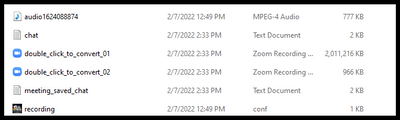
Opening a video to convert

Can't manually open a video to convert.

zoom issue.png

 Thank you for any support

reply-icon Latest Reply - 

Can’t share screen on new Macbook M1Pro

Can’t share screen on new Macbook M1Pro with latest Silicon Version of Zoom App.Tried everything, googled high and low, checked all app- and profile settings. Tried as host and as guest. Whatever I do, trying to share my screen results in a error-mes... Show more

Can’t share screen on new Macbook M1Pro with latest Silicon Version of Zoom App.
Tried everything, googled high and low, checked all app- and profile settings. Tried as host and as guest. Whatever I do, trying to share my screen results in a error-message „you can’t share your screen in this meeting“
Please send help, got a big presentation tomorrow and need this issue fixed. Any hint is appreciated. Thanks!


Show less

reply-icon Latest Reply - 

Problem Video

Hi, my zoom does not convert both videos anymore. After my talks with guests there is always only the guest video and not mine. Before it was after converting both videos to one, that it jumped whenever one of us talked. What do I do?

reply-icon Latest Reply - 

Export Settings

Is there a way to export your settings under the admin area? 
I will ultimately have to create multiple accounts and do not wish to take a bunch of screen shots of every tab. 

reply-icon Latest Reply - 

Resolved! Zoom Layout for Playback with ASL Interpreters

Hello! I'm the owner for my agency's zoom account and although I am most often the host for staff trainings, I am not always the one sharing my screen. What instructions do I need to share share with staff so the person who is sharing their screen us... Show more

Hello! 


I'm the owner for my agency's zoom account and although I am most often the host for staff trainings, I am not always the one sharing my screen. 


What instructions do I need to share share with staff so the person who is sharing their screen uses the view that will make sure the speaker(s), ASL interpreters and transcript are visible in the playback? 

Should they pin the interpreters and use speaker view?


Thanks!   


Show less

reply-icon Latest Reply - 

Virtual Background

I got my zoom laptop about two weeks ago. It is the newest macbook pro m1 chip. I have not been able to use a virtual background at all. I have tried everything. Could anyone help?

reply-icon Latest Reply - 

Unable to clear recordings in cloud

I keep getting emails stating that I have exceeded my cloud storage: "You have exceeded your cloud recording storage recording limit.Storage Limit: 10 GBStorage Used: 11.85 GBYou can free up space by deleting recordings, or you can increase your stor... Show more

I keep getting emails stating that I have exceeded my cloud storage: 

"You have exceeded your cloud recording storage recording limit.

Storage Limit: 10 GB
Storage Used: 11.85 GB

You can free up space by deleting recordings, or you can increase your storage limit.
To increase the limit, please visit xxxxxxxxxxx.com to purchase an add-on Cloud Recording plan. "


I have gone in and deleted all of my recording but I am still getting the message.

Any idea on how to clear the "memory"?

TIA

n


Show less

reply-icon Latest Reply - 

Connecting Zoom to Jira Service Desk

Has anyone had any success connecting zoom to Jira Service Desk? How were you able to do it? I have installed Zoom for JSD from the marketplace. But I just cannot figure out how to connect and integrate Zoom into JSD. The Zoom item appears on the rig... Show more

Has anyone had any success connecting zoom to Jira Service Desk? How were you able to do it?


I have installed Zoom for JSD from the marketplace. But I just cannot figure out how to connect and integrate Zoom into JSD. The Zoom item appears on the right hand ticket menu.


I think I need to somehow tell Zoom and JSD to connect and integrate. But when I do, I keep clicking on the Connect and the Request pre-approval buttons and nothing happens and I simply do not know what I need to do next.


I am the Atlassian Account Admin.


I want to get Zoom connected and listed on all of our JSD tickets.


I've read through Atlassian, JSD and Zoom help pages but they do not make sense nor do they do the trick.

Thanks!


Show less