What is the procedure for sharing a meeting recorded on iCloud with attendees?
at the time of recording I clicked on Record on Cloud, and need to now how to share it with the attendees?

Zoomtopia is here. Unlock the transformative power of generative AI, helping you connect, collaborate, and Work Happy with AI Companion.
Register nowEmpowering you to increase productivity, improve team effectiveness, and enhance skills.
Learn moreKeep your Zoom app up to date to access the latest features.
Download Center Download the Zoom appDownload hi-res images and animations to elevate your next Zoom meeting.
Browse Backgrounds Zoom Virtual BackgroundsEmpowering you to increase productivity, improve team effectiveness, and enhance skills.
Zoom AI CompanionUser groups are unique spaces where community members can collaborate, network, and exchange knowledge on similar interests and expertise.
Help & Resources is your place to discover helpful Zoom support resources, browse Zoom Community how-to documentation, and stay updated on community announcements.
The Events page is your destination for upcoming webinars, platform training sessions, targeted user events, and more. Stay updated on opportunities to enhance your skills and connect with fellow Zoom users.
Zoom Meetings are a simplified video conferencing solution for an optimized virtual meeting experience. Explore the Zoom Community's Recent Activity below to join the Meetings conversation and connect with other members. If you're still looking for support, browse our Zoom Meetings support articles or start a new discussion below!
at the time of recording I clicked on Record on Cloud, and need to now how to share it with the attendees?

This is going to be a little in the nitty gritty but, as of the most recent website update, I'm running into issues. We have 5 licensed users (our trainers) and, prior to the update, as long as I was creating their meeting from my 'admin' account, I could set up any user with any template I made from my own account. This would copy over all title info and options, as well as, most importantly, all the polls. We have 7 polls we use consistently during our seminars across all 5 of our licensed trainers. As of the most recent website update, however, I can no longer use templates from my account when setting up a meeting for a different licensed user. I figured out a workaround where I would select the template from the drop down menu before selecting the trainer who would be hosting the meeting, but, to my chagrin, the polls do not carry over! Why? This is an odd change that I would like corrected. I don't want to have to reenter the polls in separate templates for each of our trainers. Any time we make a slight change to the polls or templates I would have to manually go in and fix it across the board. If I am missing something, please let me know. This was never a problem before the update.
Show less
Hi,
when I am invited to a meeting, I can only see me and one other person. There is no possibility to click on gallery view ....
Zoom not responding, settings not responding, camera working but Zoom says it shouldn't be on. I have uninstalled--rebooted--installed 64 bit version. Still doing the same. I have 110 mbs internet speed.
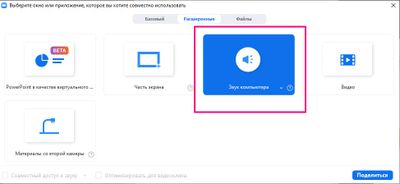
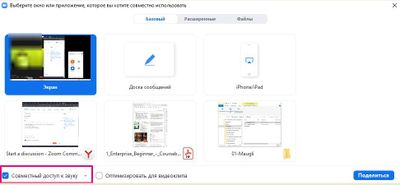
At some point the sound I share with other users became bad (it doubles and breaks on their side).
On my side the sound is perfect.
I reinstalled Zoom. upgraded audio drivers.
What should I do to find and solve the problem?
For students zoom should remove 40 minute time limit......coz all do not have the capacity to do in app purchase on zomm
I cannot find any information on how I can control the zoom level on my iPhone camera when I am in a Zoom call. Is this even possible? The specific scenario is this: The iPhone is mirrored on a large-screen TV, and the phone is located immediately below the TV. When the local participants look at the TV, they are also looking at the iPhone camera, so it looks natural to the other Zoom participants. But the local participants are 8' from the phone, so I'd like to be able to zoom them up to a reasonable level. Apple was unable to help on this.
Show less
When I click on screen share >advanced > content from 2nd camera, zoom does not automatically display the 2nd camera like it used to. I have to click "switch camera" for the 2nd camera to show. How can I avoid this. Not conducive to a seamless experience.
Show less
@AnonEl even Intel i3 is the 5 th gen go for the background blur option but the rygen 3 3250 U is does great than i3 11 th gen and does not have a blur support why ? even it has multi cores and max clock speed is 3.6 GHz.