Zoom Meetings
cancel
Showing results for 
Search instead for 
Did you mean: 
Effective January 9th, 2026 through January 22nd, 2026: The Zoom Community is currently in read-only mode with login disabled, to deliver you a new and improved community experience!

The site is still accessible to view, however, the ability to login, create content, or access your community account is temporarily unavailable. We appreciate your patience during this time. If seeking support, please browse existing community content or ask our Zoom Virtual Agent.

What are Zoom Meetings?

Zoom Meetings are a simplified video conferencing solution for an optimized virtual meeting experience. Explore the Zoom Community's Recent Activity below to join the Meetings conversation and connect with other members. If you're still looking for support, browse our Zoom Meetings support articles or start a new discussion below!

Recent Activity

Streaming to a Facebook Group as a Page - (Has anyone figured this out?)

Hi all. Has anybody had success with using Zoom's 'Live on Facebook' function to stream to a Facebook group as your business page? (not your personal account) I am using a paid account and have set it up with the group as detailed in this article. In... Show more

Hi all. Has anybody had success with using Zoom's 'Live on Facebook' function to stream to a Facebook group as your business page? (not your personal account)


I am using a paid account and have set it up with the group as detailed in this article. In terms of logistics, this worked great! Call quality was good and the stream worked as expected.


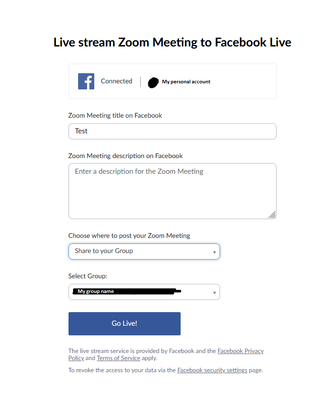
My only issue is that I was unable to find a way to post the livestream as my business page (which is vital for my use case). What I mean by this is the stream appeared to be posted by my personal account as opposed to my page (see image). This Facebook article mentions how to post as your page under normal circumstances.


Is there any way to post as your page? The prompt when you click 'Live on Facebook' doesn't seem to allow for this. I assume streaming directly to your Facebook page does so as your page but this may be an oversight.

StreamToFbPrompt.png


Show less

reply-icon Latest Reply - 

Hybrid meeting with interpretation

Hello everybody,I need your help with this scenario please:I have an Hybrid meeting with interpretation between two languages. The interpreter is not in the floor but online.i want to make each participant in the floor able to listen to the language ... Show more

Hello everybody,

I need your help with this scenario please:

I have an Hybrid meeting with interpretation between two languages. The interpreter is not in the floor but online.

i want to make each participant in the floor able to listen to the language he selects.

I used two PCs in the floor , each of them  listens to a different language and connect each of them to a transmitter that broadcast the selected language on a different channel to a receiver on that channel. each participant in the floor connects his headset to his own receiver and listens to the language of that channel.

the problem now is that when a participant in the floor speaks he hears himself from his headset that is connected to his receiver.

could you please advice a way to prevent speaker from hearing himself or suggest other other solution to accomplish that.


Thanks in advance.


Show less

reply-icon Latest Reply - 

Zoom Meeting recording

Is there a way to recover a Zoom recording using the Meeting ID Number?

I did press start and stop record on local computer; however it not convert at the end of the meeting.

When I checked my recordings, it's not listed.

By
Newcomer
This thread is read-only
reply-icon Latest Reply - 

Video suddenly stopped working in 2022

I've been using zoom for years, professionally & personally. The problem began late December/early January - I'm unable to join video anymore when I join a video. I've uninstalled and reinstalled zoom. I've confirmed my camera works by itself. I've d... Show more

I've been using zoom for years, professionally & personally. The problem began late December/early January - I'm unable to join video anymore when I join a video. I've uninstalled and reinstalled zoom. I've confirmed my camera works by itself. I've done some searching online with no luck finding a solution. I'm running Windows 10 Home on my personal computer. The specific message is "Failed to start video camera. Please select another video camera in settings."


There isn't another video camera to select and my camera works fine...its just no longer working with Zoom.


Any tips?


Show less

reply-icon Latest Reply - 

How to record a meeting from the tablet

We are running into an issue with recording from the tablet to automatically send it to the cloud to then share with others. We can only record when we use the "Meet Now" function and not when a zoom meeting is created prior. Is there a way to record... Show more

We are running into an issue with recording from the tablet to automatically send it to the cloud to then share with others. We can only record when we use the "Meet Now" function and not when a zoom meeting is created prior. Is there a way to record from the tablet when using a zoom meeting from an email invite and not just from the "Meet Now" option? Hope this makes sense. 


Show less

reply-icon Latest Reply - 

Watermark

Hi,


I joined a meeting today and I saw the screen was full of watermarks of my email. I went online to see if I had watermarks on, which I didn't. I turned it off and on but nothing changed.


I don't really know what to do now.

reply-icon Latest Reply - 

Error 3065

I can’t join to any meeting, also the test meeting from zoom. It appears the error 3065

reply-icon Latest Reply - 

Chat settings within Zoom breakout rooms

Looks like the only chat option available in Zoom breakout rooms is to chat with "Everyone" not with specific participants.

Is this normal? Is this something that has been forgotten to implement.

reply-icon Latest Reply - 

Is there a way to recover a recording if I didn't select it to be recorded in the first place?


Is there a way to recover a recording if I never set my account to record? I'm assuming no, but are all meetings recorded for people like me who forget to check 'record meeting'? Thanks

By
Newcomer
This thread is read-only
reply-icon Latest Reply - 

@Local recordings

Hello, I lost my old computer where I had my local recordings saved. How can I have access to view and download them on my new compute…T

By
Newcomer
This thread is read-only
reply-icon Latest Reply -