Zoom Meetings
cancel
Showing results for 
Search instead for 
Did you mean: 
Effective January 9th, 2026 through January 22nd, 2026: The Zoom Community is currently in read-only mode with login disabled, to deliver you a new and improved community experience!

The site is still accessible to view, however, the ability to login, create content, or access your community account is temporarily unavailable. We appreciate your patience during this time. If seeking support, please browse existing community content or ask our Zoom Virtual Agent.

What are Zoom Meetings?

Zoom Meetings are a simplified video conferencing solution for an optimized virtual meeting experience. Explore the Zoom Community's Recent Activity below to join the Meetings conversation and connect with other members. If you're still looking for support, browse our Zoom Meetings support articles or start a new discussion below!

Recent Activity

chromebook and original sound

i have an acer chrome book and would like to use original sound on zoom music lessons.  cannot find this 

reply-icon Latest Reply - 

Resolved! Setting up

I am kinda familiar with soon ,I have used but, need more practice on the  different settings for meetings and webnar nerd to practice.

reply-icon Latest Reply - 

How do I create a meeting without the passcode enabled?

When ever I try to create a meeting link it has  "passcode" grayed out and selected but it requires a pass code.

How do I de-select this?

By
Newcomer
This thread is read-only
reply-icon Latest Reply - 

Resolved! Is it against the Zoom ToS for multiple people to log in to one zoom account?

Hi I know of many small groups that rotate HOST responsibilities between people by sharing a zoom account’s username/password amongst them. Is this legal? My group would like to do this but we don’t want to violate Zoom’s ToS. I’ve gotten conflicting... Show more

Hi

 I know of many small groups that rotate HOST responsibilities between people by sharing a zoom account’s username/password amongst them. Is this legal? My group would like to do this but we don’t want to violate Zoom’s ToS. I’ve gotten conflicting responses from Zoom support.  @Bort  - can you enlighten us about this?

Thanks in advance for any help you can offer!


Show less

reply-icon Latest Reply - 

How to stop automatic updates

Hi all, I recently upgraded to Windows 11 and Zoom did not function properly, so I rolled it back to several versions ago. It is now working just fine. I have turned off the setting for automatic updating, but each time I open zoom, it now opens a wi... Show more

Hi all,


I recently upgraded to Windows 11 and Zoom did not function properly, so I rolled it back to several versions ago. It is now working just fine. I have turned off the setting for automatic updating, but each time I open zoom, it now opens a window trying to update. If I close out of it right away, it stops. Is there a way around this?


Thanks!!!


Show less

By
Newcomer
This thread is read-only
reply-icon Latest Reply - 

Audio in microphone

Hi everyone,I've ran into an annoying problem - my microphone is not working during meetings (people cannot hear me), yet when I test it before and during the meeting, it was alright. I've tried changing the microphone and to re-install zoom, but it ... Show more

Hi everyone,

I've ran into an annoying problem - my microphone is not working during meetings (people cannot hear me), yet when I test it before and during the meeting, it was alright. I've tried changing the microphone and to re-install zoom, but it didn't change.  I would appreciate any help.


Show less

By
Newcomer
This thread is read-only

Help

Hello
I don't have a cell phone.
How do I install or access zoom on my recently purchased smart TV (Samsung)?

reply-icon Latest Reply - 

I just completed a zoom session: my FIRST.

I bought a year with zoom...  I want to recapture the session.. to see it played out... how do I access that session, NOW, that it is over?

reply-icon Latest Reply - 

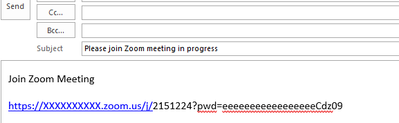
hyperlinks break in invention outlook

hiin zoom client when sending invitation with default email, we receive the link brokeI try changing in outlook the parameter Automatically wrap text at character https://mail.google.com/mail/u/0/#inbox/WhctKKXPgkThgGTXxLgHtfvFQtdDrzQLtjbcJqBDNSmtwqB... Show more

hi

in zoom client when sending invitation with default email, 

we receive the link broke

I try changing in outlook the parameter   Automatically wrap text at character   
https://mail.google.com/mail/u/0/#inbox/WhctKKXPgkThgGTXxLgHtfvFQtdDrzQLtjbcJqBDNSmtwqBZWCmlHmnxmJbLGNjngDVDskL

or 

https://thegeekpage.com/fix-hyperlinks-are-not-working-in-outlook-in-windows-10/


the length of the link is 82 Char

if i press space after the link - it enable the hyperlinks 


have anyone incentre this problem - it affect on users

image001.png

thank you 

Roni


Show less

reply-icon Latest Reply -