

Streaming to a Facebook Group as a Page - (Has anyone figured this out?) | Community
Skip to main content
Newcomer
October 12, 2021
Question

Streaming to a Facebook Group as a Page - (Has anyone figured this out?)

  • October 12, 2021
  • 3 replies
  • 0 views

Hi all. Has anybody had success with using Zoom's 'Live on Facebook' function to stream to a Facebook group as your business page? (not your personal account)


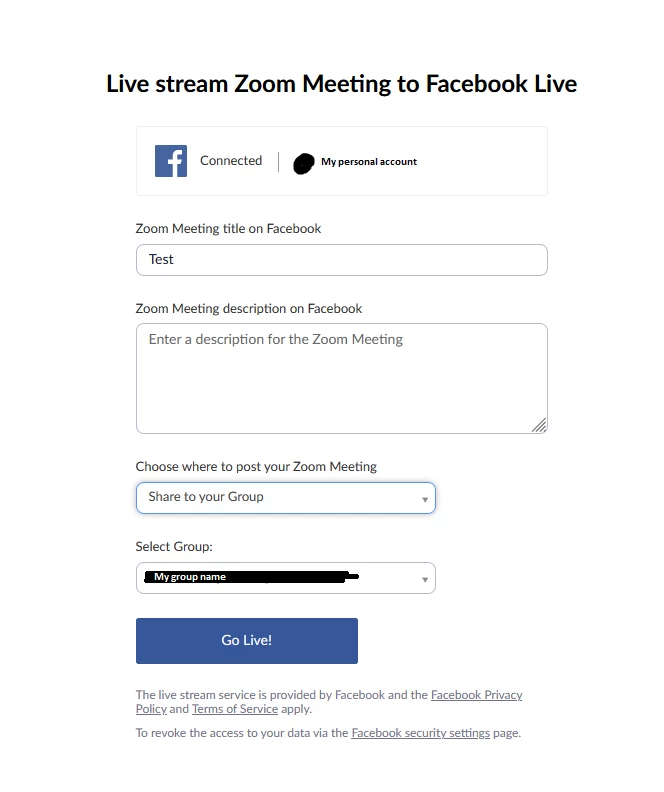
I am using a paid account and have set it up with the group as detailed in this article. In terms of logistics, this worked great! Call quality was good and the stream worked as expected.


My only issue is that I was unable to find a way to post the livestream as my business page (which is vital for my use case). What I mean by this is the stream appeared to be posted by my personal account as opposed to my page (see image). This Facebook article mentions how to post as your page under normal circumstances.


Is there any way to post as your page? The prompt when you click 'Live on Facebook' doesn't seem to allow for this. I assume streaming directly to your Facebook page does so as your page but this may be an oversight.
    3 replies

    Community Manager
    October 12, 2021

    Hey @IsaacBizS, look into this thread "Zoom Stream to Facebook Group" with an accepted solution to see if this helps! 

    IsaacBizSAuthor
    Newcomer
    October 13, 2021

    Hi @RN52_2 


    I came across this thread earlier, but unfortunately we're not having the same issue and the solution did not help here. Leigh was unable to stream to a new Group (probably due to permissions issues or app setup). I can stream to my Group but am unable to do so as my Page.


    Pages are not accounts but are managed by accounts, so it is impossible to log in as a Facebook Page through Zoom (it seems) and all streams in groups will use personal accounts by default. Going back to the fix, the page has the relevant admin permissions within the group so that is not an issue.

    Community Manager
    October 15, 2021

    @IsaacBizS are you using the new Facebook Live Producer? If so, try and utilize the Custom Service option
    https://support.zoom.us/hc/en-us/articles/115001777826. The new Facebook live producer I don't believe is supported at this time. 

    IsaacBizSAuthor
    Newcomer
    October 15, 2021

    bump

    Newcomer
    February 25, 2022

    Did you find a solution? Im still trying to stream as a page, and not from my personal account

    IsaacBizSAuthor
    Newcomer
    February 28, 2022

    Hi.

    I've switched to using an external service since then.

    I looked into using streaming to a custom service and I think I managed to get a convoluted workaround there (the details are hazy). The Live has to be created on Facebook in advance and then you copy some links across.


    In the end I settled for using a dedicated Facebook account.