Zoom Meetings
cancel
Showing results for 
Search instead for 
Did you mean: 
Weekly Leaderboard

What are Zoom Meetings?

Zoom Meetings are a simplified video conferencing solution for an optimized virtual meeting experience. Explore the Zoom Community's Recent Activity below to join the Meetings conversation and connect with other members. If you're still looking for support, browse our Zoom Meetings support articles or start a new discussion below!

Recent Activity

Saving Zoom Recording Issue

I did my first zoom 45 min call and recorded it. The recording went fine. at the end I logged off and it converted to file to save. once that reached 100% it said where to save it. It seemed it sent it straight to a folder and i was happy so I clicke... Show more

I did my first zoom 45 min call and recorded it. The recording went fine. at the end I logged off and it converted to file to save. once that reached 100% it said where to save it. It seemed it sent it straight to a folder and i was happy so I clicked ok. IT then said you need system administrator to agree to save it, sort of message. I said ok. IT wouldnt let me, I tried to change where to put it and it still said same message. I clicked cancel to go out and see if I needed to save it under video or docs or one drive or my pc. and it cancelled the whole thing and NOW I dont know if that deleted the whole recording or what!? I am pretty gutted as it takes a few months to get an interview with this guy ! Does anyone know what went wrong and if there is a way to find the recording?? 

if I dont find out how to get back here, please email ***********


Thank you! 


Show less

reply-icon Latest Reply - 

Zoom not Working

I've been using zoom since 2020 and where you have the contacts at and private messages (not a zoom meeting but the app) and just Satuday its not showing my log in with google button and i can't update my zoom for some reason. 

reply-icon Latest Reply - 

Zoom hijacks bluetooth audio while macbook is sleeping

MacBooks connect to bluetooth headphones even when the computer is sleeping. Mine are often connected to both my iphone and macbook simultaneously. If I leave zoom running on the background when the computer is sleeping, zoom will force a priority on... Show more

MacBooks connect to bluetooth headphones even when the computer is sleeping. Mine are often connected to both my iphone and macbook simultaneously. If I leave zoom running on the background when the computer is sleeping, zoom will force a priority on the audio, thus making it impossible to listen to music from my iphone as long as zoom app is running. Problem gets instantly fixed whenever I close the app. Does anyone else have this problem? MacOS Big Sur 12.1 and Zoom 5.9.3.


Show less

Lost in the breakout rooms

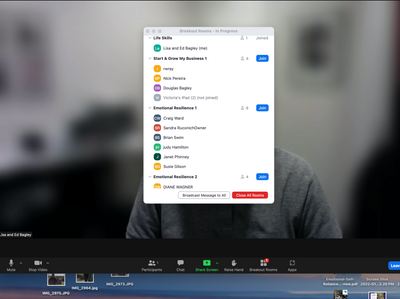
We have a weekly meeting where I am the host, and I open the breakout rooms and participants go to their assigned rooms for discussion. Sometime I need to escort someone into their assigned room, then I leave and go back to the "lobby." We've done th... Show more

We have a weekly meeting where I am the host, and I open the breakout rooms and participants go to their assigned rooms for discussion. Sometime I need to escort someone into their assigned room, then I leave and go back to the "lobby." We've done this dozens of times. But tonight, when I escorted some confused participants to their breakout rooms, I could not get out. I could come and go between rooms, but not back to the main page (lobby). The only option was to Close All Rooms, but that nuclear option blows up the whole event.  HELP!

Screen Shot 2022-03-03 at 8.09.17 PM.png


Show less

reply-icon Latest Reply - 

Teilnehmer in Focus setzen- Stummschaltung

Hallo zusammen, ich habe bei einem Meeting als Host einen Teilnehmer in den Focus gesetzt, der aber noch stummgeschaltet war.Problem: Während der Focussierung konnte ich nicht die Stummschaltung aufheben, ich musste zuerst den Focus aufheben, er selb... Show more

Hallo zusammen,


ich habe bei einem Meeting als Host einen Teilnehmer in den Focus gesetzt, der aber noch stummgeschaltet war.

Problem: Während der Focussierung konnte ich nicht die Stummschaltung aufheben, ich musste zuerst den Focus aufheben, er selbst konnte es auch nicht.

Gibt es hier eine Möglichkeit, das Audio auch während der Focussierung zu verwalten?


Lieben Dank!


Show less

reply-icon Latest Reply - 

Free account links not working in Desktop App

I come here to check if anyone has had the same problem. I have a free account and use the link for my classes, I am a teacher. It turns out that for about two weeks now I can no longer log in with any free account link on my Desktop App - I've tried... Show more

I come here to check if anyone has had the same problem. I have a free account and use the link for my classes, I am a teacher. It turns out that for about two weeks now I can no longer log in with any free account link on my Desktop App - I've tried three free accounts from different people. In the mobile App they work well. I've done everything that was suggested to solve the problem 104101, but I believe it is not my computer, because I'm using the link from an acquaintance who has a paid account, and this one works perfectly on the Desktop App.


Show less

reply-icon Latest Reply - 

USB Microphone Knocking Off Camera

Hey team, I recently purchased a usb mic and it's affecting the camera on meetings. I've used an EOS camera in the past, but now when I plug in the usb microphone in zoom keeps switching to the eos camera and is not giving me the option to select my ... Show more

Hey team,


I recently purchased a usb mic and it's affecting the camera on meetings. I've used an EOS camera in the past, but now when I plug in the usb microphone in zoom keeps switching to the eos camera and is not giving me the option to select my normal laptop camera. Can anyone help with this please?


Show less

reply-icon Latest Reply - 

Video File Types

What are the video file types that will work in Zoom when sharing a video with participants?

reply-icon Latest Reply - 

Zoom creates infinite notifications when there is no microphone

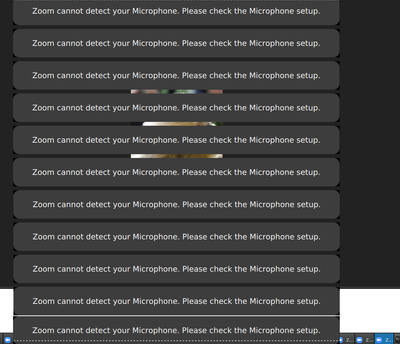
Hello, I am on desktop using Linux Mint 20 and i don't have a microphone. If i click the Join Audio button during a meeting, this happens: The mass of errors stops me from doing anything else. I have to drop down to TTY and pkill zoom.It's annoying b... Show more

Hello,


I am on desktop using Linux Mint 20 and i don't have a microphone. If i click the Join Audio button during a meeting, this happens: 

Screenshot_2022-02-04_16-17-58.png

The mass of errors stops me from doing anything else. I have to drop down to TTY and pkill zoom.

It's annoying because i do have audio output and i want to play sounds when i share my screen, but i cannot join audio at all. 


Show less

reply-icon Latest Reply - 

Post meeting report/usage didnt save participants email addresses

We use the usage report (https://us06web.zoom.us/account/my/report) to identify which users come back to our meetings. our last report didnt include any email addresses, altho everyone had to sign in and authenticate. I also tested with some users th... Show more

We use the usage report (https://us06web.zoom.us/account/my/report) to identify which users come back to our meetings. our last report didnt include any email addresses, altho everyone had to sign in and authenticate. I also tested with some users that said they were logged in so their email must have been on file.


The only email I see in the report is mine, and I REALLY need this data 😞

is there a support team that can assist restoring the addresses? please


Thanks

Eden


Show less

reply-icon Latest Reply -