Zoom Meetings
cancel
Showing results for 
Search instead for 
Did you mean: 
Weekly Leaderboard

What are Zoom Meetings?

Zoom Meetings are a simplified video conferencing solution for an optimized virtual meeting experience. Explore the Zoom Community's Recent Activity below to join the Meetings conversation and connect with other members. If you're still looking for support, browse our Zoom Meetings support articles or start a new discussion below!

Recent Activity

Resolved! Trying to stop pop-up google calendar notifications every time I schedule a meeting

Like many people (I assume), I have both a Zoom and a Google (Gmail etc) account. I never used to get any Google calendar popups or notifications when I scheduled a Zoom meeting (on my older 2015 MacBook, with somewhat out-of-date OS). But suddenly, ... Show more

Like many people (I assume), I have both a Zoom and a Google (Gmail etc) account. I never used to get any Google calendar popups or notifications when I scheduled a Zoom meeting (on my older 2015 MacBook, with somewhat out-of-date OS). But suddenly, as soon as I upgraded days ago to a 2021 MacBook Pro (Monterey OS), every time I schedule a zoom meeting, it activates my Google Calendar app, and I am immediately prompted to add it to a Google Calender.


I have to click "cancel" to make the pop-up box go away, and then I must separately quit Google Calendar (which I find annoying and never choose to activate myself).


I cannot figure out whether some setting in Zoom, or Google Calendar itself, is automatically turning on this app and prompting me to add the meeting to some calendar, but it's extremely annoying.


The only thing I can find in Zoom settings is an option to link to Google, Microsoft Exchange, or Microsoft 365, and as far as I can tell I have never activated them that way. When I click on it, there's an option to proceed but I haven't done so. I don't see any option to affirmatively disable any automatic calendaring or anything like that.


In Google, I have turned off every possible calendar notification setting I can find, disabled gmail calendar notifications (a separate annoyance!), have not added any Zoom extension to my Chrome browser, etc.


So how and why is this happening? Very baffling. It is adding an extra click plus having to turn off an app I never chose to turn on in the first place, every time I schedule a new Zoom meeting (and as a teacher meeting remotely with many students, I schedule a lot of meetings).


Show less

reply-icon Latest Reply - 

Grey bars on screen

At a couple of online events that I have hosted, when sharing my screen with a power point presentation or video a grey bar has appeared on the screen which interferes with the viewers experience. I have attached a screenshot so you can see the probl... Show more

At a couple of online events that I have hosted, when sharing my screen with a power point presentation or video a grey bar has appeared on the screen which interferes with the viewers experience.   I have attached a screenshot so you can see the problem.

Can anyone tell me what to do?


Show less

reply-icon Latest Reply - 

Zoom did not record to cloud automatically

Does anyone know why Zoom does not start automatic recording when all my meetings are set to record automatically? My recent meeting is not on the list of recordings, so I' afraid Zoom has not recorded the meeting. Is there any other way I can check ... Show more

Does anyone know why Zoom does not start automatic recording when all my meetings are set to record automatically? My recent meeting is not on the list of recordings, so I' afraid Zoom has not recorded the meeting. Is there any other way I can check this?


Show less

reply-icon Latest Reply - 

Assigning a Cohost

I have a meeting set up and sent out with the Zoom details to the participants. However, I would like to assign a cohost since I will not be attending. I have since added the co-hosting duties to the participant. How can I be certain that the role ha... Show more

I have a meeting set up and sent out with the Zoom details to the participants. However, I  would like to assign a cohost since I will not be attending. I have since added the co-hosting duties to the participant. How can I be certain that the role has been assigned?


Show less

reply-icon Latest Reply - 

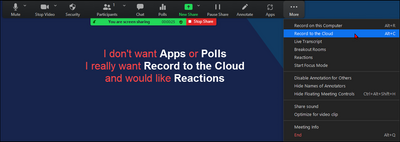
Customize Zoom Meetings during-screen-share toolbar

Hi. The picture pretty much sums it up. Very often during a meeting, after screen sharing has started, the tools I need are not necessarily the tools I have. Plus they're different from the toolbar present when content isn't being shared. (Why?) How ... Show more

NemanMTX_0-1646694357354.png

Hi. The picture pretty much sums it up. Very often during a meeting, after screen sharing has started, the tools I need are not necessarily the tools I have. Plus they're different from the toolbar present when content isn't being shared. (Why?)


How do we customize the share time toolbar? Thanks!


Show less

Intel Core i3 10th Generation - Video Background

Does Zoom supports Intel Core i3 10th generation CPU for a video background without a green screen?

reply-icon Latest Reply - 

Recording Notifications to No-one

I am trying to remove the Recording notification voice prompt in a basic account. I notice in my pro account the option for 'No-one' is there, however when I look in my basic account it is not available. In Zoom support it states that this was availa... Show more

I am trying to remove the Recording notification voice prompt in a basic account.  I notice in my pro account the option for 'No-one' is there, however when I look in my basic account it is not available.  In Zoom support it states that this was available for account types:  'For Basic, Pro, Business and Free Trial accounts with less than 100 licenses, the recording consent disclaimer is enabled for all users on a Zoom client by default and can't be disabled or customized. The voice prompt can be disabled.'


Can anyone provide any guidance on how to switch the voice prompt setting to 'no-one' in a basic account.


Show less

reply-icon Latest Reply - 

Polls in a recurring meeting

I am creating a recurring meeting. I want different poll questions for the different meeting occasions, but once I add polls they turn up at all occasions. Does anqone know how to fix this?

reply-icon Latest Reply - 

powerpoint slide show

When I share my powerpoint presentation in the 'presentation mode' and I click through the pages, my audience only sees the first slide. When I close the slide show and I click throught the different slides, it works well. (But that doesn't look nice... Show more

When I share my powerpoint presentation in the 'presentation mode' and I click through the pages, my audience only sees the first slide. When I close the slide show and I click throught the different slides, it works well. (But that doesn't look nicely.) It used to work well. What goes wrong? 


Show less

reply-icon Latest Reply - 

Syncing shared calendar

By any chance is there a way to sync a calendar that has only been shared through a link to Zoom?