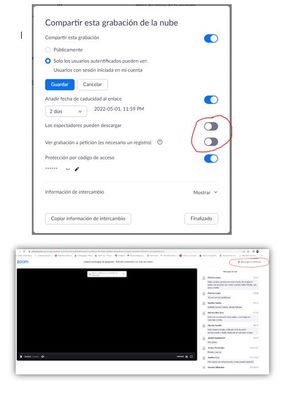
Grey Boxes in Meeting
Hi,
It seems there are still grey boxes that show the zoom controls in screen share to users even after disabling it in the web client.
Thanks,
Shawn
Zoomtopia is here. Unlock the transformative power of generative AI, helping you connect, collaborate, and Work Happy with AI Companion.
Register nowEmpowering you to increase productivity, improve team effectiveness, and enhance skills.
Learn moreKeep your Zoom app up to date to access the latest features.
Download Center Download the Zoom appDownload hi-res images and animations to elevate your next Zoom meeting.
Browse Backgrounds Zoom Virtual BackgroundsEmpowering you to increase productivity, improve team effectiveness, and enhance skills.
Zoom AI CompanionUser groups are unique spaces where community members can collaborate, network, and exchange knowledge on similar interests and expertise.
Help & Resources is your place to discover helpful Zoom support resources, browse Zoom Community how-to documentation, and stay updated on community announcements.
The Events page is your destination for upcoming webinars, platform training sessions, targeted user events, and more. Stay updated on opportunities to enhance your skills and connect with fellow Zoom users.
Zoom Meetings are a simplified video conferencing solution for an optimized virtual meeting experience. Explore the Zoom Community's Recent Activity below to join the Meetings conversation and connect with other members. If you're still looking for support, browse our Zoom Meetings support articles or start a new discussion below!
Hi,
It seems there are still grey boxes that show the zoom controls in screen share to users even after disabling it in the web client.
Thanks,
Shawn
I use Zoom to broadcast our church service and use a usb line out from our mixer as the audio and two HDMI inputs as the video. When I switch from one video source to the other the audio volume drops by about 50% for about 30-40 seconds and then returns to normal volume. This only happens through Zoom, the actual audio in the church is unaffected. There is nothing obvious in the settings but I understand that this is outside of what Zoom was really intended for but has anyone had a similar experience or have any thoughts on how to fix this?
Show less
As a deaf individual - I have zero need for audio on my end. Two issues: 1. I wish there was a way to indicate in my profile that I do not need any requests to join audio EVER. Maybe add another line where I can click "never ask again"? Thousands of deaf people use zoom and thousands of deaf people. have asked zoom to fix this annoying issue. 2. When I am spotlighted, I am asked EACH and EVERY time if I want to join audio or something. This pops up on EVERYONE's video when they are spotlighted. We have to lean in, click on "later" or something and do our thing. Spotlighted again? Same drill. Any fixes? Thanks.
Show less
I work as a professional captioner for many clients that use Zoom. For the past several weeks, I've noticed an issue with Zoom in which if the Show Subtitle option is turned on, the captions will sometimes disappear from the screen way too soon. Sometimes the caption only appears for a split second and immediately disappears, giving the viewers absolutely no reading time. This issue seems to occur more often towards the beginnings of meetings, when the presenter screens switch around a lot. I also have a theory that incoming chat messages may be causing the captions to blink off the screen.
Please fix this!
Show less
Hello Everyone,
Purchased Netgear AX6 Nighthawk WiFi Cable Modem Router and still have unstable internet connections during Zoom meetings. This doesn't make sense.
Any help would be appreciated.
Thank you.
I've been using my personal Zoom account for our organization meetings but now the organization has its own account. I want to transfer the already scheduled/upcoming meetings to the new account so we won't have to change meetings ids, etc. Is this possible?
Show less
Does anyone know why certain people can join the meeting without going into the waiting room while others go to the waiting room and need to be admitted? Doesn't seem to be any rhyme or reason to why this happens to some people versus others.
I have used polls in the past for checks on learning. I up the zoom with registration required, and ensured polls were not anonymous. I can see the registration report but not the polling report. Any advice?
Hi all We have this setup for a church- AV desk PC with monitor 1 for windows and av workspace etc AV Desk monitor 2 for zoom showing participants and controls etc Monitor 3 is the big screen tvs for the audience Monitor 4 is just for the speaker at the podium Monitor 3 shows AV content controlled off monitor 1 such as song lyrics etc. It also shows the remote zoom active speaker when needed by alt and tabbing between zoom and av windows. We want monitor 4 to show a gallery view so the speaker can see the remote audience. However we also want it to show shared local content when screen sharing. Is there any way to achieve this? Many thanks
Show less
I use the Fedora rpm package of the meetings desktop client
However, I only want to install software that is correctly cryptographically signed.
That was not a problem so far. However, the recent version 5.8.4 (210) is not signed at all (see rpm -qpi output below), and the gpg signature validation fails.$ rpm -qpi zoom_x86_64.rpm
Name : zoom
Version : 5.8.4.210
Release : 1
Architecture: x86_64
Install Date: (not installed)
Group : default
Size : 226471546
License : see https://www.zoom.us/
Signature : (none)
Source RPM : zoom-5.8.4.210-1.src.rpm
Build Date : Fri 12 Nov 2021 07:27:39 AM CET
Build Host : localhost
Relocations : /
Packager : Zoom Linux Team <linux-dev@zoom.us>
Vendor : Zoom Video Communications, Inc.
URL : https://www.zoom.us
Summary : Zoom Cloud Meetings
Show less