Zoom Meetings
cancel
Showing results for 
Search instead for 
Did you mean: 
Effective January 9th, 2026 through January 22nd, 2026: The Zoom Community is currently in read-only mode with login disabled, to deliver you a new and improved community experience!

The site is still accessible to view, however, the ability to login, create content, or access your community account is temporarily unavailable. We appreciate your patience during this time. If seeking support, please browse existing community content or ask our Zoom Virtual Agent.

What are Zoom Meetings?

Zoom Meetings are a simplified video conferencing solution for an optimized virtual meeting experience. Explore the Zoom Community's Recent Activity below to join the Meetings conversation and connect with other members. If you're still looking for support, browse our Zoom Meetings support articles or start a new discussion below!

Recent Activity

DialTone on earphones

During zoom meetings, I have recently started seeing a bug where I suddenly start hearing dial tone, no one on the other side can hear me, and I can't hear the other side. This happens with my bluetooth earphones.I have to always disconnect my earpho... Show more

During zoom meetings, I have recently started seeing a bug where I suddenly start hearing dial tone, no one on the other side can hear me, and I can't hear the other side. This happens with my bluetooth earphones.

I have to always disconnect my earphones and connect again to fix this.

I have started seeing this since I updated to Mac OS Monterey. Updated zoom to latest version, but still seeing the same issue.

Anyone else experiencing the same?


Show less

reply-icon Latest Reply - 

NO recording function on Android

Hi folks.I am trying to record meeting on an android device, a Motorola G7, but I am not offered ANY recording facility.I know you cannot record locally on a mobile device, but I am not offered a cloud option either.When I open the 'more' tab, the op... Show more

Hi folks.

I am trying to record meeting on an android device, a Motorola G7, but I am not offered ANY recording facility.

I know you cannot record locally on a mobile device, but I am not offered a cloud option either.

When I open the 'more' tab, the options presented are as shown in the pics attached.

I am the host, and its on a free plan.

Any thoughts?


Show less

By
Newcomer
This thread is read-only
reply-icon Latest Reply - 

Linux Mint - Zoom intereferes with output volumes of other programs

I'm trying to use Zoom on Linux Mint (Ubuntu based) for vocal lessons.Within that, I need to hear the following outputs from my computer:1. An audio player (e.g. VLC)2. Voice monitor script (pacmd 'module-loopback' module)3. The other party (Zoom). I... Show more

I'm trying to use Zoom on Linux Mint (Ubuntu based) for vocal lessons.

Within that, I need to hear the following outputs from my computer:

1. An audio player (e.g. VLC)

2. Voice monitor script (pacmd 'module-loopback' module)

3. The other party (Zoom).


I have volume controls for all of these, so I can hear them properly. All that is pretty robust and works fine, as long as I don't start the Zoom meeting.


When starting a Zoom meeting, seemingly especially when sharing a screen with audio, Zoom appears to create this virtual composite audio output device and enable it.

That lowers other programs volume so I can't hear those properly, and then I can't even increase those volumes.


When switching away from that composite device, Zoom continues to work fine, but the audio player pretty much blasts my ears off (because I naturally try to increase its volume beforehand), while the voice monitor remains very low / effectively unusable.


Is there a way to set up Zoom so that it minds its own business, i.e. just use the needed audio channels without creating virtual devices, touching other program volumes, etc., etc.?


Show less

reply-icon Latest Reply - 

no llega la invitacion al usuario por ceorreo electronico desde su plataforma zoom

Nuevamente agrego nuevo usuario para el licenciamiento pero no llega el correo electrónico para aceptar la invitación mi dominio es alemanhumboldt.edu.ec y no tengo ninguna restriccion que impida recibirlos, anteriormente todo estado funcionando con ... Show more

Nuevamente agrego nuevo usuario para el licenciamiento pero no llega el correo electrónico para aceptar la invitación mi dominio es alemanhumboldt.edu.ec y no tengo ninguna restriccion que impida recibirlos, anteriormente todo estado funcionando con esta cuenta tengo problemas específicamente *********** 


Show less

By
Newcomer
This thread is read-only

multiple share option

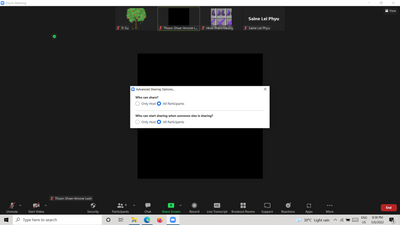
My zoom account share screen show like thisSuga_0-1651846155619.png

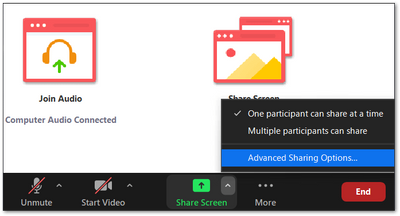
I wanna go back to the below image, I want multiple participant can share the option please help me

Suga_3-1651846321610.png


By
Newcomer
This thread is read-only

Control Screen Layout during a meeting

Hi,I am using Zoom Meeting for our weekly business meeting with about 40 participants. It is currently organised as a "hybrid" meeting, with some people participating online and the rest of the group present in the conference room.The zoom screen ist... Show more

Hi,

I am using Zoom Meeting for our weekly business meeting with about 40 participants. It is currently organised as a "hybrid" meeting, with some people participating online and the rest of the group present in the conference room.

The zoom screen ist projected on a big screen. 


I am very busy with the constant change of screen layout:
a) Screen sharing on the left, gallery on the right, screen split 50:50.
b) Screen share left, speaker right, screen split 50:50
c) Screen share left, gallery right, screen split 90:10


My question:
Is there any way to control this layout change with short cuts or something similar?


I use the Elgato Streamdeck.

I would like to configure the shortcuts, if there are any, on individual Streamdeck buttons so that I can control the settings very simply by pressing a button and without a mouse.
This would very much help me concentrate on the content of the meeting instead of operating the views.

Miklan


Show less

By
Newcomer
This thread is read-only

Windows 10 event 78 seen in Zoom startup

I have the latest Zoom app on my Windows 10 21H2 level laptop. It works OK, BUT, I noticed that every time Zoom starts up, there is an event log entry, ID 78 (reproduced below). How do I report this to Zoom Support? "Activation context generation fai... Show more

I have the latest Zoom app on my Windows 10 21H2 level laptop. It works OK, BUT, I noticed that every time Zoom starts up, there is an event log entry, ID 78 (reproduced below). How do I report this to Zoom Support?


"Activation context generation failed for "C:\Users\tonyd\AppData\Roaming\Zoom\bin_00\Zoom.exe". Error in manifest or policy file "" on line . A component version required by the application conflicts with another component version already active. Conflicting components are:. Component 1: C:\Windows\WinSxS\manifests\x86_microsoft.windows.common-controls_6595b64144ccf1df_6.0.19041.1110_none_a8625c1886757984.manifest. Component 2: C:\Windows\WinSxS\manifests\amd64_microsoft.windows.common-controls_6595b64144ccf1df_6.0.19041.1110_none_60b5254171f9507e.manifest."


Show less

By
Newcomer
This thread is read-only
reply-icon Latest Reply - 

Spotlight auf zweitem Monitor

Hallo, ich habe folgendes Problem.Ich möchte zwei Bildschirme nutzen und auf dem zweiten Bildschirm 2 Personen, die in Spotlight gesetzt wurden, sehen. Leider werden sie da weiterhin nur abwechselnd als Sprecher angezeigt und auf dem Hauptbildschirm ... Show more

Hallo, ich habe folgendes Problem.

Ich möchte zwei Bildschirme nutzen und auf dem zweiten Bildschirm 2 Personen, die in Spotlight gesetzt wurden, sehen. Leider werden sie da weiterhin nur abwechselnd als Sprecher angezeigt und auf dem Hauptbildschirm in Spotlight angezeigt. Ich weiß echt nicht weiter... Vielen Dank für die Unterstützung.


Show less

reply-icon Latest Reply - 
By
Explorer
This thread is read-only
reply-icon Latest Reply - 

Long meeting - different groups - some people on the whole time - will this work?

Hello - I have a five hour meeting next week. Some people will be participating in the entire meetings. Other will only long in for their parts. Is this possible? I assume it is but I want to make sure. Can the people who are in the whole meeting jus... Show more

Hello -


I have a five hour meeting next week.


Some people will be participating in the entire meetings.  Other will only long in for their parts.


Is this possible? I assume it is but I want to make sure. 


Can the people who are in the whole meeting just stay in the room the whole time?    Is there any advice on the best way to organize this with invites?  


Thanks in advance!


Show less

reply-icon Latest Reply -