Customer Success Forum
cancel
Showing results for 
Search instead for 
Did you mean: 
Effective January 9th, 2026 through January 22nd, 2026: The Zoom Community is currently in read-only mode with login disabled, to deliver you a new and improved community experience!

The site is still accessible to view, however, the ability to login, create content, or access your community account is temporarily unavailable. We appreciate your patience during this time. If seeking support, please browse existing community content or ask our Zoom Virtual Agent.

Welcome to the Customer Success Forum!

Welcome to the Customer Success Forum! This is a collaborative place for Zoom users to share customer success stories, learn about upcoming events, and exchange use cases for helpful ways to use Zoom features.

Recent Activity

Resolved! Team Chat Question

Hello everyone, In our tenant, we would like to have Team Chat disabled for everyone, but we would also like to be able to slowly deploy it should we decide to do so. Our Zoom reps mentioned creating a group with a name something like "Team Chat Disa... Show more

Hello everyone,


In our tenant, we would like to have Team Chat disabled for everyone, but we would also like to be able to slowly deploy it should we decide to do so.  Our Zoom reps mentioned creating a group with a name something like "Team Chat Disabled," then disable team chat in that group's settings.  Then it was mentioned to enable team chat at the account level and leave it unlocked there.  From there, people we don't want team chat enabled would be added to the "Team Chat Disabled" group.


Surely, others here have wanted the same thing to where you perhaps want certain groups to have team chat, but not others.  For those with experience with this, how did you handle it?


Thanks!


Show less

reply-icon Latest Reply - 

Breakout rooms set- and random groups

Hi,I am new to Zoom and have a question I am hoping someone can help me answer!?  I am working for a school that uses Zoom for some of its digital classes. In this case we would like to have pre-assigned set groups for every week, but in the beginni... Show more

Hi,

I am new to Zoom and have a question I am hoping someone can help me answer!? 🙂


I am working for a school that uses Zoom for some of its digital classes. In this case we would like to have pre-assigned set groups for every week, but in the beginning of the class we also want the option to have randomly selected groups in the breakout rooms. Is there a way where you can use both these functions? If yes - how?

Also, is it possible to share and save documents  in the "set group" breakout rooms? 


Thank you so much in advance,

Carolina


Show less

reply-icon Latest Reply - 

Zoom IQ: A Cut Above

Zoom IQ enables you to enhance productivity, shorten deal cycles, and improve revenue predictability with actionable insights directly from your Zoom Meetings and Zoom Phone customer interactions. Here are some of the reasons people love Zoom IQ: Sal... Show more

Zoom IQ enables you to enhance productivity, shorten deal cycles, and improve revenue predictability with actionable insights directly from your Zoom Meetings and Zoom Phone customer interactions.


Here are some of the reasons people love Zoom IQ:


Sales and Revenue Leaders

Provide actionable feedback
Reduce anecdotal feedback and quickly identify areas for improvement using post-meeting analysis that includes transcription highlights as well as sentiment and engagement scores.

Understand sales deals better
View sales deals by stage, size, teams, opportunity name, and use analytics for the number of interactions, competition, and customer sentiments to identify sales improvements.

Forecast more accurately
Digestible, aggregated insights integrated into your CRM give context on your sales funnel, highlight deals that need attention, and identify pipeline trends.

Stay on top of the critical moments in your business
Track words and expressions across customer conversations and get proactive alerts that help assess opportunity health, gather competitor intelligence, or help ensure products are effectively positioned.


Sellers

Cut the noise, focus on selling
Reduce the burden of tasks like note-taking, adding information to the CRM, or capturing the next steps and spending more of time connecting with customers.

Get better faster
Review meetings and calls faster and get better continuously with insights such as talk-listen ratio, talking speed, sentiment analysis, and more.

Eliminate customer knowledge gaps
Leverage an easy-to-search source of truth in all your customer conversations that simplifies preparing for sales calls, onboarding accounts, and collaborating across the revenue team.


Marketing and Sales Enablement

Replicate best practices and onboard sellers faster
Showcase sales best practices with curated playlists of recording snippets to get new sellers up to speed faster and provide more impactful training.

Evaluate your marketing messages faster
Give your marketing teams access to your sales calls to understand which messages are working and which are not.

Improve your competitive strategy
See which competitors are mentioned the most, why you’re winning or losing against them, and what sentiments are commonly associated with them.


Learn more about Zoom IQ here!


Show less

reply-icon Latest Reply - 

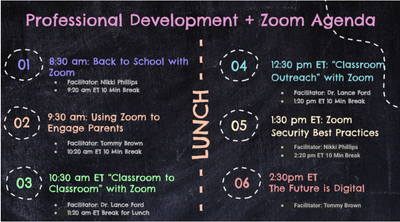
CSM led Professional Development/Continuing Education course at large K12 School District!

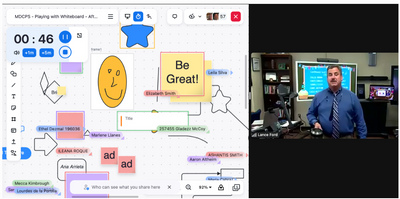
One of our Senior CSMs here at Zoom, Nikki Phillips led a wonderful Professional Development/Continuing Education course for one of her top K12 customers today! She partnered with our talented Zoom Rooms specialist @lanceford-zoom as well. Lance Ford... Show more

One of our Senior CSMs here at Zoom, Nikki Phillips led a wonderful Professional Development/Continuing Education course for one of her top K12 customers today! She partnered with our talented Zoom Rooms specialist @lanceford-zoom as well. Lance Ford demonstrated our awesome Zoom Whiteboard collaboration tool as well!! Reach out to your CSM or CS Advisory team if you would like to have a presentation done for your team!  

Screenshot 2023-08-15 at 1.06.52 PM.png

Screenshot 2023-08-15 at 1.10.41 PM.png


Show less

The Motley Fool’s head of IT shares insights for succeeding in a hybrid world

With so many different channels for communication, different business needs, and physical distance as a barrier, how can you best support a hybrid workforce? During our Hear from a Peer webinar, we sat down with Lawrence Morrisson, head of IT at The ... Show more

With so many different channels for communication, different business needs, and physical distance as a barrier, how can you best support a hybrid workforce?


During our Hear from a Peer webinar, we sat down with Lawrence Morrisson, head of IT at The Motley Fool, an organization dedicated to helping the world become smarter, happier, and richer through sound investment advice. He shared how their teams have managed to develop a robust and thriving hybrid work culture. Here are some key insights from our conversation.


How have your collaboration and communication needs evolved over the last decade?


In the beginning, it was like the Wild West. We were mostly an in-office culture back then, with open floor plan — no offices, not even for the CEO — with many conference rooms for meetings.


People would use whatever technology was most familiar to them, or whatever the team on the other side of the call was used to. Because of that we had all different connection options, and so we were trying to do screen sharing across those four or five different technologies with dongles that you would plug in, and it was a real headache. With the global presence that we have, it was clear that wasn’t going to scale.


We had to go with something simple and consistent. That’s when we found Zoom in the marketplace. So we tried it and we loved it.


How are your employees embracing this remote culture today?


We’ve committed to our employees that they can choose to go fully remote and are not required back in the office. And most employees have embraced that. It surprised us that we didn’t really skip a beat, productivity-wise. But it was a challenge to make sure we retained the special sauce of our culture that makes The Motley Fool such a rewarding place to work.


Our People Experience Team is focused on ensuring that Fools are building connections outside of their day-to-day work. Part of that is having social outlets and opportunities to learn, both professionally and personally. We’ve offered dozens of classes like gardening, beatboxing, bartending, active listening, and sushi making. We’ve also done events like virtual trick or treating on Halloween, pub trivia, escape rooms, meditation, and more.


As a result, more than 70% of our employees have participated in at least one “extracurricular” event in the last year. We find that when you’ve built a connection with another, even if it’s while doing a water tasting class (yes, seriously), you’re more likely to trust one another and collaborate successfully.


How are you using Zoom to support diversity, equity, and inclusion?


One of our guiding principles is test, learn, and iterate. Our People Experience Team has been tirelessly creative in providing a variety of remote experiences, enabled because of Zoom. We know not every Fool has the same interests, so it’s key to always try new things.


We know diverse teams make for stronger teams and better decision-making. We have ERGs (employee resource groups) set up to provide opportunities for like-minded Fools to share cultural moments and develop professional skills together all made available to everyone through Zoom.


What best practices or tips would you like to share with your peers?


Staying flexible is key — what we think we know today is almost certainly going to be different tomorrow. It’s going to change. Don’t get locked into a particular strategy. For example, we put all the various technical pieces in place that we needed to support a return to the office after COVID, and then we found that we were not getting the attendance that we thought we would. [So we gave] employees choice, flexibility, and trust.


There’s a very common misconception that people are going to be less productive if they’re not in the office, and I think that’s quite the opposite. So trust your people to get the job done.


If a colleague or industry peer with similar needs is evaluating Zoom, what would you tell them?


I really enjoy using Zoom — it’s very intuitive. It’s very flexible. If you’re going to go with Zoom, I would certainly recommend doing it across the board as we did.


I would also recommend doing a lot of communications leading up to your switch. We had a bunch of material prepared, as well as FAQs and best practices that we used to help our employees. We had a little graphic in the background of our conference room screens that asked participants if they wanted to share their screen. We also provided a link at the bottom that directed users to our in-house repository of documentation that we built out specifically to help everyone get onboarded with the product.


To learn more about how The Motley Fool is using Zoom to empower its hybrid workforce and reinforce its culture, check out the customer story.


Original story posted in Zoom Blog.


Show less

Zoom Healthcare Client Collaboration

Are there are any healthcare clients (large hospital systems) that would like to share knowledge back and forth on how they are utilizing Zoom?

reply-icon Latest Reply - 

Resolved! Suggested functionality for breakout rooms

Hi,I'm using Zoom when teaching and depend on breakout rooms for group work. The feature is excellent for my purposes but I lack the opportunity to monitor all groups at once, like a tradisjonell classroom situation.My idea is that when breakout room... Show more

Hi,

I'm using Zoom when teaching and depend on breakout rooms for group work. The feature is excellent for my purposes but I lack the opportunity to monitor all groups at once, like a tradisjonell classroom situation.

My idea is that when breakout rooms have been activated, they should pop-up as live footage together on my screen and sound from a specific room would only be activated when hoovering over the live image with the cursor.

This would enable me to navigate smoothly between group discussions and enter swiftly when I see students need guidance.

This would make Zoom almost unbeatable!

BR Peter


Show less

reply-icon Latest Reply - 

Please allow us to save our breakout room setups!

I'm an instructor at an online coding school. We use zoom as our classroom and use the breakout rooms when it's time for practices. It would be so wonderful if I could create templates or save breakout room setups in some way so I don't have to enter... Show more

I'm an instructor at an online coding school. We use zoom as our classroom and use the breakout rooms when it's time for practices. It would be so wonderful if I could create templates or save breakout room setups in some way so I don't have to enter the same settings every single time. I think this would be a great feature for your next update! Thanks for your time.


Show less

reply-icon Latest Reply - 

Resolved! Educator Zoom Meetings

I created a Zoom account as an Educator because I will be teaching students ages 12-18 accounting, budgeting, business accounting, etc. I am still being shown that my Zoom Meetings can only be 40min long, even as an educator. Do educators not receive... Show more

I created a Zoom account as an Educator because I will be teaching students ages 12-18 accounting, budgeting, business accounting, etc. I am still being shown that my Zoom Meetings can only be 40min long, even as an educator. Do educators not receive longer Zoom Meetings?


Show less

reply-icon Latest Reply - 

Can Zoom Oauth App allow multiple Zoom Account connection simultaneously

Hello, I am representing a Developer from the profession. We have Zoom Oauth App and using that app we have one product that connects with Zoom to create meetings. We are facing an issue when we connect Two accounts with the same account and the same... Show more

Hello,


I am representing a Developer from the profession. We have Zoom Oauth App and using that app we have one product that connects with Zoom to create meetings. We are facing an issue when we connect Two accounts with the same account and the same Zoom Oauth App.It allows to use recently connected Zoom account only. If we disconnect which we are facing an issue, It will work while another start sending an error, error we are getting is:
401 Unauthorized` response:
{"code":124,"message":"Invalid access token."}

Let me know if we are missing anything here. Thanks


Show less