Customer Success Forum
cancel
Showing results for 
Search instead for 
Did you mean: 
Effective January 9th, 2026 through January 22nd, 2026: The Zoom Community is currently in read-only mode with login disabled, to deliver you a new and improved community experience!

The site is still accessible to view, however, the ability to login, create content, or access your community account is temporarily unavailable. We appreciate your patience during this time. If seeking support, please browse existing community content or ask our Zoom Virtual Agent.

Welcome to the Customer Success Forum!

Welcome to the Customer Success Forum! This is a collaborative place for Zoom users to share customer success stories, learn about upcoming events, and exchange use cases for helpful ways to use Zoom features.

Recent Activity

TV and Zoom

Hello! My team is needing to find a setup that works for us when using Zoom in our conference room. We would like to be able to have a zoom meeting on our tv and utilize a camera that is connected to our tv rather than the camera that is in our lapto... Show more

Hello!


My team is needing to find a setup that works for us when using Zoom in our conference room.  We would like to be able to have a zoom meeting on our tv and utilize a camera that is connected to our tv rather than the camera that is in our laptops.


Does anyone know how to set this up?


Please help!!


Show less

reply-icon Latest Reply - 

Zoom Rooms and Digital Signage: Elevating Office Culture and Collaboration

Technology has seamlessly integrated into our lives, fostering increased engagement and collaboration. Zoom Meetings, for instance, has transcended its initial business-oriented purpose to encompass a diverse array of activities, ranging from online ... Show more

Technology has seamlessly integrated into our lives, fostering increased engagement and collaboration. Zoom Meetings, for instance, has transcended its initial business-oriented purpose to encompass a diverse array of activities, ranging from online training and classes to concerts, busking, and even virtual parties. Now how about our other Zoom products and features?

During a recent meeting with a client, I delved into the realm of Zoom Rooms, a facet of the platform tailored to elevate the meeting experience. These dedicated spaces boast professional audio and video equipment, featuring high-quality cameras, microphones, speakers, and display screens. Catering to businesses, educational institutions, and organizations, Zoom Rooms provide a reliable and immersive virtual meeting environment.

Let me talk about the additional perk accompanying every Zoom Room license – unlimited access to Zoom Digital Signage. This feature empowers users to showcase dynamic content on digital screens, facilitating the dissemination of information, announcements, and engaging materials in various physical spaces like offices, lobbies, conference rooms, and public areas.

Intriguingly, my client had ingeniously leveraged this feature to inject fun and camaraderie into the workplace. For every holiday or office event, they creatively displayed captivating posters, images, banners, or marketing material on digital screens. Embedded within were tiny hidden images, enticing employees and office guests to embark on a treasure hunt, capturing selfies with the concealed visuals to win enticing prizes. The successful "treasure hunters" were rewarded with swag, creating a delightful and interactive work environment.

This inventive use of productive tools prompts contemplation on how else such platforms can be harnessed to engage employees or guests. The possibilities are vast – from fostering team spirit to enhancing guest experiences, these technological solutions offer a canvas for creativity and innovation in the professional realm. Can you think of any other ways to utilize these productive work tools and platforms to engage your employees or even guests?


Show less

reply-icon Latest Reply - 

Surviving the Work Tsunami: From Email Chaos to Zoom Scheduler Zen 🌊💼

Hey there, fellow workweek warriors!  Ever felt like your schedule was hit by a tsunami of meetings? One day you're sipping coffee in peace, the next – BOOM – you're drowning in meeting requests. And oh, the struggle of the endless back-and-forth da... Show more

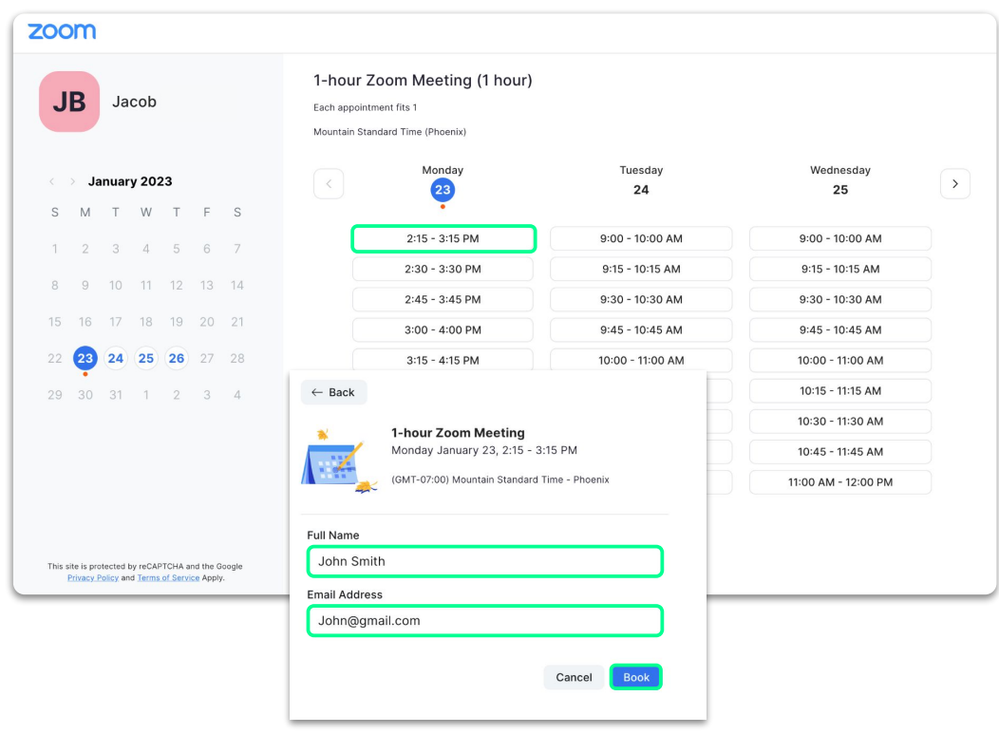
Hey there, fellow workweek warriors! 🚀 Ever felt like your schedule was hit by a tsunami of meetings? One day you're sipping coffee in peace, the next – BOOM – you're drowning in meeting requests. And oh, the struggle of the endless back-and-forth dance trying to find the perfect time to connect with your squad. It's like scheduling a meeting turns into a mini Olympic sport of email gymnastics!


But hold the phone, because I've got the game-changer for you: introducing Zoom Scheduler! 🎉 It's the superhero cape your calendar didn't know it needed. With Zoom Scheduler, you can toss away the email ping-pong and create magical "availability slots." Your contacts can then pick their fave time, and boom – meeting scheduled with a simple click! No more email marathons, just pure productivity hacks served with a side of sanity. 🌪


Screenshot 2023-12-07 at 11.28.57 AM.png


Show less

reply-icon Latest Reply - 

New Zoom AI Companion Features and Enhancements

2023 is coming to a close but that doesn’t stop Zoom from improving its AI Companion offerings. With Zoom AI Companion reaching a milestone less than two months after its launch (more than 125,000 accounts using AI Companion and generating more than ... Show more

2023 is coming to a close but that doesn’t stop Zoom from improving its AI Companion offerings.


With Zoom AI Companion reaching a milestone less than two months after its launch (more than 125,000 accounts using AI Companion and generating more than one million meeting summaries), Zoom has now added support for 32 new languages, new capabilities for Zoom Events, in-meeting questions and meeting coaching.


Zoom AI Companion now features an in-meeting questions capability in seven new languages, with meeting summaries now including an overview and  available in summaries delivered via continuous meeting chat.


crissyd_1-1703033903489.png


crissyd_0-1703033634313.png


In addition, speech analytics functions or Meetings Coach are now in smart recordings, including the meeting host’s talk-listen ratio, talk speed, and speech fillers to offer insights into how speakers engage with meeting participants during Zoom Meetings.


crissyd_2-1703034013533.png


Lastly, AI Companion is also available in Zoom Events, with chat compose capabilities for lobby chats and assistance with composing emails for registration, marketing and ticketing communicationsThis enhances the entire event process and experience and reduces the burden of setting up and supporting virtual events with quick compose functionality from Zoom AI Companion.


crissyd_3-1703034555637.png

crissyd_4-1703034591072.png


These enhancements really show that we always aim to provide the best value to our customers across our platform.  This is also why AI Companion is available at no additional cost with the paid services, and we continue to introduce new AI capabilities at Zoom speed, so more of our customers can get the most out of Zoom’s AI innovations.


Show less

reply-icon Latest Reply - 

Workspace Reservation for Office Parking and more!

So we all know how Zoom's Workspace Reservation works, using the web portal, desktop client, or your phone, you can access spaces available in your Zoom Account. You can book a conference room for yourself or for others, view the details of available... Show more

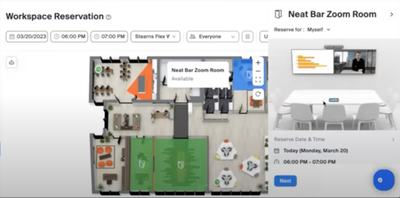
So we all know how Zoom's Workspace Reservation works, using the web portal, desktop client, or your phone, you can access spaces available in your Zoom Account. You can book a conference room for yourself or for others, view the details of available rooms, upload photos, etc. Those options are all available right now just in case you didn't know.

Screenshot 2024-01-09 at 2.58.10 AM.png

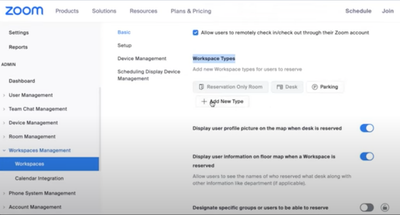
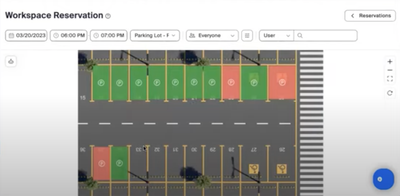
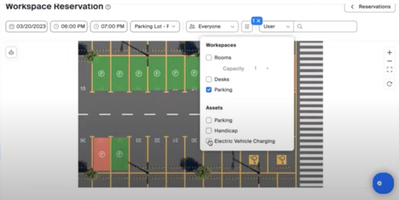
Now over the past few months, we've been getting a lot of feedback from customers wanting to utilize more spaces and amenities for their employees. With that said, did you know that you have the ability to upload and configure additional "Space Types". A very popular one is Parking Reservation.

Screenshot 2024-01-09 at 3.13.04 AM.png

Screenshot 2024-01-09 at 3.03.31 AM.png

What's really cool about this is you can configure filters to be made available for your users. (Date and time, Floor Level, Available slots, handicap parking slots, Electric Vehicle Slots)

Screenshot 2024-01-09 at 3.08.29 AM.png

It's been very interesting to see how creative Zoomies got with the Workspace Reservations by taking things to the next level. From daycare to zen spaces, from fitness centers to sound rooms, the sky's the limit!

Screenshot 2024-01-09 at 3.16.28 AM.png

If you want to know more, you can contact your Account Executive and schedule a demo today. 


Show less

reply-icon Latest Reply - 

Accidentally clicked Educator Account

I accidentally click the educator button while signing up with my school provided email. I have read same issues on the forum. I really need to proceed in creating my account without filling up the educator setting as I only want a regular account. I... Show more

I accidentally click the educator button while signing up with my school provided email. I have read same issues on the forum. I really need to proceed in creating my account without filling up the educator setting as I only want a regular account. I'm currently using different email , can someone help me thanks! 


Show less

reply-icon Latest Reply - 

Resolved! Server Error on zoom learning center

HI there, I am unalble to access any courses on the Zoom Learning Center. I keep getting a toast message saying server error. I have tried both chrome and edge. Yesterday I was able to complete my courses without any issues. Today it will not load an... Show more

HI there, 

I am unalble to access any courses on the Zoom Learning Center. 


I keep getting a toast message saying server error. I have tried both chrome and edge. Yesterday I was able to complete my courses without any issues. 


Today it will not load any of the content for these courses and returns "server error" 


  1. https://learning.zoom.us/learn/course/internal/view/elearning/15/JoiningandNavigatingaZoomMeeting
  2. https://learning.zoom.us/learn/course/internal/view/elearning/143/Sharing&Annotation

    Please help! 

Show less

reply-icon Latest Reply - 

Zoom Contact Center Customer Story: AVI SPL

AVI SPL’s contact center team of 200 spread across seven countries, providing 24/7 support for over 26,000 service cases for their 3,000 unique customers was struggling with their analog customer care tool. After review multiple CCaaS providers, they... Show more

AVI SPL’s contact center team of 200 spread across seven countries, providing 24/7 support for over 26,000 service cases for their 3,000 unique customers was struggling with their analog customer care tool. After review multiple CCaaS providers, they chose Zoom Contact Center and in the process realized $70K+ in cost savings.


Because many of the AVI SPL agents already used Zoom Phone and Zoom Meetings, they were familiar with the interface and now have one integrated contact center portal. Agents got up and running and quickly saw results. Their team was able to improve NPS by 5% and now having video capabilities native in the solution helped their team see a 10% reduction in their resolution time.


AVI SPL already is seeing success with ZCC and this is only Phase One. They are currently in Phase 2 of their implementation where they are rolling out ZVA as well as features for ZCC to continue improving agent productivity such as email routing, SMS messaging, automated and agent-based chat, self-service, and the incorporation of more AI-powered tools! 👀


📖 Read the full story on AVI SPL's journey with Zoom here


Show less

reply-icon Latest Reply - 

Zooming Into the Future: Revolutionize Your Fax Experience with FaxSIPit's Zoom App

In the fast-paced world of virtual meetings and digital collaborations, FaxSIPit takes your faxing experience to the next level with its innovative Zoom App. Say goodbye to clunky fax machines and hello to a seamless, unified interface that not only ... Show more

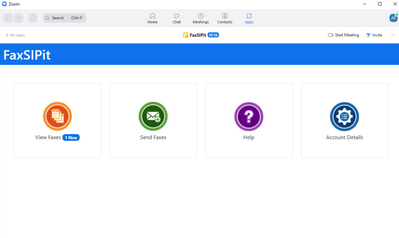
In the fast-paced world of virtual meetings and digital collaborations, FaxSIPit takes your faxing experience to the next level with its innovative Zoom App. Say goodbye to clunky fax machines and hello to a seamless, unified interface that not only simplifies your workflow but adds a touch of humor to your faxing endeavors.


Boosting Your Fax Game with FaxSIPit's Zoom App

FaxSIPit doesn't just fax; it elevates your productivity game. Let's dive into some common scenarios where FaxSIPit's Zoom App shines:

  1. Unified User Interface Magic:

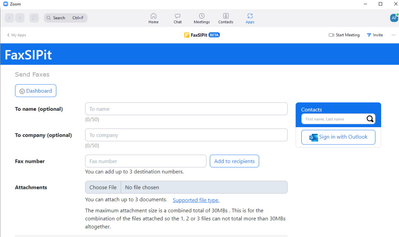
    • Ever wished your faxing, Zoom meetings, and chats could coexist harmoniously? FaxSIPit makes it happen! Transition effortlessly between Zoom meetings, calls, and chats—all while keeping track of your fax messages.
  2. Fax Power Where You Need It:

    • Imagine having the power of a fax machine at your fingertips, wherever you are. FaxSIPit makes it possible. Downloadable PDFs for annotations and signatures? Check. Support for multiple document formats? Absolutely.
  3. Cost-Cutting without Compromise:

    • FaxSIPit isn't just about fancy features; it's also about reducing costs. Bid farewell to outdated fax technology with TLS. No more need for T.38 and POTS lines—just streamlined efficiency.
  4. Security that Speaks Volumes:

    • Security isn't a laughing matter, but FaxSIPit ensures compliance with a touch of humor. From HIPAA to GDPR, our technology supports various security and privacy regulations, ensuring your faxing is as secure as it is entertaining.

Why FaxSIPit? Because Fax Can Be Fun!

FaxSIPit's Zoom App isn't just a tool; it's a game-changer in the world of virtual communication. Say goodbye to administrative headaches and hello to a more efficient, secure, and downright enjoyable faxing experience. Embrace the future with FaxSIPit and redefine the way you fax in the Zoom era!


Want to find out more? Check out this video clip and article.


Screenshot 2024-01-16 at 3.06.39 PM.png 


Screenshot 2024-01-16 at 3.06.57 PM.png


Show less

Las herramientas de Zoom. Recopilación Temporada 1

A finales de 2023 hemos repasado o descubierto algunas de las herramientas que Zoom ofrece para sus Reuniones y Webinarios. Con el espíritu de hacer el contenido más accesible, hemos creado está entrada en la Comunidad recopilando todo lo comentado h... Show more

A finales de 2023 hemos repasado o descubierto algunas de las herramientas que Zoom ofrece para sus Reuniones y Webinarios. Con el espíritu de hacer el contenido más accesible, hemos creado está entrada en la Comunidad recopilando todo lo comentado hasta la fecha y combinando todos los videos instructivos creados con Zoom Clips en un solo lugar.

Les dejo el “Megapost” de la primera Temporada de “Las herramientas de Zoom”. Muchas gracias a todos los que han participado, aportado ideas y compartido opiniones. ¡Espero verles a todos en la siguiente temporada!


Episodio 1: La sala de Espera: una herramienta fundamental

La Sala de Espera es una herramienta fundamental para su Reuniones de Zoom. Lo primero de todo y más importante es que se trata de una función de seguridad que nos permite filtrar aquellas personas que queremos que se unan o no a nuestra Reunión. Además de esto nos puede servir como una breve plataforma de marketing para anunciar campañas, productos o eventos de su organización gracias a la posibilidad de incluir un soporte audiovisual. Todo esto está disponible de manera sencilla para todos los usuarios con una licencia de Zoom.

Echémosle un vistazo a la Sala de Espera en este breve vídeo creado con Zoom Clips:


AnderV_0-1704838813125.png


Episodio 2: Preguntas y Respuestas: una función para despejar las dudas en Reuniones y Webinars

La función de Preguntas y Respuestas nos permite tener un espacio dedicado a estas tanto en nuestras Reuniones como Webinars. Si bien el chat durante las Reuniones nos puede servir para que los participantes hagan sus preguntas, también puede acabar siendo un poco caótico. De hecho, suele ser frecuente durante los Webinars que queramos tener un entorno más controlado que lo que permite el chat y por lo tanto deseemos tenerlo desactivado. Es en estas situaciones donde la herramienta Preguntas y Respuestas entra en juego, permitiéndonos tener un entorno completamente controlado por el anfitrión donde las preguntas pueden ser públicas, anónimas o solo visibles una vez hayamos respondido a las mismas.

Para aprender más sobre Preguntas y Respuestas, echémosle un vistazo al siguiente video creado con Zoom Clips: 

AnderV_1-1704838912703.png


Episodio 3: Votaciones y Cuestionarios: promueve la participación en tus Reuniones y Webinarios


Las Votaciones y Cuestionarios nos permiten que los participantes de nuestras Reuniones y Webinarios participen dando su opinión, respondiendo a una batería de preguntas, proveyéndonos de datos, etc. Las posibilidades son extremadamente variadas.

La posibilidad de crear nuestras Votaciones y Cuestionarios con antelación y guardarlos como plantillas para su futuro uso nos da una gran flexibilidad. Además una vez se haya completado la Votación durante la Reunión, podemos descargar los resultados y así poder tratarlos más tarde. Otra de las opciones que nos permiten las Votaciones es que, los participantes sean divididos en Salas de Grupo Pequeño conforme a sus respuestas.

Por último mencionar la función de Cuestionario, que nos permite transformar la Votación en un test donde podemos asignar respuestas correctas a cada pregunta. Esto puede ser muy útil, por ejemplo, para docentes que quieren hacer un pequeño muestreo del conocimiento de los alumnos.

Para aprender más sobre Votaciones y Cuestionarios, echémosle un vistazo al siguiente video creado con Zoom Clips:

AnderV_2-1704838992410.png


Episodio 4: Control de Diapositivas: haz que tus presentaciones en equipo sean más dinámicas

¿Cuántas veces hemos tenido que realizar o atender una presentación en equipo en la cual se usan diapositivas/transparencias? Y ¿cuántas veces hemos oído “pasa a la siguiente”, "¡espera!" o “vuelve a la anterior”?

Ahora nos podemos ahorrar estás frases que pueden variar desde lo monótono hasta dar una impresión de descoordinación a potenciales clientes y socios.  Dar el control de las diapositivas a los asistentes de una Reunión de Zoom o a un panelista en un Webinario nunca ha sido más sencillo.

Para aprender más sobre cómo Compartir el Control de las Diapositivas, echémosle un vistazo al siguiente video creado con Zoom Clips:

AnderV_3-1704839067509.png


Espero que este post les haya resultado útil. No duden en dejar comentarios y participar en la Comunidad de Zoom.

¡Y si tienen temas que quisieran ver abordados de esta manera, déjenos sus ideas en los comentarios!

¡Hasta la próxima!


Show less