Zoom Meetings
cancel
Showing results for 
Search instead for 
Did you mean: 
Weekly Leaderboard

What are Zoom Meetings?

Zoom Meetings are a simplified video conferencing solution for an optimized virtual meeting experience. Explore the Zoom Community's Recent Activity below to join the Meetings conversation and connect with other members. If you're still looking for support, browse our Zoom Meetings support articles or start a new discussion below!

Recent Activity

Resolved! Can we use an external web camera on a smart phone(android or iPhone)?

As a subject shows. I will try using an external web camera, attaching to android or iphone mobile devices,but I found a topic that zoom dose not recommend an external web camera on the smart phone.Is it a truth? reference:https://zoom-support.nissho... Show more

As a subject shows.


I will try using an external web camera, attaching to android or iphone mobile devices,

but I found a topic that zoom dose not recommend an external web camera on the smart phone.

Is it a truth?


reference:

https://zoom-support.nissho-ele.co.jp/hc/ja/articles/360029790532-%E3%82%B9%E3%83%9E%E3%83%9B%E3%81%AB%E5%A4%96%E4%BB%98%E3%81%91%E3%82%AB%E3%83%A1%E3%83%A9%E3%82%92%E6%8E%A5%E7%B6%9A%E3%81%97-Zoom%E3%83%9F%E3%83%BC%E3%83%86%E3%82%A3%E3%83%B3%E3%82%B0%E3%81%AB%E5%8F%82%E5%8A%A0%E3%81%99%E3%82%8B%E3%81%93%E3%81%A8%E3%81%8C%E3%81%A7%E3%81%8D%E3%81%BE%E3%81%99%E3%81%8B-


Show less

By
Explorer
This thread is read-only
reply-icon Latest Reply - 

not able to change the email template / invitation

per documentation i can change the email template / invitation text from advanced->branding menu. i dont see this menu option at all. i want to change the text that gets copied on COPY INVITATION, would like to remove the phone numbers and all that c... Show more

per documentation i can change the email template / invitation text from advanced->branding menu. i dont see this menu option at all. i want to change the text that gets copied on COPY INVITATION, would like to remove the phone numbers and all that come by default.


Show less

reply-icon Latest Reply - 

Resolved! Increasing the meeting size?

So, my meeting was getting big, so I purchased a one-time $50 large-meeting add-on, to go to 500.  How can I tell if this was applied to my meeting, prior to folks trying to sign up and hitting a 100 person ceiling?  

reply-icon Latest Reply - 

Changing External Caller ID

We attempted to reach our Manager using the ZOOM call feature today. He received a phone call, but the following happened: 1) Verizon blocked the call as possible Spam.2) The caller ID was incorrect. Can we change the caller ID? What are the steps to... Show more

We attempted to reach our Manager using the ZOOM call feature today. He received a phone call, but the following happened:


1) Verizon blocked the call as possible Spam.

2) The caller ID was incorrect.


Can we change the caller ID? What are the steps to do that?


Please note that we do not use ZOOM Phone.


Thanks,

Brett


Show less

reply-icon Latest Reply - 

Problem logging in. Error message appears when logging in: http 401 error

I have been using zoom since last year for my online classes. Yesterday, I had problems logging in to my zoom account. After typing in my email address and password, a message popped up "http 401 error". This continued for a few minutes. I tried logg... Show more

I have been using zoom since last year for my online classes. Yesterday, I had problems logging in to my zoom account. After typing in my email address and password, a message popped up "http 401 error". This continued for a few minutes. I tried logging in again from a different computer and the same message appeared. About 1 hour later, I tried logging in once again and I was able to (thankfully my class could go on).


However, I experienced this same problem again just a few minutes ago. The same error message appeared: http 401 error. The problem persisted for a few more minutes. After those few minutes, I am finally  able to log in.


I'm wondering if there is any  reason for this problem? It stresses me out because I rely 100% on zoom to conduct my online classes and without being able to log in, it will be a major issue in carrying out my teaching work. I have never had this problem before and when it occurred yesterday for the first time, I was really taken aback by it.


Does anyone else experience this problem?


Show less

reply-icon Latest Reply - 

Claimed host duties transfer to account holder upon joining a meeting

Every time I log into a meeting hosted on my account it takes host duties away from the person who claimed host (via the host key) and makes me host. Then I have to figure out who was host and turn host duties back over to them. How do I disable this... Show more

Every time I log into a meeting hosted on my account it takes host duties away from the person who claimed host (via the host key) and makes me host. Then I have to figure out who was host and turn host duties back over to them. How do I disable this? Thank you for any help. I have to admit I'm quite frustrated about it. It used to not do this.


Show less

reply-icon Latest Reply - 

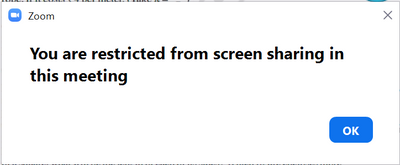
Restricted from screensharing

When I join a meeting it shows up as You are restricted from screensharing in this meeting, and my Screenshare button is gone. When I do Alt+S It shows up with a Window showing I am restricted. This has been a problem for over a month before an updat... Show more

When I join a meeting it shows up as You are restricted from screensharing in this meeting, and my Screenshare button is gone. When I do Alt+S It shows up with a Window showing I am restricted. This has been a problem for over a month before an update I dont know which. When the host enables screensharing, other participants can screenshare but I can't.

Lewin_0-1636530699472.pngLewin_1-1636530745771.png


Show less

reply-icon Latest Reply - 

Close registration after meeting date is defaulted to on for recurring meeting... how turn off?

Hi there I have been setting up recurring weekly meeting for quite some time now but just recently, the close registration after meeting date option in the edit registration seems to be defaulted to on and I am unable to change it to off. I want peop... Show more

Hi there


I have been setting up recurring weekly meeting for quite some time now but just recently, the close registration after meeting date option in the edit registration seems to be defaulted to on and I am unable to change it to off. I want people to still be able to register once the meeting starts. 


Show less

reply-icon Latest Reply - 

zoom is running but cannot join or create meeting

Zoom is working on the user's computer.Chat is working fineJoining the meeting is not. Just load a while and then nothing happens.Creating a meeting is not working too. Just load a while and then nothing happens. Uninstalled it, and reinstalled it ag... Show more

Zoom is working on the user's computer.

Chat is working fine

Joining the meeting is not. Just load a while and then nothing happens.

Creating a meeting is not working too. Just load a while and then nothing happens.


Uninstalled it, and reinstalled it again. Still the same.

removed his account from the portal and invited the user again and reinstalled zoom on the computer.

Still, nothing is working except the chat.


Can anyone help with that?


Show less

reply-icon Latest Reply - 

Resolved! Newbie first meeting questions

I will be attending a Zoom meeting for the first time. I have downloaded the Desktop Client, registered, browsed through a few tutorials and videos, attended a "Back to Basics" live training, and tried a test meeting. I know how to join a meeting, bu... Show more

I will be attending a Zoom meeting for the first time. I have downloaded the Desktop Client, registered, browsed through a few tutorials and videos, attended a "Back to Basics" live training, and tried a test meeting. I know how to join a meeting,  but still have a few questions about attending one.


The meeting is an informal family meeting, with several speakers, including myself. I will turn off mic and video at the start of the meeting, and turn them on before my turn comes. After speaking, I will turn them off again. Questions:


- Is it possible to chat with just the host, and not with everyone? In case I have a technical issue.


- I would like to view only what the host presents, and the other speakers, but not all the attendees. Can this be done by selecting the "Speaker View" option in "Gallery View"? Or is there another way?


- I would like to continue to attend the meeting after my speech. How do I let the host know that I have finished my speech?


Thanks in advance.


Show less

reply-icon Latest Reply -