Zoom Meetings
cancel
Showing results for 
Search instead for 
Did you mean: 
Weekly Leaderboard

What are Zoom Meetings?

Zoom Meetings are a simplified video conferencing solution for an optimized virtual meeting experience. Explore the Zoom Community's Recent Activity below to join the Meetings conversation and connect with other members. If you're still looking for support, browse our Zoom Meetings support articles or start a new discussion below!

Recent Activity

Recording in Zoom with multiple monitors?

When recording a Zoom meeting with multiple monitors, does anyone know how to select the monitor from which you wish to record?


reply-icon Latest Reply - 

Zoom volume

I’m having a problem with my zoom volume.  Called zoom for support and they tell me I have go to zoom community. Help

reply-icon Latest Reply - 

Last Meeting Column in Users

Hello! The Last Meeting Column is empty for all of my users. I would expect this column to show the last meeting hosted by a user. I need this in order to tell whether a person is using their license. It is a much quicker way than generating a report... Show more

Hello!


The Last Meeting Column is empty for all of my users.  I would expect this column to show the last meeting hosted by a user.  I need this in order to tell whether a person is using their license.  It is a much quicker way than generating a report for x days and then hunting down the missing names.


What is the correct behavior for this column?


Show less

reply-icon Latest Reply - 

Cannot join meeting on Windows 11

Whenever I try to connect to a meeting on Windows 11 it gets stuck on connectng and also takes a long time to load up too

reply-icon Latest Reply - 

Involuntary disconnection

Every time I join a Zoom meeting using the app, it disconnects after only a few seconds. It automatically reconnects and disconnects again after another few seconds, ad infinitum.

reply-icon Latest Reply - 

Zoom --> Jira Helpdesk Plugin Account Settings

I recently set up the Zoom integration for Jira and it works ad advertises... except for one thing.... it nabbed my personal account that I was logged into during install and I need to configure it for the corporate account my company has. Where/How ... Show more

I recently set up the Zoom integration for Jira and it works ad advertises... except for one thing.... it nabbed my personal account that I was logged into during install and I need to configure it for the corporate account my company has.  Where/How do I do that?  Anyone know?


Show less

reply-icon Latest Reply - 

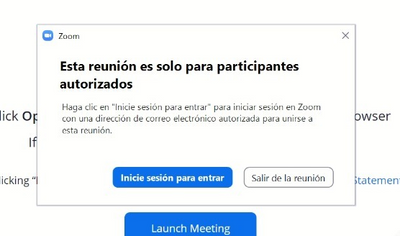
Esta reunion es solo para participantes autorizados zoom

Buen dia,


Estimado tengo este problema que cuando programo la reunion  de zoom me quiero logear me sale este mensaje y no se como desactivar para las personas que quieran ingresar no le salga este mensaje.


LEONARDO3_0-1631720829011.png


reply-icon Latest Reply - 

Quit Zoom with keyboard shortcut

I apologize in advance as this post has some anger accumulated because of the Zoom app. Zoom doesn't let you quit the app the way other apps do, nor does it offer a keyboard-shortcut for that. It doesn't quit when you click the X in the corner. Nor d... Show more

I apologize in advance as this post has some anger accumulated because of the Zoom app.  


Zoom doesn't let you quit the app the way other apps do, nor does it offer a keyboard-shortcut for that.

It doesn't quit when you click the X in the corner.  Nor does it quit when you hit the regular Alt+F4 like the other apps do.

In regards to a keyboard shortcut, I've looked around the Zoom app, and haven't been able to do it from within the keyboard. 


I guess most people are comfortable with using the mouse, and don't mind an extra right-click -> Quit Zoom.  Even more, the majority won't mind the app running in the background consuming their RAM.


However, I do like to keep my desktop organized whilst choosing the apps that I like to run;  thus I'm upset with Zoom doing what Microsoft does, to force their app open in my desktop.  

What upsets me the most, is not having an option to change this behavior. 


If other people get upset by this, give an upvote and maybe Zoom will hear us. 
Thank you for your attention.


Show less

reply-icon Latest Reply - 

Zoom Sharing

Participants zoom keeps crashing when I shares my screen. It usually happens when the number of people in the meeting is high. Then how to solve this problem please

reply-icon Latest Reply - 

Live streaming from both main room and breakout room

How can you live stream (on youtube) from both the main room and from a breakout room. We would to live stream to one Youtube chanel from the main room and another Youtube chanel from the breakout room. Is it possible if fx a participant in the break... Show more

How can you live stream (on youtube) from both the main room and from a breakout room. We would to live stream to one Youtube chanel from the main room and another Youtube chanel from the breakout room.  Is it possible if fx a participant in the breakout room have a separat licence?  Other solutions?


Show less

reply-icon Latest Reply -