Zoom Meetings
cancel
Showing results for 
Search instead for 
Did you mean: 
Weekly Leaderboard

What are Zoom Meetings?

Zoom Meetings are a simplified video conferencing solution for an optimized virtual meeting experience. Explore the Zoom Community's Recent Activity below to join the Meetings conversation and connect with other members. If you're still looking for support, browse our Zoom Meetings support articles or start a new discussion below!

Recent Activity

Resolved! Disturbance during Zoom meeting

Dear Zoom, I made a complain about one participant during Zoom meeting who used to make vulgar noises during zoom meeting. This user is disturbing from quite some time. I am a teacher by profession and using one PMID from quite sometime. I complained... Show more

Dear Zoom, I made a complain about one participant during Zoom meeting who used to make vulgar noises during zoom meeting. This user is disturbing from quite some time. I am a teacher by profession and using one PMID from quite sometime. I complained about this user during meeting and got confirmation email from Zoom and you confirmed that, you will get back to me within 7 days. its more than 7 days and i am not informed about the user that who he is and why is he constantly disturbing class.


Show less

reply-icon Latest Reply - 

WITHOUT AUDIO! shared video for all simultaneous rooms (breakout roons)

When sharing a video (with audio) to all 10 rooms simultaneously (breakout roons), none of them audio is heard. Only the image appears.

reply-icon Latest Reply - 

Why I'm I always stuck without any backgrounds

I always have to turn of the video because of the busy background. Most people just blur the background but for some reason I can't. I originally thought it was because of the host but I saw other people doing it and many more. And its not just the b... Show more

I always have to turn of the video because of the busy background. Most people just blur the background but for some reason I can't. I originally thought it was because of the host but I saw other people doing it and many more. And its not just the blur but I seriously do not have any virtual backgrounds or video filters.😞help!!!!!!


Show less

reply-icon Latest Reply - 

How ro use zoom so i can use laptop as a video recorder?

Hi,How can i use zoom so that i can use my laptop as a video recorder?I can do it at the moment by opening a meeting with myself, and sharing screen, and sharing sound, and hitting record...only problem is the video comes out just a small thumbnail w... Show more

Hi,

How can i use zoom so that i can use my laptop as a video recorder?

I can do it at the moment by opening a meeting with myself, and sharing screen, and sharing sound, and hitting record...only problem is the video comes out just a small thumbnail when i play it back. How can i make the video all over the full laptop screen.?


Show less

reply-icon Latest Reply - 

Upgraded to Pro but only have 1 license?

Hi,


We recently upgraded to a Pro Account and paid a full one year ahead.  When we try to assign a license to other family members, it says we have zero license - why?  The pricing plan says we have up to 9 licenses.  PLEASE HELP! 


Thanks

reply-icon Latest Reply - 

Alternate Host

I am trying to add an alternate host to a meeting I am scheduling. This person has a person zoom account with meeting ID and everything. Every time I try to add them as the alternate host I get an error that his email or name cannot be found. Need he... Show more

I am trying to add an alternate host to a meeting I am scheduling.  This person has a person zoom account with meeting ID and everything.  Every time I try to add them as the alternate host I get an error that his email or name cannot be found.  Need help asap


Show less

reply-icon Latest Reply - 

Generating a VTT file for upload on Vimeo

Hi -I'm trying to determine whether or not it is possible to generate a VTT file with the transcript IF I hide the captioning while I'm speaking. I did a test where I recorded myself with the transcript enabled and viewable on the screen and the file... Show more

Hi -

I'm trying to determine whether or not it is possible to generate a VTT file with the transcript IF I hide the captioning while I'm speaking.  I did a test where I recorded myself with the transcript enabled and viewable on the screen and the file was generated with my speech utterances.  However, the transcript file only includes that content which was stated while transcript was viewable.  When I hid the transcript, that content didn't make it into the file.


So if I need to record with captioning viewable but I don't want to have the viewable captioning baked into the video I upload to Vimeo, what workaround is there?

Thank you.


Show less

reply-icon Latest Reply - 

Streaming Issue regarding RTMPS

Good day to you, We have an issue regarding broadcasting in zoom. We have an application “Bright cove” and it was used in several webinar and meeting in the bank. Before it works fine with ‘RTMP”. But now on the update using ‘RTMPS’ we cannot merge o... Show more

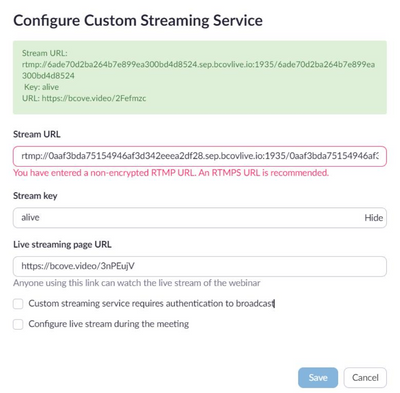
Good day to you, We have an issue regarding broadcasting in zoom. We have an application “Bright cove” and it was used in several webinar and meeting in the bank. Before it works fine with ‘RTMP”. But now on the update using ‘RTMPS’ we cannot merge our apps for broadcasting.


Please refer to our screen shot as the green highlighted was used and works fine.

MiKeClaro12_0-1632192810348.png


Show less

reply-icon Latest Reply - 

Resolved! Can Zoom re. send an original cloud recording?

I recorded a staff meeting today. I needed to cut out about 15 minutes in the middle of the presentation ... unfortunately, the piece that was saved was the piece that I cut! This is only the 2nd or 3rd recording that I've done and the first one that... Show more

I recorded a staff meeting today.  I needed to cut out about 15 minutes in the middle of the presentation ... unfortunately, the piece that was saved was the piece that I cut!  


This is only the 2nd or 3rd recording that I've done and the first one that required editing afterwards and obviously, I need more training!


Is Zoom able to re-send to me the original Cloud recording so I can try again?


Show less

reply-icon Latest Reply -