Zoom Meetings
cancel
Showing results for 
Search instead for 
Did you mean: 
Weekly Leaderboard

What are Zoom Meetings?

Zoom Meetings are a simplified video conferencing solution for an optimized virtual meeting experience. Explore the Zoom Community's Recent Activity below to join the Meetings conversation and connect with other members. If you're still looking for support, browse our Zoom Meetings support articles or start a new discussion below!

Recent Activity

Behavior in a meeting

Hi everybody,I'm sorry if this post is not in the right place...I have a question... Does already exist a vademecum with some indications or suggestions of behavior (netiquette / gentlemen's agreement) to be held during a meeting and, technical sugge... Show more

Hi everybody,

I'm sorry if this post is not in the right place...

I have a question... Does already exist a vademecum with some indications or suggestions of behavior (netiquette / gentlemen's agreement) to be held during a meeting and, technical suggestions to improve the experience, summarized in a document? I'm building them myself for my organization, but it wouldn't hurt to hear from those with more experience too 🙂

Thanks.

David.


Show less

reply-icon Latest Reply - 

Best way to show current meeting "sensitivity" status

We have 3 or 4 "sensitivity levels" of discussions that are permitted based on the current attendees. Simple example: if only employees are on the call then proprietary info is allowed but if external customers are on, proprietary info is disallowed.... Show more

We have 3 or 4 "sensitivity levels" of discussions that are permitted based on the current attendees. Simple example: if only employees are on the call then proprietary info is allowed but if external customers are on, proprietary info is disallowed.


I'm looking for the best way to *dynamically* set a visual indicator on a live meeting that can be changed during the meeting to indicate this. Could be the background color of the main meeting panel (*not* an individual user's background - the entire meeting window background) or maybe color of the title bar or a banner / title including "EXTERNAL" vs "INTERNAL" or ...? Having someone manually change the indicator is fine - doesn't need to be automatic.


Scenario: We start a meeting in "blue" mode which means employees only so proprietary info is ok. During the meeting we add a customer so switch to "red" mode meaning no proprietary info. 


What's the best way currently to do something like this?


Many thanks in advance!


Show less

reply-icon Latest Reply - 

Virtual Background

I have a virtual background video and I'm trying to download it.  I had a hard drive crash and lost the file.  It is still on one of my Zoom accounts, but I want to get it to my other account (i.e. download it to my hard drive so 

reply-icon Latest Reply - 

Zoom MAC MDM Setup (Screen Sharing Permissions)

I'm currently in the progress of deploying a few MAC devices in our environment using Kandji MDM. One issue we're experiencing right now is that we need to enable Screen Recording in Security & Privacy but we would like to do that via the MDM rather ... Show more

I'm currently in the progress of deploying a few MAC devices in our environment using Kandji MDM. One issue we're experiencing right now is that we need to enable Screen Recording in Security & Privacy but we would like to do that via the MDM rather by then the user as they are standard users. 


For some other software I was able to use the bundleID and TeamID and enable it via the MDM after deployment, although I'm not able to do the same for Zoom.


Is there any way I can enable the permissions via the MDM rather than the user. 


Thanks

Mateusz


Show less

reply-icon Latest Reply - 

CANTIDAD DE PERSONAS

HOLA, CUAL ES LA CANTIDAD DE PERSONAS PERMITIDAS EN UNA REUNIÓN? TENGO JUNTA CON PADRES DE FAMILIA Y SON 230 PERSONAS. 

reply-icon Latest Reply - 

Recovering Zoom Recording (After Convert)

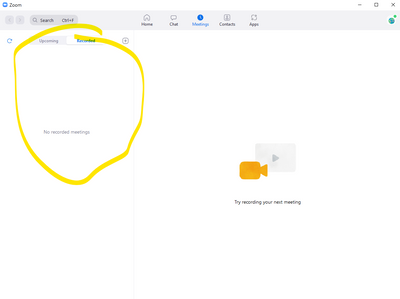
Hi ! I have already converted recording zoom, but I accidently deleted my recording on this zoom app (see at below picture - yellow circle). So, I couldn't find any recording on my laptop C:\Users\"ID"\Documents\Zoom . How can i get back my recording... Show more

Hi !


I have already converted recording zoom, but I accidently deleted my recording on this zoom app (see at below picture - yellow circle). So, I couldn't find any recording on my laptop C:\Users\"ID"\Documents\Zoom . How can i get back my recordings? :"((


hel center2021-10-08 134604.png


Thank you


Show less

reply-icon Latest Reply - 

Blocked Participants from China

I have tried to have a zoom meeting with a Chinese participant. They weren't able to join the meeting. I tried to have another one, this time with a new zoom account. I got the same result. Is there a problem with Chinese participants gaining access ... Show more

I have tried to have a zoom meeting with a Chinese participant.  They weren't able to join the meeting.  I tried to have another one, this time with a new zoom account.  I got the same result.  Is there a problem with Chinese participants gaining access to Zoom?


Show less

reply-icon Latest Reply - 

Resolved! Sync buttons on Headset Audio Option

Good afternoon, We have an organization with about 500 users. We use the Plantronics Blackwire 5220 Series headset. Our users are using Zoom meetings to coordinate calls, and then using a SIP phone to make the calls.When they make the calls with the ... Show more

Good afternoon,


We have an organization with about 500 users.  We use the Plantronics Blackwire 5220 Series headset.

Our users are using Zoom meetings to coordinate calls, and then using a SIP phone to make the calls.
When they make the calls with the SIP phone, they mute themselves in zoom to make the call.

When they mute themselves in zoom, it also mutes the headset across all other applications.  If you press the unmute button on the headset, it also unmutes zoom.  The only way we have found to fix this is by disabling the "sync buttons on headset" option within the audio options.

We are trying to figure out a solution to roll this out to all computeres in an automated fashion.  Any help would be apprecated.  Is it possible to do this through the registry or through group policy?  Ive searched alot of articles and haven't found any luck on this, I have found out how to configure almost every other option through the registry but not this one.

Thanks!


Show less

reply-icon Latest Reply - 

réunion

impossible de relancer une nouvelle réunion aujourd'hui en tant qu'animateur . Quel est la solution pour y arriver ?

reply-icon Latest Reply -