Zoom Meetings
cancel
Showing results for 
Search instead for 
Did you mean: 
Weekly Leaderboard

What are Zoom Meetings?

Zoom Meetings are a simplified video conferencing solution for an optimized virtual meeting experience. Explore the Zoom Community's Recent Activity below to join the Meetings conversation and connect with other members. If you're still looking for support, browse our Zoom Meetings support articles or start a new discussion below!

Recent Activity

Moving telephone participants to main session

In the last few months (Fall 2021) the option to move participants from a breakout room back to the main session seems to be only inconsistently available, even though there are options to move these participants to other breakout rooms. Yesterday, t... Show more

In the last few months (Fall 2021) the option to move participants from a breakout room back to the main session seems to be only inconsistently available, even though there are options to move these participants to other breakout rooms.  Yesterday, the 'main session' option was missing for all our participants joining by telephone.  'Main session' simply did not appear under the 'move to' choices for telephone participants, although it was an option for participants in the same meeting who had joined in other ways.   Since (I believe) telephone participants cannot move themselves, we needed to have them leave the meeting and then rejoin in order to get to the main session.  Are we missing something?


Show less

reply-icon Latest Reply - 

unstable connection or lags in Windows 11 with wifi

 I can't get a good connection through wifi with Zoom in windows 11.
 
With wifi I am getting 35-40 mbps
 
It does work fine when it is plugged in to the ethernet and I am getting 58 mbps

reply-icon Latest Reply - 

Resolved! Local Recording

Sometimes when my boss and I get off our Zoom calls (using his personal Zoom Link) the recording saves to my local drive. He has it set up to save to his and I'm not sure if they are saving on both mine and his when this happens. I have delegate acce... Show more

Sometimes when my boss and I get off our Zoom calls (using his personal Zoom Link) the recording saves to my local drive. He has it set up to save to his and I'm not sure if they are saving on both mine and his when this happens. I have delegate access to his account and am able to schedule meetings for him, so I'm not sure if this is why some of the recordings are saving on my drive?


Show less

reply-icon Latest Reply - 

Zoom

Teacher-appreciation-week-1.jpg

reply-icon Latest Reply - 

upload the list of users participating in a meeting

Hello, I am urgently looking for a tool that makes me upload the list of users participating in a meeting. They are people who have paid and I would like to register them already, so as to approve them by recognizing only the name and surname. And th... Show more

Hello, I am urgently looking for a tool that makes me upload the list of users participating in a meeting. They are people who have paid and I would like to register them already, so as to approve them by recognizing only the name and surname. And then send them the direct access link, there are many users and we cannot check them one by one by hand. I use Infusion Soft as a crm and send emails


Show less

reply-icon Latest Reply - 

Live Stream question

i am a pro-licensed user and owner of my account, when i join a zoom session hosted by people with their license (which i am giving co-host right for that event), can i live to stream it to my facebook group? and how should i set it up using custom s... Show more

i am a pro-licensed user and owner of my account, when i join a zoom session hosted by people with their license (which i am giving co-host right for that event), can i live to stream it to my facebook group? and how should i set it up using custom services ? thks


Show less

reply-icon Latest Reply - 

Resolved! Meetings settings vs API - who wins?

Hello-We are rolling out an app that launches Zoom meetings via the Zoom API. With this launch, we will have some Zoom users that will be hosts in that app, but those same users will also be hosts of other Zoom meetings outside of the app. My questio... Show more

Hello-

We are rolling out an app that launches Zoom meetings via the Zoom API. With this launch, we will have some Zoom users that will be hosts in that app, but those same users will also be hosts of other Zoom meetings outside of the app. My question is will the Zoom settings applied to the users be overridden while they are hosting meetings in our app via the Zoom API?


Thanks! 


Show less

reply-icon Latest Reply - 

Zoom producer

Hello, Does anyone know if there is a certification or training on how to become a zoom virtual producer? l am a meeting facilitator and have used zoom for a long time. Would like to know how to proceed to become a producer. Thanks so much in advance... Show more

Hello,


Does anyone know if there is a certification or training on how to become a zoom virtual producer?  l am a meeting facilitator and have used zoom for a long time.  Would like to know how to proceed to become a producer.


Thanks so much in advance for the feedback.


K


Show less

reply-icon Latest Reply - 

Microphone not working

Weird one... Have a user whose microphone doesn't work in Zoom when in a meeting. Doing the microphone test picks up the mic input, so I know Zoom can access the mic, but when you go to join the meetint with computer audio it says the mic and speaker... Show more

Weird one...


Have a user whose microphone doesn't work in Zoom when in a meeting. Doing the microphone test picks up the mic input, so I know Zoom can access the mic, but when you go to join the meetint with computer audio it says the mic and speakers could not be found


I have of course rebooted, reinstalled Zoom, updated mic drivers, checked microphone privacy settings etc 


At a bit of a loss! Any ideas?


Thanks


Show less

reply-icon Latest Reply - 

Using ProPresenter Output in Zoom

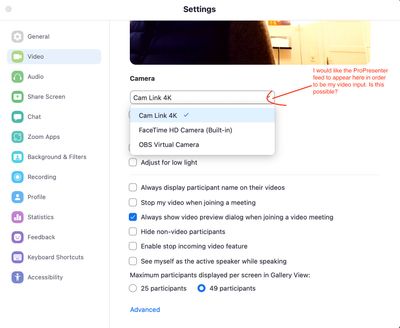
I am trying to find a way to use my ProPresenter output as input source in Zoom. Ideally I would like to use the output / feed of ProPresenter as my video source in Zoom (s. Screenshot). But I have not found any instructions / best practices on this.... Show more

I am trying to find a way to use my ProPresenter output as input source in Zoom. Ideally I would like to use the output / feed of ProPresenter as my video source in Zoom (s. Screenshot). But I have not found any instructions / best practices on this.


All I found was this suggestion to just share my audience-screen in Zoom as discussed here: https://www.reddit.com/r/ProPresenter/comments/jxhbmy/pro_presenter_and_zoom/


But the problem is that this approach leads to a massive delay between audio and video. So this seems to be no reasonable option.


Does anyone have any experience on how to integrate the ProPresenter output into Zoom? I am happy for any advice!

zoom-pp.jpg


Show less

reply-icon Latest Reply -