Slide presentation
Hi. How can I still see everyone who is in the zoom room while I am hosting and presenting a slide presentation? The participants disappear when I share/play a presentation and I can not see them or interact with them.

Zoomtopia is here. Unlock the transformative power of generative AI, helping you connect, collaborate, and Work Happy with AI Companion.
Register nowEmpowering you to increase productivity, improve team effectiveness, and enhance skills.
Learn moreKeep your Zoom app up to date to access the latest features.
Download Center Download the Zoom appDownload hi-res images and animations to elevate your next Zoom meeting.
Browse Backgrounds Zoom Virtual BackgroundsEmpowering you to increase productivity, improve team effectiveness, and enhance skills.
Zoom AI CompanionUser groups are unique spaces where community members can collaborate, network, and exchange knowledge on similar interests and expertise.
Help & Resources is your place to discover helpful Zoom support resources, browse Zoom Community how-to documentation, and stay updated on community announcements.
The Events page is your destination for upcoming webinars, platform training sessions, targeted user events, and more. Stay updated on opportunities to enhance your skills and connect with fellow Zoom users.
Zoom Meetings are a simplified video conferencing solution for an optimized virtual meeting experience. Explore the Zoom Community's Recent Activity below to join the Meetings conversation and connect with other members. If you're still looking for support, browse our Zoom Meetings support articles or start a new discussion below!
Hi. How can I still see everyone who is in the zoom room while I am hosting and presenting a slide presentation? The participants disappear when I share/play a presentation and I can not see them or interact with them.

Good afternoon, I work with a professional zoom, from where I teach language classes, and today I have experienced problems with video calls. In the first class, the video was frozen and I was expelled from the session after 20 minutes without any problems and in the second time, after 45 minutes of class without problems, the same thing happened again. Every time I tried to get back in, it was trouble and I couldn’t. My wifi connection is perfect, I have fiber optic installed and I have never had any problems. I would like to know if there are more people experiencing these technical problems. For me it is important because if there are problems with Zoom, I do not receive any money for the class taught. I’d appreciate it if you could help me, Kind regards Clara
Show less
New Asus ZenBook running Windows 11. Speakers and Microphone work perfectly with Microsoft Teams and all other applications EXCEPT ZOOM. I've followed all troubleshooting guidance and paid for an IT expert to investigate. The problem still remains. The Zoom test section for speakers returns a good result. The Zoom test section for microphone shows that sound is being heard, but when the reply button is pressed the recording is silent.
Show less
How do I get a list of meeting participants to a meeting that I attended, but was not the owner?
Thanks
I erroneously cut more portion of my video recording. Is there a way i can get my original recording (unedited) back? thanks
Is there a way to have the content I am sharing in a screen share included as a window in a zoom conference?
Specifically, I would like to see the content I am sharing as attendees see it to verify It's the correct content without having to ask everyone if "can you see xyz report".
Show less
I did a test run of recording a zoom meeting. I had my image set to be mirrored - but when I watched the video that I recorded, my side was not mirrored as it had been in the meeting. Is this a bug in terms of the recording not being representational of the gallery view as seen during the meeting? I have a Brio 4k and apparently, I can do a lot of things with the app called camera settings but I cannot 'pre-mirror' the signal from the camera to the zoom software.
Show less
only zoom is having problems,
athoer use on net is as - clear and fast.
i would love a seloution.
thank's
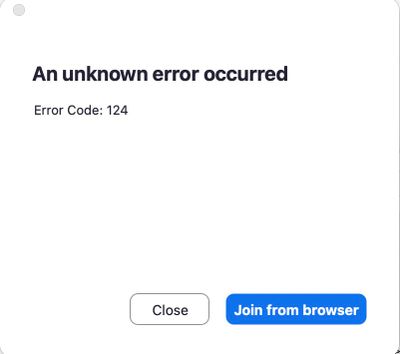
Every time I tried to join a meeting no matter from the website or the zoom app, I can't join it and it displayed an error code 124 occurred.