Where can I find Zoom Meetings 5.5.2(12494.0204) ?
So that I can uninstall this file from my Windows 10 computer. It won't upgrade to the new one due to the missing file of the original installer 5.5.2(12494.0204) file. Or Zoom Cleanup Tools?

Zoomtopia is here. Unlock the transformative power of generative AI, helping you connect, collaborate, and Work Happy with AI Companion.
Register nowEmpowering you to increase productivity, improve team effectiveness, and enhance skills.
Learn moreKeep your Zoom app up to date to access the latest features.
Download Center Download the Zoom appDownload hi-res images and animations to elevate your next Zoom meeting.
Browse Backgrounds Zoom Virtual BackgroundsEmpowering you to increase productivity, improve team effectiveness, and enhance skills.
Zoom AI CompanionUser groups are unique spaces where community members can collaborate, network, and exchange knowledge on similar interests and expertise.
Help & Resources is your place to discover helpful Zoom support resources, browse Zoom Community how-to documentation, and stay updated on community announcements.
The Events page is your destination for upcoming webinars, platform training sessions, targeted user events, and more. Stay updated on opportunities to enhance your skills and connect with fellow Zoom users.
Zoom Meetings are a simplified video conferencing solution for an optimized virtual meeting experience. Explore the Zoom Community's Recent Activity below to join the Meetings conversation and connect with other members. If you're still looking for support, browse our Zoom Meetings support articles or start a new discussion below!
So that I can uninstall this file from my Windows 10 computer. It won't upgrade to the new one due to the missing file of the original installer 5.5.2(12494.0204) file. Or Zoom Cleanup Tools?

Hello, I just set a friend up with Zoom in anticipation of a class she's going to be taking online next week. I started the meeting (on my phone) and she joined on her computer. Everything was fine but then I wanted to show her how Speaker View worked and, specifically, how the person featured would change depending on who was talking. So I muted myself and she began to speak. (We'd tested her audio and it passed.) On my phone, her tile was featured but on her computer, even with her speaking and me muted, I continued to be the featured tile. Nothing helped. Any suggestions? Thanks, Z
Show less
Hello there
I am contacting you using my FB account.
My account to which I no longer have access to the email account has been disabled. May I know why please?
It is the same details such as name etc, just the email address is different.
I cannot login my account and join the zoom meetings through the zoom.us. It showed me that the network was not work and let me check whether the network was work or not. However, the wifi network does not have any problem. Therefore, the problems seems to be the zoom.us. Then I am now trying to get a help from your zoom support team.
Show less
We have subscribed to a Zoom PRO Plan. We would like to know whether it is possible to plan and hold two (or more) meetings simultaneusly with the same account. If not, which plan do we need to buy to be able to do so? Moreover, we would like to understand what the "license counts" are. Thank you in advance.
Show less
I try to do “cloud recording” today, but I missed to push the stop button at the end of the meeting, so recording status is continuing even now. Could someone please support me?
Hi
I've got a MS Modern Wireless headset and when setting up audio for a Zoom call, if I test the speaker, I hear audio. If i then select the Mic to be the headset mic, audio stops.
Can anyone tell me how I could look to resolve this?
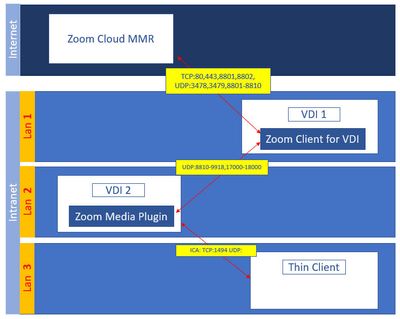
Thin client user connect Citrix xen desktop to VDI-2 .VDI-2 in Lan2 can not go to internet,so it connect to VDI1 to run Zoom meeting.Is that possible install Zoom media plusin on VDI2? or The VDI1 can redirect audio/video dat to this IGEL thin client?(IGEL thin client had Zoom plugin installed)
Show less
Hi, I listen to meeting.participant_left event in order identify the participant. But unfortunately the returned object from this event does not return the email. It only returns the id, leave_reason, leave_time, user_id, user_name. But when the participant who hosted the event leaves the meeting i get the email in the event.
Show less