Zoom Meetings
cancel
Showing results for 
Search instead for 
Did you mean: 
The Zoom Community will be placed in read-only mode January 9th, 2026 through January 22nd, 2026 to deliver you a new and improved community experience!

The community will still be accessible, however, the creation of any new discussions or replies will be temporarily unavailable. We appreciate your patience during this time.

Weekly Leaderboard

What are Zoom Meetings?

Zoom Meetings are a simplified video conferencing solution for an optimized virtual meeting experience. Explore the Zoom Community's Recent Activity below to join the Meetings conversation and connect with other members. If you're still looking for support, browse our Zoom Meetings support articles or start a new discussion below!

Recent Activity

Recorded video stuck "in processing"

I have not encountered this before where the cloud recording is not sent within an hour of my recording -- it has been almost 10 hours and it is marked "Processing" in my recording file.  How can I fix this?

 

reply-icon Latest Reply - 

How to turn off name tags in the video

Hello. I was wondering if someone could help me with something. I use Zoom to record video meetings, but the participant name tags always appear on the video. I've gone into the setting and unchecked the box that says "Always display participant name... Show more

Hello. I was wondering if someone could help me with something. 


I use Zoom to record video meetings, but the participant name tags always appear on the video. I've gone into the setting and unchecked the box that says "Always display participant name on their videos" but the names still appear on my recording. 


I was wondering if anyone could help and suggest why this is still happening? Thanks!


Show less

reply-icon Latest Reply - 

Available types of integrations with zoom

I have web-application and need integration with zoom. I have two integration cases: 1. Put a call button to my application near with Google Calendar, Outlook and Yahoo.After clicking open my web application that interacts with the created Zoom - mee... Show more

I have web-application and need integration with zoom.


I have two integration cases:


1. Put a call button to my application near with Google Calendar, Outlook and Yahoo.

After clicking open my web application that interacts with the created Zoom - meeting.

Is it possible? What I need to do?


2. Put a call button to Zoom in my web-application.

After clicking create Zoom - meeting and use it in my web-application.

Is it possible? What I need to do?


Show less

reply-icon Latest Reply - 

Creating a Meetings

I have 2 different zoom accts. Currently one is attached to my calendar. What I would like to know is when I create a meeting and then select to add a zoom session - I only see the one account - can I get both to show so that I may choose which accou... Show more

I have 2 different zoom accts.  Currently one is attached to my calendar.  What I would like to know is when I create a meeting and then select to add a zoom session - I only see the one account - can I get both to show so that I may choose which account is hosting the meeting?


TIA

Nannette


Show less

reply-icon Latest Reply - 

Slides as Background - Can't load because "don't have" Keynote or Powerpoint (but I do)

I wanted to try out the Slides as Background functionality. I know it's still a beta.I chose the option in the Advanced Screen Share window, and the error messages said that it couldn't open the file because Keynote (or Powerpoint) is not installed.I... Show more

I wanted to try out the Slides as Background functionality.  I know it's still a beta.

I chose the option in the Advanced Screen Share window, and the error messages said that it couldn't open the file because Keynote (or Powerpoint) is not installed.

I have both, I use them both all the time.

Screen grab with the error attached.


Is there something that needs to be done to "turn them on" for Zoom to see them, or somehow specify where they are (in the Applications folder, the default location), etc?

Thanks!


Show less

reply-icon Latest Reply - 

How to disable that account owner always gets host?

When one of our account owners joins a call, he will always automatically get the host. This behaviour is not useful, as this diables screensharing for other participants.

How can we disable this functionality?


Best regards

reply-icon Latest Reply - 

Multiple users

Good afternoonI need to set up multiple Zoom meetings for 3 different users at any one time. I have added 3 new users to our Zoom Pro account yesterday. I have the following questions:1. How do these users log in, do they use the same login as the li... Show more

Good afternoon

I need to set up multiple Zoom meetings for 3 different users at any one time. I have added 3 new users to our Zoom Pro account yesterday. I have the following questions:

1. How do these users log in, do they use the same login as the licensed account?

2. Can the Owner of the license create the zoom meeting's for all users? Is there any way that these are easily differentiated in Zoom?

Thanks very much


Show less

reply-icon Latest Reply - 

Resolved! confusion over July 15, 2022 change

I have a paid pro account and use it for weekly two-hour meetings of a group of friends. As far as I know, they have only zoom basic accounts.in the past when I have had to miss a meeting, I have asked one of the more frequent attendees to start the ... Show more

I have a paid pro account and use it for weekly two-hour meetings of a group of friends. As far as I know, they have only zoom basic accounts.
in the past when I have had to miss a meeting, I have asked one of the more frequent attendees to start the meeting in my absence and claim the host privilege by using my host key.
I understand from the announcement that when a basic user creates a meeting of more than two people, there is a duration limit of 40 minutes.
It is not clear if this applies only to their own meetings, or if it also applies to meetings of a licensed that they initiate.
On one hand it would seem that any of the meetings that I create can run longer than 40 minutes, so does that limit change if a basic user starts the meeting, or is it still an unlimited duration meeting because it belongs to a licensed user.

I'd be grateful for any comments anyone may have on this.


Show less

reply-icon Latest Reply - 

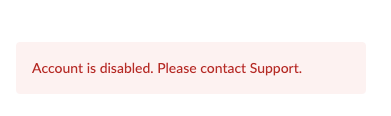
ACCOUNT DISABLED

Dear Teams,


I have notice that zoom my accounts  was disabled.

i have many account, it's disabled without any info.

may you help me in order to enable my account again, please?


thank you in advance.

Opik_Sutisna_0-1649574974205.png


reply-icon Latest Reply -