Zoom Team Chat
cancel
Showing results for 
Search instead for 
Did you mean: 
Weekly Leaderboard

What is Zoom Team Chat?

Zoom Team Chat connects teams and streamlines communication through securely integrated messaging software. Explore the Zoom Community's Recent Activity below to join the Team Chat conversation and connect with other members. If you're still looking for support, browse our Zoom Team Chat support articles or start a new discussion below!

Recent Activity

lost icon on dock, can't find Zoom in applications folder

The Zoom icon disappeared from my dock. I pulled it back, but it disappeared again. Now I cannot even find Zoom in my applications folder. The only way I can get into any of my mtgs is by going in as a guest. The zoom icon disappears from my dock as ... Show more

The Zoom icon disappeared from my dock. I pulled it back, but it disappeared again. Now I cannot even find Zoom in my applications folder. The only way I can get into any of my mtgs is by going in as a guest. The zoom icon disappears from my dock as soon as I exit Zoom.

Any ideas? Help?


Show less

reply-icon Latest Reply - 

you cannot chat with XYZ because m t is not your contact.

i have been using zoom chats for a while.. suddenly today it came with a message that i can not send a message to one of my coworker because he is not my contact.even though he is my contact.so here is what we tried to fix1. we removed each other fro... Show more

i have been using zoom chats for a while.. suddenly today it came with a message that i can not send a message to one of my coworker because he is not my contact.

even though he is my contact.

so here is what we tried to fix

1. we removed each other from our contacts

2. we added back

3. even now if we try to send a text it comes with same message 

"you cannot chat with XYZ because m t is not your contact."


we both can chat to other people but cant to each other.


any help will be appreciated.

Thanks


Show less

reply-icon Latest Reply - 

The passcode for the Monday 8 pm Neptune meeting


The passcode for the Monday 8 pm Neptune meeting does not permit me to join the meeting.

account has been deleted by their account admin

Hi I can't chat with my friend. I used to chat daily with her but today my problem began When I send a contact request to her, she won't received my invitation, when she invites me, I accept and I see this following message If i click on "Start Chat"... Show more

Hi I can't chat with my friend. I used to chat daily with her but today my problem began


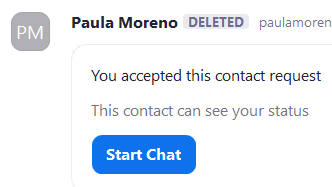
When I send a contact request to her, she won't received my invitation, when she invites me, I accept and I see this following message

Zumiro_1-1639574730757.png


If i click on "Start Chat", I can't send a message because I see this warning


"Paula Moreno's account has been deleted by their account admin"


Show less

reply-icon Latest Reply - 

Sound sharing Issue

Hi, one big question. When i am sharing my STERO Sound from my PC to MAC the recipient receives the sound in MONO - its on his left side. When he is sharing his sound, I can listen to it in Stereo The recipient is using a METRIK HALO ULN 2 Soundcard.... Show more

Hi, one big question. When i am sharing my STERO Sound from my PC to MAC the recipient receives the sound in MONO - its on his left side. When he is sharing his sound, I can listen to it in Stereo


The recipient is using a METRIK HALO ULN 2 Soundcard. Has anyone also this issue ? 


Thank you very much 


Show less

reply-icon Latest Reply - 

Virtual hand raise

When I click on "participants" when in a ZOOM meeting, I do not see an opportunity to raise a virtual hand on the drop down menu of those participating. What am I missing? Thanks.

reply-icon Latest Reply - 

Only authenticated users can join?

My "only authenticated users can join" function is permanently enabled. Any idea how to turn it off? In my settings, it says it is off. But when in a zoom meeting it says its enabled. Any participant that wants to join a meeting has to authenticate b... Show more

My "only authenticated users can join" function is permanently enabled. Any idea how to turn it off?


In my settings, it says it is off. But when in a zoom meeting it says its enabled. Any participant that wants to join a meeting has to authenticate before joining. I did not turn this function on and at some point it just started being permanently on regardless of what the "on / off" switch does in settings. Any ideas?


Show less

reply-icon Latest Reply - 

Pending balance.

Why my pending balance is showing even after cancellation. 

reply-icon Latest Reply - 

Use PMI for New Meeting

Previously, whenever I click on New Meeting my PMI would be used as the Meeting ID automatically. That's because I was able to check the "Use My Personal Meeting ID (PMI)" box. I now have a new paid account and that box is greyed out and is unavailab... Show more

Previously, whenever I click on New Meeting my PMI would be used as the Meeting ID automatically.  That's because I was able to check the "Use My Personal Meeting ID (PMI)" box.  I now have a new paid account and that box is greyed out and is unavailable.  How can I go back to having my PMI used automatically?


W. Russ


Show less

reply-icon Latest Reply - 

Zoom Meeting Download

My Zoom Meetings were all recorded but I cannot find the download file.... Any help please

reply-icon Latest Reply -