Zoom Rooms and Workspaces
cancel
Showing results for 
Search instead for 
Did you mean: 
The Zoom Community will be placed in read-only mode January 9th, 2026 through January 22nd, 2026 to deliver you a new and improved community experience!

The community will still be accessible, however, the creation of any new discussions or replies will be temporarily unavailable. We appreciate your patience during this time.

What are Zoom Rooms and Workspaces?

Zoom Rooms are modern workspaces that enable in-person and remote participants to interact in real-time in a hybrid setting. Explore the Zoom Community's Recent Activity below to join the Rooms and Workspaces conversation and connect with other members. If you're still looking for support, browse our Zoom Rooms and Workspaces support articles or start a new discussion below!

Recent Activity

Resolved! No speaker thumbnail in cloud recording from Zoom Room

Even though I have "Record active speaker with shared screen" enabled for this room, when I record an instant meeting, It does not record the room's cameras in the top right corner, I only get content. If there is no content, I get the camera view. Show more

Even though I have "Record active speaker with shared screen" enabled for this room, when I record an instant meeting, It does not record the room's cameras in the top right corner, I only get content. If there is no content, I get the camera view.


Show less

reply-icon Latest Reply - 

Usability of entering breakout room

We host a non-profit speeddating event on Zoom from time to time. It works quite well, we have up to 100 participants per event. The event has several rounds, in each round we show a table where participants can look-up what breakout room they have t... Show more

We host a non-profit speeddating event on Zoom from time to time. It works quite well, we have up to 100 participants per event. The event has several rounds, in each round we show a table where participants can look-up what breakout room they have to enter next.


We experienced that the usability of entering the breakout rooms is suboptimal. The problem occurs when 100 participants try to enter 50 distinct breakout rooms at the same moment. Every time someone enters a breakout room, the name of the participant is listed below the room name. As a consequence, the list of rooms is shifted down. This mechanism makes it hard for other participants to "catch" their breakout room. Sometimes participants entered the wrong room (room list shifted when they clicked) or it took 1-2 minutes to enter the designated room. This was frustrating for participants as time is crucial in a speeddating event. 😉


Thus, we want to ask if there is any chance you can enhance the usability for this use case. This are our ideas:

1) Option (for the host) to avoid listing the participant names below the breakout room name.

2) Text field where the user can enter the number of the room-to-be-entered.

3) Possibility to update pre-assignment to breakout rooms during the meeting.


Thanks for your consideration!


Show less

reply-icon Latest Reply - 

Zoom Room meeting Calendar

Hi Guys, So i found something that i cant seem to locate the settings for. For Example if someone sets a meeting at 10:30 am. The host decides I'm going to cancel, sends the cancelation and frees the room. When the rooms free its now 10:20 am, if i g... Show more

Hi Guys,


So i found something that i cant seem to locate the settings for. For Example if someone sets a meeting at  10:30 am. The host decides I'm going to cancel, sends the cancelation and frees the room. When the rooms free its now 10:20 am, if i go in to set a new meeting at 10:30 am, the room doesn't repopulate the new meeting for 10:30am. Is there a setting i need to change. It be greatly appreciated if anyone had any information on this!


Show less

reply-icon Latest Reply - 

Calendar Integration with Zoom Rooms

Does anyone know if I can integrate any calendar services other than that of Google, Microsoft and Apple with Zoom Rooms?

reply-icon Latest Reply - 

Problems to view recorded reunions

When I attend reunions in live I have no problems but when I try to see recorded reunions it stops at the tenth second!

 Did someone have this problem?

Does anyone Knowles hoy to solve it?

Thank you! 

reply-icon Latest Reply - 

Meeting list empty

Hello, The meeting list on the Logitech Rally plus Tab is always empty but the lunch controler feature (to remote control the Tab) show the meeting list properly. Everything is working fine except the meeting list that display no meeting at all and t... Show more

Hello,


The meeting list on the Logitech Rally plus Tab is always empty but the lunch controler feature (to remote control the Tab) show the meeting list properly.


Everything is working fine except the meeting list that display no meeting at all and the meeting doesn't start automaticaly.


We already checked that all firmware and available updates are done.


Could you please help ? 


Show less

reply-icon Latest Reply - 

Incorrect SIP/H323 Room Connector IPs

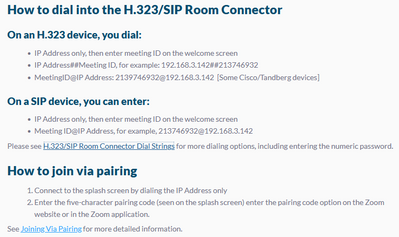
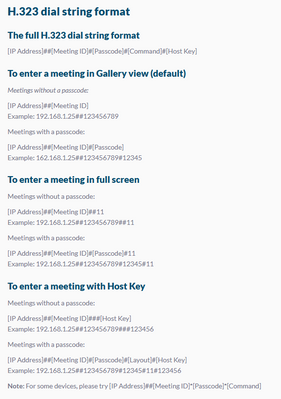
The IP addresses listed on https://support.zoom.us/hc/en-us/articles/201363273-Using-the-SIP-H-323-Room-Connector and https://support.zoom.us/hc/en-us/articles/202405539-H-323-SIP-Room-Connector-Dial-Strings are wrong. Those are private IP addresses.... Show more

The IP addresses listed on https://support.zoom.us/hc/en-us/articles/201363273-Using-the-SIP-H-323-Room-Connector and https://support.zoom.us/hc/en-us/articles/202405539-H-323-SIP-Room-Connector-Dial-Strings are wrong.  Those are private IP addresses.


summervillese_0-1637159552852.png


summervillese_1-1637159578257.png


They should be what zoomcrc.com resolves to (162.255.36.11 or 162.255.37.11).


Show less

reply-icon Latest Reply - 

Resolved! Scheduling multiple Zoom Rooms

We have three Zoom Rooms. Our front desk person does all the scheduling because the rooms are not always used for Zoom meetings. I've created the Rooms as resources in Google Workspace and have created a calendar for each room. I have made the front ... Show more

We have three Zoom Rooms. Our front desk person does all the scheduling because the rooms are not always used for Zoom meetings. I've created the Rooms as resources in Google Workspace and have created a calendar for each room. I have made the front desk person a manager for all three calendars and everyone in the office is able to view them. We all have business accounts on the same Zoom account. 


I would like to have the Room and the staff member in charge of the meeting to be the hosts. We don't want the front desk person's account to be the host and we don't want to use scheduling privileges. 


What is the easiest way for us to schedule the Rooms?


Thank you!


Show less

reply-icon Latest Reply - 

Reset the UC-Engine password

Hi,


Please advise on how to reset the uc-engine password. Someone change it and the default admin/crestron credentials don't work.

Thank you

reply-icon Latest Reply - 

Managing Breakout Rooms

For educators working with younger kids (grades K-5), is there a way for the teacher to be in multiple breakout rooms OR be able to hear what is going on in each breakout room? Since we are learning online and can't be physically present, I need a wa... Show more

For educators working with younger kids (grades K-5), is there a way for the teacher to be in multiple breakout rooms OR be able to hear what is going on in each breakout room? Since we are learning online and can't be physically present, I need a way to be able to hear what is being said in each breakout room. This avoids problems that may arise. 


Show less

reply-icon Latest Reply -