Zoom Rooms and Workspaces
cancel
Showing results for 
Search instead for 
Did you mean: 
The Zoom Community will be placed in read-only mode January 9th, 2026 through January 22nd, 2026 to deliver you a new and improved community experience!

The community will still be accessible, however, the creation of any new discussions or replies will be temporarily unavailable. We appreciate your patience during this time.

What are Zoom Rooms and Workspaces?

Zoom Rooms are modern workspaces that enable in-person and remote participants to interact in real-time in a hybrid setting. Explore the Zoom Community's Recent Activity below to join the Rooms and Workspaces conversation and connect with other members. If you're still looking for support, browse our Zoom Rooms and Workspaces support articles or start a new discussion below!

Recent Activity

Zoomtopia Sessions now available on-demand!

Recorded sessions from this year’s Zoomtopia are now available on-demand! Discover tips and tricks for running Zoom Rooms and Workspaces, learn about new product feature updates, and hear from Zoom Rooms and Workspace Product Managers by checking out... Show more

Recorded sessions from this year’s Zoomtopia are now available on-demand! Discover tips and tricks for running Zoom Rooms and Workspaces, learn about new product feature updates, and hear from Zoom Rooms and Workspace Product Managers by checking out some of our top-rated content below:


Interested in watching other Zoomtopia sessions and content? Check out our on-demand  library here: https://zoomtopia.com/ondemand/


Show less

Share sound causing microphone to turn on (with Zoom rooms)

Hi all, I have 1 person in a team of 40, who when he shares screen to a zoom room (Macbook pro - i5) unable to share sound the room account is doing the Mic/video, he clicks 'share sound' nothing comes through to the meeting room. if he tries to turn... Show more

Hi all, 


I have 1 person in a team of 40, who when he shares screen to a zoom room (Macbook pro - i5) unable to share sound


the room account is doing the Mic/video, he clicks 'share sound' nothing comes through to the meeting room. 

if he tries to turn his sound up; the microphone/speakers instantly turn on and start causing a feedback loop


Anyone come across this issue before, none of the other laptops do that in our setup, and we can't figure out whats going on. 


Show less

reply-icon Latest Reply - 

Anyone gotten the DTEN Go/Mate yet?

The DTEN Go and Mate just came out and I got mine in yesterday. https://dten.com/go It seems so far like a pretty great deal on a Zoom Rooms device. The main unit and Go tablet together are $1299, but they do also recommend getting the dock for the t... Show more

The DTEN Go and Mate just came out and I got mine in yesterday. https://dten.com/go 


It seems so far like a pretty great deal on a Zoom Rooms device.  The main unit and Go tablet together are $1299, but they do also recommend getting the dock for the tablet for an additional $100.  That's an amazing price for a Zoom Rooms appliance.  Everything you need comes with it--the camera unit has Zoom Rooms guts in it just like the Neat Bar and Poly Studio, so you just plug it into a TV and it's good to go.


The things I don't like about it are that it doesn't have a speaker (unless I'm mistaken), and you need to either use a 3.5mm audio out jack in the back for an external speaker, or have a TV that supports audio over the HDMI cable to play through the TV speakers.  Also, the tablet doesn't work like most Zoom Rooms tablets.  It actually constantly mirrors what's on the TV, and it does this wirelessly.  This is kinda cool because it means the tablet doesn't need a Wi-Fi or an Ethernet connection--it connects to its Go unit on its own network.  But it also means that the tablet is a bit slow--there's a lag between when you tap something and when it updates on screen.  Typing text into chat is a painful experience.  Hopefully a future update will improve this.


I mentioned the tablet doesn't use the standard Zoom Rooms interface--it actually instead uses the Zoom Rooms for Touch interface.  Which you might be familiar with if you ever used Zoom Rooms on a touchscreen TV.  I feel that it would be much better if it used the regular interface on the tablet, or at least gave the option to rather than forcing it to mirror the TV using Zoom Rooms Touch.  The standard Zoom Rooms interface is much more user friendly.  Maybe that will come with an update, who knows.


All things considered I feel it's a great deal for a hardened Zoom Rooms appliance, and it has worked for me well so far in two days of testing (despite the slowness and the no-speaker issue).  I support Zoom Rooms at my company, and I will probably continue getting Neat Bars for my offices for the most part.  But the Go seems a good option for office directors who balk at the $2500 pricetag and demand a cheaper option to put Zoom in their conference rooms.  $1299 is much easier for some offices to swallow.


Very curious to know other people's thoughts, so please let me know if you got one already or are thinking about it.


Show less

reply-icon Latest Reply - 

Call center with zoom?

Hi, I want to know if it's possible to make a call center with Zoom meeting? I just saw that Zoom Phone has this feature, but is it possible to do this in Zoom meeting? This is how I would like it to work: someone connects to a "general meeting" and ... Show more

Hi, I want to know if it's possible to make a call center with Zoom meeting? I just saw that Zoom Phone has this feature, but is it possible to do this in Zoom meeting?


This is how I would like it to work: someone connects to a "general meeting" and receives a welcome message (noboby can talk with other persons at this point). Then she is placed in a queue to finally be joined in a 1: 1 meeting with one of our specialist from our company. No camera, only the voice.  Just like a call center.

Is it possible?

Thank you,

Mathieu Bilodeau


Show less

reply-icon Latest Reply - 

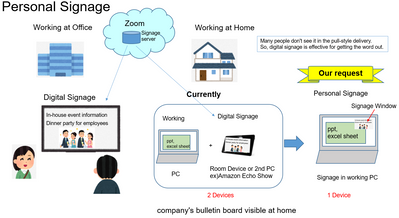
Zoomのデジタルサイネージ

Zoom Communityの皆さん、おはようございます。 Zoomには、デジタルサイネージサービスがあります。デジタル サイネージ | ZoomZoom Roomライセンスに付帯されています。しかも、台数制限がありません。これは、ミーティング参加機能とサイネージが融合したとても先進的なサービスで、私たちの会社では積極的に普及させようと活動を始めました。私たちは、テレワーク時代の新しいサイネージとして、個人サイネージをZoomの日本法人を通じてリクエストしました。つまり、自宅で仕事しながら会社の... Show more

Zoom Communityの皆さん、おはようございます。


Zoomには、デジタルサイネージサービスがあります。

デジタル サイネージ | Zoom
Zoom Roomライセンスに付帯されています。しかも、台数制限がありません。
これは、ミーティング参加機能とサイネージが融合したとても先進的なサービスで、私たちの会社では積極的に普及させようと活動を始めました。
私たちは、テレワーク時代の新しいサイネージとして、個人サイネージをZoomの日本法人を通じてリクエストしました。
つまり、自宅で仕事しながら会社の掲示版をPC上に表示するというアイデアです。

テレワークに於ける孤独感が問題視される中、TVの点け流し感覚で会社のお知らせを表示出来るとすばらしいと思いませんか?


ZoomのデジタルサイネージはWindows PC上で動作しますが、マウスを動かした途端に表示が止まってしまいます。

だから、現在の仕様では作業をしない時とか、もう一台専用の機器を準備する必要があります。

PCで仕事をしながら、お知らせを流すためには、サイネージを小窓表示してマウスを使っても表示が停止しないようにする必要がありますが、それは、僅かな変更で可能と思われました。


然し、残念ながらZoom本社側で受け入れて頂けませんでした。

賛同者を集めて、Zoom本社の製品開発責任者の下に声を届けたいと思います。


私のアイデアにご同意頂ける皆さんの”いいね”やご意見をお願いいたします。


Ohkawa_0-1630628217808.png


Show less

By
Community Champion | Customer
reply-icon Latest Reply - 

Virtual Background

I hope I am in the right room for this discussion. I am using a Dell PC and have started joining Zoom sessions. I would like to be able to set up my Virtual Background but cannot do this. When in a Zoom session, the ability to create a Virtual Backgr... Show more

I hope I am in the right room for this discussion.  I am using a Dell PC and have started joining Zoom sessions.


I  would like to be able to set up my Virtual Background but cannot do this.  When in a Zoom session, the ability to create a Virtual Background or Filter (off the Video icon) is disabled.  When I click on Settings (again, off the Video icon), the ability to create a Virtual Background or Filter is disabled.  Is there something that I need to do to change this.


I worked with a friend who is an Zoom account admin and he set up a test session.  His wife and I joined this test session.  His wife, who had the same privileges as me, was able to create a Virtual Background.  I still cannot create a Virtual Background.


I know that I must have something set wrong but cannot, for the life of me, figure out what it is or even where to start. 


TIA!


Show less

reply-icon Latest Reply - 

Zoom Room PolyCom Callout Disabled

Hi Folks - I have a Polycom Trio 8800 and recently provisioned the phone to be a Zoom Room controller. I assigned the phone a Zoom Phone license and phone number as well, however whenever I try to call out by pressing the "Phone" button on the Polyco... Show more

Hi Folks -


I have a Polycom Trio 8800 and recently provisioned the phone to be a Zoom Room controller.  I assigned the phone a Zoom Phone license and phone number as well, however whenever I try to call out by pressing the "Phone" button on the Polycom, it tells me "callout disabled please contact admin"


Not sure if this is a Polycome issue or Zoom Room issue.


Show less

reply-icon Latest Reply - 

friends someone with experience in configuring cisco webex pro with zoomcrc.com

auto_awesomeSe muestra la traducción de amigos alguien con experiencia en configuracion de cisco webex pro con zoomcrc.com. necesito ayuda con la configurwcion de crc mejoradod e zoom y configuracion en una cisco webex kit pro.Traducir amigos algioen... Show more
auto_awesome
Se muestra la traducción de amigos alguien con experiencia en configuracion de cisco webex pro con zoomcrc.com. necesito ayuda con la configurwcion de crc mejoradod e zoom y configuracion en una cisco webex kit pro.
Traducir amigos algioen con experiencia en configuracion de cisco webex pro con zoomcrc.com. necesito ayuda con la configurwcion de crc mejoradod e zoom y configuracion en una cisco webex kit pro.
 
 
volume_up
190 / 5000
 

Resultados de traducción

friends someone with experience in configuring cisco webex pro with zoomcrc.com. i need help with setting up crc enhanced zoom and setup on a cisco webex kit pro.

Show less

reply-icon Latest Reply - 

Using Zoom Rooms in shared space with multiple user logins?

I am curious if Zoom Rooms has a way to be started and ready for screen sharing on a shared PC that would be logged into with random/different user accounts. I was apple to login and activate Zoom Rooms with the activation code as a Zoom Administrato... Show more

I am curious if Zoom Rooms has a way to be started and ready for screen sharing on a shared PC that would be logged into with random/different user accounts.  I was apple to login and activate Zoom Rooms with the activation code as a Zoom Administrator.  However, I would like for others to be able to launch Zoom Rooms when logged in with their account, without have to re-enter the activation code.  The goal is to allow various staff members login to our meeting room PC and launch Zoom Rooms to use as a method for wireless sharing content from a laptop being used in the room.


Show less

reply-icon Latest Reply - 

FACTURACION FUERA DE CONTRATGO

MI CONTRATO CON ZOOM VENCIÓ EN JUNIO, NO HE UTILIZADO PARA NINGUNA REUNIÓN, PERO ME ESTÁN ENVIANDO FACTURACIÓN CON DEUDA. ESTA SITUACIÓN ESTÁ AFECTANDO MI SALUD, PORQUE NO SÉ CON QUIÉN COMUNICARME PARA RESOLVER ESTE PROBLEMA. ATTE.SADITH ROCA TAPIA05... Show more

MI CONTRATO CON ZOOM VENCIÓ EN JUNIO, NO HE UTILIZADO PARA NINGUNA REUNIÓN, PERO ME ESTÁN ENVIANDO FACTURACIÓN CON DEUDA. ESTA SITUACIÓN ESTÁ AFECTANDO MI SALUD, PORQUE NO SÉ CON QUIÉN COMUNICARME PARA RESOLVER ESTE PROBLEMA. 

ATTE.

SADITH ROCA TAPIA

051-968270818


Show less

reply-icon Latest Reply -