Zoom Meetings
cancel
Showing results for 
Search instead for 
Did you mean: 
Weekly Leaderboard

What are Zoom Meetings?

Zoom Meetings are a simplified video conferencing solution for an optimized virtual meeting experience. Explore the Zoom Community's Recent Activity below to join the Meetings conversation and connect with other members. If you're still looking for support, browse our Zoom Meetings support articles or start a new discussion below!

Recent Activity

Recording Problem: two guests plus host

I have PRO Using headset. Using lap top. Recording myself as host with two guests. Asked a question to guest #1, could hear the answer. Asked question to guest #2, they could hear me I could not hear them but guest #1 did ear them. Trying to record a... Show more

I have PRO  Using headset.  Using lap top.   Recording myself as host with two guests.   Asked a question to guest #1, could hear the answer.  Asked question to guest #2, they could hear me I could not hear them but guest #1 did ear them.  Trying to record an interview show for a community  radio station.  Prior to turning on recording, could hear both guests.  Had to stop interview.  WHAT could have been the problem and how to solve, and  keep from happening again?  They both have Zoom PRO or higher.


Show less

reply-icon Latest Reply - 

Multiple spotlight won't work with Livestream

I have noticed that multiple spotlights not working while live streaming to Facebook or Workplace. Sometimes this is critical while we have multiple speakers in the call and we need to spotlight only two participants in those sharing videos. Gallery ... Show more

I have noticed that multiple spotlights not working while live streaming to Facebook or Workplace. Sometimes this is critical while we have multiple speakers in the call and we need to spotlight only two participants in those sharing videos. Gallery view is another option but this will share all the videos. Is there any other workaround?


Show less

reply-icon Latest Reply - 

Problem hearing my singing students

I can not hear my singing students well in certain ranges on the scale when they are doing the vocal exercises. Sometimes I notice there is a difference if they move to a specific spot but I really need to get this handled. Even if they are practical... Show more

I can not hear my singing students well in certain ranges on the scale when they are doing the vocal exercises. Sometimes I notice there is a difference if they move to a specific spot but I really need to get this handled. Even if they are practically on top of their speaker, I still can't hear them well.  How can this be fixed?


Show less

reply-icon Latest Reply - 

Version 5.8.0 (1324)

As a Student I am really interested in Zoom Version Updates. I always keep my app up-to-date. I daily visit Zoom Update Center to get Updated about Zoom versions. The latest Zoom Version 5.8.0 (1324) released on September 22, 2021 is the best zoom ve... Show more

As a Student I am really interested in Zoom Version Updates. I always keep my app up-to-date. I daily visit Zoom Update Center to get Updated about Zoom versions.


The latest Zoom Version 5.8.0 (1324) released on September 22, 2021 is the best zoom version I have Updated.


I mostly like the following features of version 5.8.0 (1324)

  • Stop incoming video
  • Easier emoji selection for in-meeting chat
  • Rich text formatting support
  • Quote messages
  • Additional customization for Personal Note
  • Support for search and Link Previews with Advanced Chat Encryption
  • Updated New Chat button

And I also like the following previous Zoom Version features,


Version 5.7.4 (804) Updated on July 21, 2021

  • Introducing Zoom Apps for meetings - Windows, mac OS

Version 5.7.0 (522) Updated on July 19, 2021

  • Non-verbal feedback enhancement: Coffee cup
  • In-meeting chat emoji support
  • Focus mode

Version 5.7.0 (522) Updated on June 21, 2021

  • Share screen to all Breakout Rooms
  • Improvements to chat sidebar
  • Improvements to chat sidebar

Version 5.6.4 (799) Updated on April 26, 2021

  • Immersive View

Version 5.6.3 (751)Updated on April 19, 2021

  • New annotation tool: Vanishing Pen
  • Full emoji suite for Reactions

Version 5.5.0 (12454.0131) Updated on February 1, 2021

  • Relocated and enhanced attendee view controls for webinars
  • Persistent non-verbal feedback
  • Rotate camera
  • Blurred background

Version 5.4.7 (59784.1220) Updated on December 21, 2020

  • Enhanced nonverbal feedback and reactions

Version 5.4.3 (58891.1115) Updated November 16, 2020

  • Pin chat messages

And also I like to suggest some features which would make Zoom more better,

  1. Allow participants to multi-pin others without permission of the Host.
  2. Add all chat features like Record Audio, Screenshot, Format, Edit messages, delete messages, Reply a message, and reactions for a sent or received messages & all other features to in-meeting chat.
  3. Enable a option which shows if others have viewed a viewed a message, who are they & and at which time have they viewed the message.
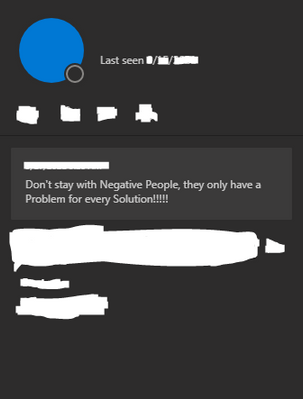
  4. When showing whether friends are offline & away show when they were last online as shown below👇 the 5th suggestion.
  5. And also show the personal note we have set in meetings as shown below👇.


ZoomUser2008_0-1632569110338.png


And always I Highly encourage others to keep their application up-to-date.


If anyone Agree Like the message & Reply.


Thank You.


Show less

reply-icon Latest Reply - 

Cloud recording search my Meeting link ?

I have been doing meetings/Webinars in Zoom since March 2020.I kept one record sheet of the recorded sessions.But as now I am going out of space I want to delete the old recording.But I can't find the particular recording in zoom user ids as I have m... Show more

I have been doing meetings/Webinars in Zoom since March 2020.

I kept one record sheet of the recorded sessions.

But as now I am going out of space I want to delete the old recording.

But I can't find the particular recording in zoom user ids as I have meeting link only ...Please HELP


Show less

reply-icon Latest Reply - 

Breakout rooms not fully working

I held a meeting recently when I divided participants into approximately 9 rooms of 9 people. They were automatically sent to the rooms (ie participants did not need to click on join room) but two of the rooms just didn't work. People were not put in... Show more

I held a meeting recently when I divided participants into approximately 9 rooms of 9 people. They were automatically sent to the rooms (ie participants did not need to click on join room) but two of the rooms just didn't work. People were not put in the rooms. I could send some of them to rooms that were working and some of them reappeard in the main room but others were just left hanging. Why did this happen and how can i prevent it in future?


Show less

reply-icon Latest Reply - 

activacion del plan avanzado

hola compre el plan avanzado y no se como activarlo debido a que mis reuniones solo duran 40 minutos como le hago y la factura ya me la cobraron


reply-icon Latest Reply - 

Difference in plans

I can't get an answer from billing or tech support on what plan I actually have. And I have not been able to talk with anyone. Have done 2 different chats with no answer. Any suggestions?

reply-icon Latest Reply - 

Resolved! Zoom Meeting Privacy * Security Settings on Mac

ISSUE * When someone else has invited me to join their Zoom Meeting and I am asked to share something in that meeting* I click on the share button* Zoom then tells me I need to adjust my privacy and security settings* I click on that to do so where i... Show more

ISSUE 
* When someone else has invited me to join their Zoom Meeting and I am asked to share something in that meeting
* I click on the share button
* Zoom then tells me I need to adjust my privacy and security settings
* I click on that to do so where it takes me to the privacy and security settings tab on my computer where everything is grayed out and I cannot click to change anything


Show less

reply-icon Latest Reply - 

Resolved! Error 1132

Hello I am running on my Toshiba laptop and all of a sudden it kicks me out and ask me to log back in. Upon attempting to sign back in it shows "failed to sign in. Please try again. (Error Code: 1132)" I have tried uninstalling, restarting the system... Show more

Hello I am running on my Toshiba laptop and all of a sudden it kicks me out and ask me to log back in. Upon attempting to sign back in it shows "failed to sign in. Please try again. (Error Code: 1132)" I have tried uninstalling, restarting the system, and re-installing the newest version from zooms site and still receiving the same thing. Image below of the login screen. I need this fixed ASAP as I have meetings with clients today and tons of work to to! Any help is appreciated! I can still login in on my phone (apple product) and use the app there it is just my PC desktop this is happening on.  


Show less

By
Newcomer
This thread is read-only
reply-icon Latest Reply -