Zoom Meetings
cancel
Showing results for 
Search instead for 
Did you mean: 
Weekly Leaderboard

What are Zoom Meetings?

Zoom Meetings are a simplified video conferencing solution for an optimized virtual meeting experience. Explore the Zoom Community's Recent Activity below to join the Meetings conversation and connect with other members. If you're still looking for support, browse our Zoom Meetings support articles or start a new discussion below!

Recent Activity

Consent for screenshot

Hi, Just like the hands-up feature, it would be great to have a I CONSENT feature where if someone wants to take a screenshot, people can put that I CONSENT sign up (or not consent and it removes video) and then when people share screenshots from Zoo... Show more

Hi, Just like the hands-up feature, it would be great to have a I CONSENT feature where if someone wants to take a screenshot, people can put that I CONSENT sign up (or not consent and it removes video) and then when people share screenshots from Zoom, it can be clearly seen who has consented for their image to be shared?


Show less

reply-icon Latest Reply - 

Sharing a Recording - permission granted but still errors opening (No permission - error200)

Since upgrading to the latest version of Zoom I can't seem to share cloud recordings with people anymore. When sharing I have made the recordings publicly available, on demand registration is required, they have the password to login in yet they stil... Show more

Since upgrading to the latest version of Zoom I can't seem to share cloud recordings with people anymore. When sharing I have made the recordings publicly available, on demand registration is required, they have the password to login in yet they still all receive the message "No permission200". What am I doing wrong?


Show less

reply-icon Latest Reply - 

Resolved! Can I set up that students can unlock mute by themselves when they want to talk?

Hello, I am a newbie here.During my webinar lessons, I want to ask students if anyone wants to answer the question.I will see the list of the students who raise their hands, and I will pick who can answer it.But I am unable to manage to unlock the st... Show more

Hello, I am a newbie here.
During my webinar lessons, I want to ask students if anyone wants to answer the question.
I will see the list of the students who raise their hands, and I will pick who can answer it.
But I am unable to manage to unlock the student's mute by myself as I cannot be in front of my computer.
So ideally, the student can unlock the mute by him/herself.
Is that possible?
But do you think this may cause me unexpected trouble?
Please advise. Thank you.

Mikirinne


Show less

reply-icon Latest Reply - 

Financial complexity

I have a subscription to Zoom. I think it is about $17 a month. Recently I was in a session and got a message telling me that my 45 minute limit was being lifted for some reason. But I have a subscription! I don't have a limit! Or do I? I am having a... Show more

I have a subscription to Zoom.   I think it is about $17 a month.  Recently I was in a session and got a message telling me that my 45 minute limit was being lifted for some reason.  But I have a subscription!  I don't have a limit!  Or do I?  I am having a lot of trouble with this service.  (This isn't the only problem.)  How do I get in touch with a real Zoom help person?  


Show less

reply-icon Latest Reply - 

How to make a local recording.

Hi! 

I was wondering, how can I create a local recording? 

I am using IOS

reply-icon Latest Reply - 

Resolved! Lost recording

Hello there,I've recorded a 40 minute meeting locally. When I enter the recordings section it doesn't appear. I don't know if the recording has been lost or is being converted.I need help ... do you know if the 40 minute local recordings appear immed... Show more

Hello there,
I've recorded a 40 minute meeting locally. When I enter the recordings section it doesn't appear. I don't know if the recording has been lost or is being converted.
I need help ... do you know if the 40 minute local recordings appear immediately or if they take a long time? I don't know if this is normal.

Thank you


Show less

reply-icon Latest Reply - 

Zoom Meeting flashes black around 6x when sharing screen and performance issues afterwards.

Since about early September, when I start up a zoom meeting, and share a window, the screen will flash black around 6 times before it finally comes back to the screen. There is red text that states Please move this window away from the shared applica... Show more

Since about early September,  when I start up a zoom meeting, and share a window, the screen will flash black around 6 times before it finally comes back to the screen.    There is red text that states Please move this window away from the shared application, even though there is nothing else being shared, on top of the shared screen.    In addition the text gets bigger, and my machine performance is degraded until I reboot.

I have the latest zoom software, Windows 10, Dell 5550 machine.


Show less

reply-icon Latest Reply - 

?

I would like to ask, do you think how many days before the zoom review the appeal about reactivation of deactivated account. Unfortunately, four of my members in zoom organization deactivated by zoom without specific reason. And take note all of then... Show more

I would like to ask, do you think how many days before the zoom review the appeal about reactivation of deactivated account. Unfortunately, four of my members in zoom organization deactivated by zoom without specific reason. And take note all of then are grade school student


Show less

reply-icon Latest Reply - 

Recording Issues

I recorded a 1 hour meeting however the video I downloaded shows only 12 seconds. I have had 2 such meetings everyday for the past 4 days and they all seem fine except one. How do I retrieve the whole video?

reply-icon Latest Reply - 

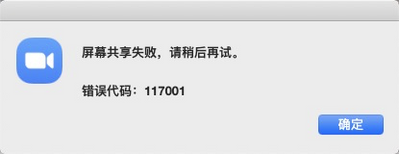
share screen not work; error code 117001

share screen not work; error code 117001


tangxiaojun_0-1634620418486.png


system version:  MacOS 10.15.7 (19H1417)

reply-icon Latest Reply -