Zoom Meetings
cancel
Showing results for 
Search instead for 
Did you mean: 
Weekly Leaderboard

What are Zoom Meetings?

Zoom Meetings are a simplified video conferencing solution for an optimized virtual meeting experience. Explore the Zoom Community's Recent Activity below to join the Meetings conversation and connect with other members. If you're still looking for support, browse our Zoom Meetings support articles or start a new discussion below!


Recent Activity

Zoom meetings

Maybe you guys haven't downloaded Zoom yet?

camera quality

Hi all, I've woken up an old PC as my primary Mac is feeling a bit moody and tired.My zoom camera or settings make me look like its a 1990s thriller movie.What do I need to do/ buy (other than a new computer)? Allegedly Zoom is updated to most recent... Show more

Hi all,


I've woken up an old PC as my primary Mac is feeling a bit moody and tired.

My zoom camera or settings make me look like its a 1990s thriller movie.

What do I need to do/ buy (other than a new computer)? 

Allegedly Zoom is updated to most recent version,


Thank you for any help !


Jess


Show less

reply-icon Latest Reply - 

How do I zoom iphone camera in or out while in Zoom meeting

Trying to use i phone to capture meeting room….camera zooms normal until i go to Zoom meeting and then i can’t  zoom it in or out. Can this be done?

reply-icon Latest Reply - 

Cannot Join meeting

Hello! Does anyone experience the same problem? My participants cannot join my personal meeting even if I started it already?

reply-icon Latest Reply - 

Zoom watermark

Hello. I have been using the Zoom watermark option, but I think Zoom has changed their watermark design and it is now very distracting. Is there any way that we choose the watermark design option? I prefer the previous watermark that just shows the u... Show more

Hello. 


I have been using the Zoom watermark option, but I think Zoom has changed their watermark design and it is now very distracting. 


Is there any way that we choose the watermark design option? 

I prefer the previous watermark that just shows the user's name just once on the screen rather than the new watermark that shows too many emails shown on the screen which is very distracting and I am getting lots of complaint about that.


If there is no way to change the current watermark design to the previous one, I suggest that Zoom provides an option for watermark design so that I can choose the previous watermark design. 


Thank you. 


Show less

reply-icon Latest Reply - 

Can't open recordings

I've been regularly opening zoom recordings sent to me over the last year by a yoga teacher. But in the past few weeks the link fails to open, leading a message that says that 'The media could not be loaded, either because the server or network faile... Show more

I've been regularly opening zoom recordings sent to me over the last year by a yoga teacher.  But in the past few weeks the link fails to open,  leading a message that says that 'The media could not be loaded, either because the server or network failed or because the format is not supported'.  Other people who are on PCs can still open her links. My system is macOS Mojave 10.14.6. Can anyone tell me why this failure is happening and what I can do about it.  Thanks.


Show less

Zoom Meetings Closing Automatically vs Staying Open Forever

Hey All, I recently started working at a new company that uses Zoom for their primary means of voice and video communication. We however use Slack as our primary means of text communication, so we use "/zoom" commands through Slack in order to conven... Show more

Hey All,


I recently started working at a new company that uses Zoom for their primary means of voice and video communication. We however use Slack as our primary means of text communication, so we use "/zoom" commands through Slack in order to conveniently create and use Zoom meetings.


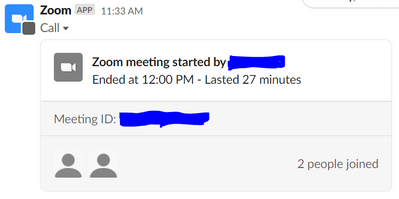
I have noticed that when coworkers create Zoom meetings in Slack through the "/zoom" command, their meeting stays open seemingly forever. For instance, I am currently looking at a Zoom meeting that one of my coworkers created at 10:40 AM on October 15th. The "Join" button is still green, and I am able to join the meeting if I want to. Of course, because the meeting was created a week ago, when I join, no one is in the room but me.


kkowals3_0-1634851114618.png


When I create a Zoom meeting through the "/zoom" command, the "Join" button becomes greyed out shortly after everyone leaves the meeting, making it impossible for anyone to join that specific meeting again in the future.


kkowals3_1-1634851174179.png

Out of a desire to understand Zoom better, I've spent a while trying to figure out what is causing this difference. As far as I can tell, there is no setting to automatically destroy meeting rooms after everyone leaves. What am I missing?


Thanks for your help


Show less

reply-icon Latest Reply - 

ライセンスの付替のタイミングによる影響

ライセンスを付け替える場合の動作について確認をしたいです。


A タイプ ライセンス済

B タイプ 基本


Aがミーティングをスケジュールする。

Aのミーティングの実行前に、BがミーティングをするためにAのライセンスをBに付け替える。

その場合に、先にスケジュールしたAのミーティングのIDやパスコードは、利用可能でしょうか。

reply-icon Latest Reply - 

Accessing Zoom Recording from PC

Problem: I can access these saved meetings from my iPhone, but not from my PC. Explanation: I have a friend who hosts Zoom meetings and sometimes has them saved. He gave me the zoom link "address" so I could access a couple of them . I can access the... Show more

Problem: I can access these saved meetings from my iPhone, but not from my PC.

Explanation:  I have a friend who hosts Zoom meetings and sometimes has them saved. He gave me the zoom link "address" so I could access a couple of them . I can access them with my iPhone, but not with my PC, on which I regularly attend/interact with his zoom meetings. Can you help me resolve the PC problem here.


Show less

reply-icon Latest Reply - 

Maximise screen size on wide-screen monitor

I have a 27-inch wide-screen monitor, and when I share my screen and then run a PowerPoint presentation, the viewing experience for participants is worse because it cuts out space on the top and bottom and both side as per attached screenshot (which ... Show more

I have a 27-inch wide-screen monitor, and when I share my screen and then run a PowerPoint presentation, the viewing experience for participants is worse because it cuts out space on the top and bottom and both side as per attached screenshot (which was taken on the participant laptop).


I also recorded this Loom video to try and explain it:

https://www.loom.com/share/44aa0e1a87014eed827bafd736b39c8d


and I would like to know when in presentation mode on PowerPoint, if the presentation can take more up of the viewer's screen, not less as is currently the case.


Show less

reply-icon Latest Reply -