Resolved! recurring meetings change
When I edit a meeting scheduled as recurring in my zoom-destop-app to change some settings the meeting is changed to a none-recurring meeting. Why this?

Zoomtopia is here. Unlock the transformative power of generative AI, helping you connect, collaborate, and Work Happy with AI Companion.
Register nowEmpowering you to increase productivity, improve team effectiveness, and enhance skills.
Learn moreKeep your Zoom app up to date to access the latest features.
Download Center Download the Zoom appDownload hi-res images and animations to elevate your next Zoom meeting.
Browse Backgrounds Zoom Virtual BackgroundsEmpowering you to increase productivity, improve team effectiveness, and enhance skills.
Zoom AI CompanionUser groups are unique spaces where community members can collaborate, network, and exchange knowledge on similar interests and expertise.
Help & Resources is your place to discover helpful Zoom support resources, browse Zoom Community how-to documentation, and stay updated on community announcements.
The Events page is your destination for upcoming webinars, platform training sessions, targeted user events, and more. Stay updated on opportunities to enhance your skills and connect with fellow Zoom users.
Zoom Meetings are a simplified video conferencing solution for an optimized virtual meeting experience. Explore the Zoom Community's Recent Activity below to join the Meetings conversation and connect with other members. If you're still looking for support, browse our Zoom Meetings support articles or start a new discussion below!
When I edit a meeting scheduled as recurring in my zoom-destop-app to change some settings the meeting is changed to a none-recurring meeting. Why this?

Hello!
We are having issues where there is a screetching feeback-noise that is happening when anyone other than the host is talking. The host is unable to hear this noise and it is not constant. Any suggestions for how to fix this?
As of this morning, when I go into "meetings" in Zoom, I can see the meetings which are set up, but none of them have the usual tags beside them of "start", "edit", "delete". So I'm unable to start a meeting until someone else has already joined, yet it was me who set up the meetings- This has changed overnight.
Show less
Hello All,
I'm trying to set up recording disclaimer and I do not have it showing up in my account. Anyone else have this issue and if so how did you correct it?
Thank you.
Hi folks, Are meeting recordings still available after a user has had their license removed? If we apply one new license to our Zoom admin account will we be able to access Recording Management and run a report to give us a list of all recordings (including things like date/time, call organizer, and participants). If the new license wont allow us to run the report is this something Zoom support could assist with? Thanks, Kurt Howard.
Show less
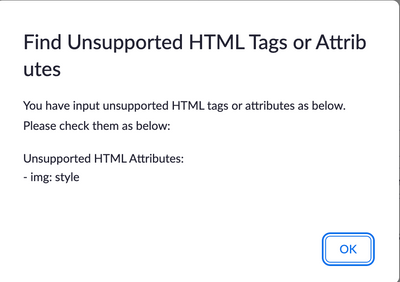
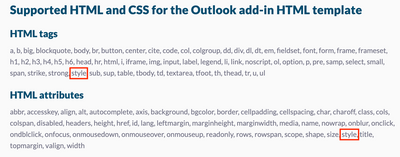
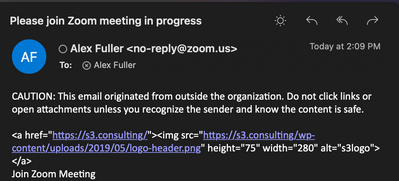
I have been tasked with fixing my jobs email template, because recently it has stopped showing the logo in the invite emails. However when i look at it, there doesnt seem to be anything wrong with it. When i try and preview the template, i get this But i know that Style works for both tags and attributes on testing, i took out the style attribute from the image, and got this on the preview, which is how its supposed to look but when i send the preview email i get this So even though the preview recognizes the image, when it send the actual email, it doesnt and i have no idea why. Any suggestions would be much appreciated
Show less
My guitar teacher and I have tried using Zoom for guitar lessons but there is a significant delay in audio during our meetings. Occasionally, there is a loud prolonged noise that sounds like white noise, static or a train passing by. It is so loud that it drowns out everything else and nothing else can be heard. The audio delay is a constant problem and the loud white noise static is a frequent problem. How do I eliminate these issues? Thank you.
Show less
Hi Team, I want to ask if the link to a gated zoom meeting can be blocked/encrypted such that those who subscribed or paid for access to the gate meeting unable to share with their friends, and anyone who has not paid for a gate meeting to join. I need response please. Thank you.
Show less
Hello
I'm a web developer learning zoom.
A problem occurred while using zoom api and sdk.
1. Only one jwt token per account that must be issued to use zoom api and zoom sdk can be received.
>> Is it a problem that can be solved when upgrading to pro and creating a subaccount?
2. Is there only way to register Created Apps on the App Marketplace?
>> I want to make several meetings with sdk and register the host.
>> however, it is impossible due to the policy that the zoom sdk token user and the host should be the same.
>> Additionally, I wonder if the created apps event is only available on the app marketplace website.
Show less
HI, JM
For the account I'm managing we have Large Meeting (500 participants) and Webinar (1000 participants) for all the users.
Accounts are created automatically through SSO at first sign-in.
How could I automatically assign the Large Meeting (500 participants) and Webinar (1000 participants) feature ?
Currently it is a manual process, on a monthly basis export the list of users, identify those without the feature and assign through bulk import. + manual assignement based on tickets created by the end-users.
Thanks
Show less