zoom Recording convert process interrupted
hello -- the recording convert window got closed by mistake. So there are no files in the zoom directory! Any way the raw zoom recording files can be recovered!?

Zoomtopia is here. Unlock the transformative power of generative AI, helping you connect, collaborate, and Work Happy with AI Companion.
Register nowEmpowering you to increase productivity, improve team effectiveness, and enhance skills.
Learn moreKeep your Zoom app up to date to access the latest features.
Download Center Download the Zoom appDownload hi-res images and animations to elevate your next Zoom meeting.
Browse Backgrounds Zoom Virtual BackgroundsEmpowering you to increase productivity, improve team effectiveness, and enhance skills.
Zoom AI CompanionUser groups are unique spaces where community members can collaborate, network, and exchange knowledge on similar interests and expertise.
Help & Resources is your place to discover helpful Zoom support resources, browse Zoom Community how-to documentation, and stay updated on community announcements.
The Events page is your destination for upcoming webinars, platform training sessions, targeted user events, and more. Stay updated on opportunities to enhance your skills and connect with fellow Zoom users.
Zoom Meetings are a simplified video conferencing solution for an optimized virtual meeting experience. Explore the Zoom Community's Recent Activity below to join the Meetings conversation and connect with other members. If you're still looking for support, browse our Zoom Meetings support articles or start a new discussion below!
hello -- the recording convert window got closed by mistake. So there are no files in the zoom directory! Any way the raw zoom recording files can be recovered!?

I have a Huawei Matebook X Pro 2022 with a resolution of 3120 x 2080.
Can someone please tell me why I'm not getting fully full screens?
Hello there! I have been trying to log into our account and start a meeting with no luck. I found this page with suggested remedies and have tried them all. https://pupuweb.com/solved-fix-zoom-1132-error/
Can anyone please assist me?
Thanks
I own two pro accounts. They are configured exactly the same. I am the owner of both accounts. When I try to add a background to one of the accounts I cannot do it. I sometimes get an error message that the Admin had locked out that option. This is not correct nothing is blocked. I am using the latest version of Zoom, with an iMac running 64 gig of memory and an i7 processor. OS is current Monterey 12.1. Any help appreciated. Thanks
Show less
Hello! I have a reoccurring training my team holds on a weekly basis that has different hosts for each session. I added my team as alternative hosts so they can log in to the training without any issues or needing to log in to our main client facing zoom account. The problem is that now every alternative host has a calendar hold for every training session. How can I keep my team as alternative hosts, while removing the calendar holds from their GCal? Ideally, they would all be able to log in to any of the training times, but will only have a calendar hold from an internal reminder that I created. Thank you!
Show less
I signed up for a Zoom Premium account on a monthly basis, as I was scheduled to present at several meetings with homeowners in our neighborhood re: renovations to our clubhouse. A session was recorded, saved to the cloud and the link sent out to those who could not attend a live session. Will that recording still be accessible after my premium account expires? (I don't have a need for the premium account beyond this specific use. I needed premium, because the sessions were 90 minutes in length.)
Thanks for a prompt response!
Show less
None of Zooms own virtual backgrounds fill the screen. There is a black bar on either side. Is there a solution to this. Cheers. John.
I use ios zoom sdk - 5.7.6.1080.
I use custom UI.
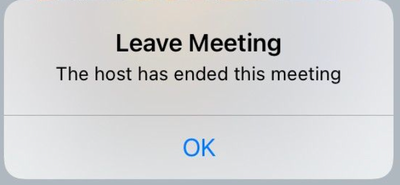
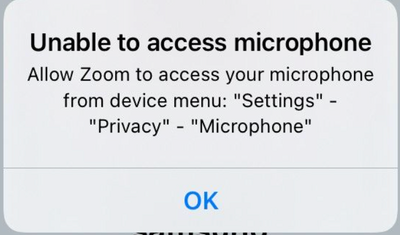
But in some cases the zoom sdk shows the following alerts -
Since I use my own interface i don't want users to see these alerts.
How to disable these notifications?
My husband has had a stroke so learning new things is very difficult for him. Zoom is now requiring him to start the video every time he joins a meeting. Is there some way to ensure this happens by default. Also switching of screen sharing is difficult, because it is in a different place from switching it on. The Off button needs to be much bigger. There is too much information on the buttons. Please can we have a simplified version for people who are not computer savvy but still like to join Zoom meetings.
Show less