Zoom Meetings
cancel
Showing results for 
Search instead for 
Did you mean: 
Weekly Leaderboard

What are Zoom Meetings?

Zoom Meetings are a simplified video conferencing solution for an optimized virtual meeting experience. Explore the Zoom Community's Recent Activity below to join the Meetings conversation and connect with other members. If you're still looking for support, browse our Zoom Meetings support articles or start a new discussion below!

Recent Activity

breaking the flow of our conversing voices.

After joining the meeting, we left the meeting idling for about 30 minutes.When we tried to start conversation, the audio was cut off on the client side.Once we "exited from comupter audio" adn reconnected, it came back on. Can you think of anything ... Show more

After joining the meeting, we left the meeting idling for about 30 minutes.
When we tried to start conversation, the audio was cut off on the client side.

Once we "exited from comupter audio" adn reconnected, it came back on.


Can you think of anything that might have caused it?

Can such a phenomenon be caused by an older zoom application version on the client side?


Show less

Limited Access with Basic Plan?

Hello. New user here - never used this kind of virtual set-up. I have the basic plan when I signed up but unless I read wrong, I understand that there is a 40 min max from 1 to 100 users? My employers tech company will be hosting a couple of training... Show more

Hello.  New user here - never used this kind of virtual set-up.  I have the basic plan when I signed up but unless I read wrong, I understand that there is a 40 min max from 1 to 100 users?  My employers tech company will be hosting a couple of training days that will last about 6 hours each.  Anyway, I have been sent an email my my boss to launch the link for the training along with the link to download the app, which I did on my phone and laptop.  So with that, I have created an account.  Do I have to pay to upgrade to unlock some unlimited access?  40 min seems pretty useless for my situation.


Show less

会議接続中に音声が途絶えた

会議接続した後、30分程度会話なしでアイドリング状態で放置しました。

その後、通話開始しようとした所、クライアント側に音声が途絶えました。映像は出てます。

一旦「コンピュータオーディオから退出」した後、再接続したら、復帰しました。


原因として、何が考えられますか?

クライアント側の古いアプリバージョンによって、そういった現象が発生することがありますか?

Hybrid Meetings - Best Practices

Does anyone have any best practices on hosting a hybrid meeting where attendees are meeting in a conference room via a H.323/SIP Room Connector and people are joining in via a Zoom meeting?  Please let me know if you use any special equipment.  Thanks.

reply-icon Latest Reply - 

Minimal view question

Hi, the minimal view in Zoom used to show your face and your name. That was it. But now, every time I minimise, I keep getting the black band at the bottom of the window which obscures my name and shows the mute/video etc icons instead. This is a pro... Show more

Hi,  the minimal view in Zoom used to show your face and your name. That was it. But now, every time I minimise, I keep getting the black band at the bottom of the window which obscures my name and shows the mute/video etc icons instead.


This is a problem because I've been using the thumbnails to video myself as a talking head for recorded presentations. 


Is there a way I can get rid of the band or is this some new and unavoidable devilry?


Show less

How to live stream using basic plan


Hi
I would like to know how I can live stream from Facebook or YouTube using Basic. I even used Zoom chat and it didn't lead me anywhere. It would be great if someone here could guide me in the right direction.

Resolved! Force limit sharing options / always share exact same thing / shortcut to share predefined choice

TL;DR: How can we predefine a share target and immediately start sharing it?Hi. We have a series of meetings where two presenters need to share their screen, one after the other. When Presenter 1 is finished and stops sharing their screen (say, with ... Show more

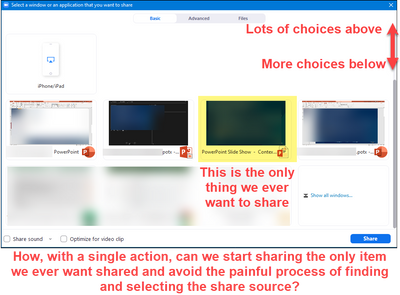
TL;DR: How can we predefine a share target and immediately start sharing it?

NemanMTX_1-1646778403706.png

Hi. We have a series of meetings where two presenters need to share their screen, one after the other. When Presenter 1 is finished and stops sharing their screen (say, with ALT-S), we need to minimize the awkward and inelegant time gap between then and Presenter 2 starting up. Eventually we flip back to P1, back to P2, etc.


Regardless of how Presenter 2 starts the sharing dialog (Share button or ALT-S) there's still a painful process (to go through or sit through) of Presenter 2 finding the correct item to share then initiating the share. In our case, we specifically want presenters to only show the PowerPoint slide show application window, not the whole screen, so that includes the extra step of having to scroll down the list of share options. PowerPoint itself adds one more complication - if you've already started your screen share, there are many windows that all look the same at first glance, so it's too easy to get confused and select the wrong one.


How can we predefine a share target and immediately start sharing it? The speed and precision of ALT-S to stop a share, but instead to start sharing a known thing.


Thanks!


Show less

reply-icon Latest Reply - 

Resolved! Error Code 1152

Unable to join this meeting
Guest participants who have archiving enabled are unable to join meetings hosted by this account


Participants getting this error trying to join my meeting. And I can't find archiving settings on my end as a host.

reply-icon Latest Reply - 

Resolved! "Let participants choose room" with "Breakout Room pre-assign" -ed

I've created a meeting with "Breakout Room pre-assign" enabled, with participants field is empty. My meetings is somewhat open, and it takes alot of effort to acquire email of said participants. I did this to avoid the hassle in creating in-meeting B... Show more

I've created a meeting with "Breakout Room pre-assign" enabled, with participants field is empty. My meetings is somewhat open, and it takes alot of effort to acquire email of said participants. I did this to avoid the hassle in creating in-meeting Breakout Room, because my meeting breakout room is quite alot.


When my meeting started, i (host/co-host) need to manually assign every participants to certain Breakout Room, with no "Let participants choose room" setting to be found.


Am i missing something or i failed to understand what "Breakout Room pre-assign" mean? Please help.


English is not my first language, pardon me if what i said is hard to understand.

Thank you.


Show less

reply-icon Latest Reply - 

Personal invite Link Suddenly Changed

My personal invite link was suddenly changed. I did not make any changes to my settings, but everytime I created new/schedule a meeting, new invite link is generated. I noticed that the invite link was shortened and it is based on my personal meeting... Show more

My personal invite link was suddenly changed. I did not make any changes to my settings, but everytime I created new/schedule a meeting, new invite link is generated. I noticed that the invite link was shortened and it is based on my personal meeting ID. Do you guys have a new update? 


Show less

reply-icon Latest Reply -