Zoom Meetings
cancel
Showing results for 
Search instead for 
Did you mean: 
Weekly Leaderboard

What are Zoom Meetings?

Zoom Meetings are a simplified video conferencing solution for an optimized virtual meeting experience. Explore the Zoom Community's Recent Activity below to join the Meetings conversation and connect with other members. If you're still looking for support, browse our Zoom Meetings support articles or start a new discussion below!

Recent Activity

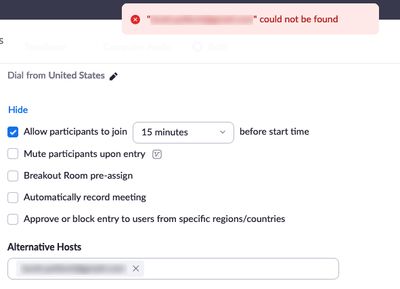
Alternative Host in Google Chrome Extension?

Is it possible to add an alternative host within the Google Chrome extension/add on? I often schedule calls either for others or where multiple team members are on together and it's most efficient to have an alternate who can start things without me ... Show more

Is it possible to add an alternative host within the Google Chrome extension/add on? I often schedule calls either for others or where multiple team members are on together and it's most efficient to have an alternate who can start things without me if needed. I can do this by editing the meeting if I log into our Zoom account but hoping it's possible to add them directly in our Google Calendar to skip the extra step of having to go to the other account. Thanks!


Show less

Zoom Drops

Zoom is dropping the meetings when I am the host and not the host.

reply-icon Latest Reply - 

Jumping annotations

When I am sharing my screen, anyone using the annotate, will choose a tool (stamp, text, etc.) Click on the screen and the stamp, text, etc.  jumps to a different area of the screen.

Need to display toasts on screen-share while demoing software

I am preparing to demonstrate software over screen share in a Zoom meeting. A feature being demonstrated involves displaying a toast notification to the user. However, toast notifications are not being shown in screen shares. I have not found a way o... Show more

I am preparing to demonstrate software over screen share in a Zoom meeting. A feature being demonstrated involves displaying a toast notification to the user. However, toast notifications are not being shown in screen shares.


I have not found a way of changing this in configuration. If the application being demoed is selected for the screen share instead of the monitor it is shown on, then the toast is displayed to the user sharing their screen, but it is still not visible to other users viewing it.


Is there a way of configuring things so that toast notifications from the software being demonstrated are shown in the screen share?


Show less

reply-icon Latest Reply - 

Need to find the record in cloud

Hi! I need your help. I had a base account. During the meeting, the person (who has a pro account) made me the organizer. And I accidentally recorded it not on a local computer, but in the cloud. But her record is not displayed in the cloud. I just b... Show more

Hi! I need your help. I had a base account. During the meeting, the person (who has a pro account) made me the organizer. And I accidentally recorded it not on a local computer, but in the cloud. But her record is not displayed in the cloud. I just bought an improved account, but I don't have this entry in my personal account either. How can I find it now? It was a very important conversation and I really need it!


Show less

Enregistrement et utilisation de l'enregistrement pendant la réunion

Bonjourje vais animer une réunion sur la prise de parole en public avec Zoom.j'ai besoin de filmer les stagiaires et je pensais utiliser la fonction "enregistrer". Mais suis je oublier de fermer la réunion pour récupérer l'enregistrement?merci pour v... Show more

Bonjour

je vais animer une réunion sur la prise de parole en public avec Zoom.

j'ai besoin de filmer les stagiaires et je pensais utiliser la fonction "enregistrer". Mais suis je oublier de fermer la réunion pour récupérer l'enregistrement?

merci pour votre aide.


Show less

reply-icon Latest Reply - 

Teilen von dwg-Dateien

Guten Tag,


wenn wir während des Zoom-Meetings DWG-Dateien teilen möchten, bricht Zoom immer ab. Warum?


Danke für die Hilfe!

Beste Grüße

reply-icon Latest Reply - 

User activity reports

Hello i am a manger of my Zoom account and i want to Know If i cam pull reports on How many zoom meetings a user has attended ? 


Scott.. 

Account is disabled

My zoom account has been disabled. recently i upgrade from basic to pro version and somehow when i want to use it, it turn into Account is disabled Please contact Support. (1,003)

reply-icon Latest Reply - 

Managing accounts

I have a bit of an unusual problem. I have two jobs -- I own a small consulting business, and I also work part-time for a nonprofit organization. I use Zoom for both jobs. I originally signed up for Zoom with my email address from the nonprofit, but ... Show more

I have a bit of an unusual problem. I have two jobs -- I own a small consulting business, and I also work part-time for a nonprofit organization. I use Zoom for both jobs. I originally signed up for Zoom with my email address from the nonprofit, but then I converted that to an independent paid account to use with the consulting business. Now I'm having an issue because the nonprofit has tightened up their security and I apparently can't get in to some meetings unless my Zoom account is associated with theirs. Our IT guy told me that most employees with paid Zoom accounts have resolved the issue by bringing their account under the umbrella of the organization's (receiving a substantial discount in the process), but I'm a little reluctant to do that because honestly I'm primarily using the paid features for my other business, including making the account available to my business partner,  and I don't like further entangling my two worlds. I could just have two separate accounts, one paid and one free, but then I'd have to keep switching back and forth. Is there some way to associate my existing account with my organization without merging the billing? I found a place under settings that seemed to be a way to do that, but when I entered the email address my IT guy gave me as the organization's primary account, Zoom didn't recognize it.


Show less

reply-icon Latest Reply -