Zoom Not responding
Zoom not responding, settings not responding, camera working but Zoom says it shouldn't be on. I have uninstalled--rebooted--installed 64 bit version. Still doing the same. I have 110 mbs internet speed.

Zoomtopia is here. Unlock the transformative power of generative AI, helping you connect, collaborate, and Work Happy with AI Companion.
Register nowEmpowering you to increase productivity, improve team effectiveness, and enhance skills.
Learn moreKeep your Zoom app up to date to access the latest features.
Download Center Download the Zoom appDownload hi-res images and animations to elevate your next Zoom meeting.
Browse Backgrounds Zoom Virtual BackgroundsEmpowering you to increase productivity, improve team effectiveness, and enhance skills.
Zoom AI CompanionUser groups are unique spaces where community members can collaborate, network, and exchange knowledge on similar interests and expertise.
Help & Resources is your place to discover helpful Zoom support resources, browse Zoom Community how-to documentation, and stay updated on community announcements.
The Events page is your destination for upcoming webinars, platform training sessions, targeted user events, and more. Stay updated on opportunities to enhance your skills and connect with fellow Zoom users.
The site is still accessible to view, however, the ability to login, create content, or access your community account is temporarily unavailable. We appreciate your patience during this time. If seeking support, please browse existing community content or ask our Zoom Virtual Agent.
Zoom Meetings are a simplified video conferencing solution for an optimized virtual meeting experience. Explore the Zoom Community's Recent Activity below to join the Meetings conversation and connect with other members. If you're still looking for support, browse our Zoom Meetings support articles or start a new discussion below!
Zoom not responding, settings not responding, camera working but Zoom says it shouldn't be on. I have uninstalled--rebooted--installed 64 bit version. Still doing the same. I have 110 mbs internet speed.

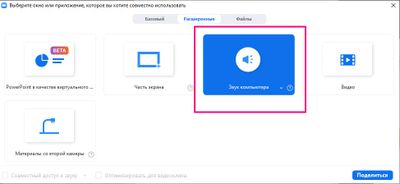
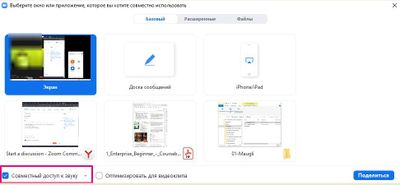
At some point the sound I share with other users became bad (it doubles and breaks on their side).
On my side the sound is perfect.
I reinstalled Zoom. upgraded audio drivers.
What should I do to find and solve the problem?
For students zoom should remove 40 minute time limit......coz all do not have the capacity to do in app purchase on zomm
I cannot find any information on how I can control the zoom level on my iPhone camera when I am in a Zoom call. Is this even possible? The specific scenario is this: The iPhone is mirrored on a large-screen TV, and the phone is located immediately below the TV. When the local participants look at the TV, they are also looking at the iPhone camera, so it looks natural to the other Zoom participants. But the local participants are 8' from the phone, so I'd like to be able to zoom them up to a reasonable level. Apple was unable to help on this.
Show less
When I click on screen share >advanced > content from 2nd camera, zoom does not automatically display the 2nd camera like it used to. I have to click "switch camera" for the 2nd camera to show. How can I avoid this. Not conducive to a seamless experience.
Show less
@AnonEl even Intel i3 is the 5 th gen go for the background blur option but the rygen 3 3250 U is does great than i3 11 th gen and does not have a blur support why ? even it has multi cores and max clock speed is 3.6 GHz.
Hello,
I need help seeing the participants list from previous meetings. I have the basic plan. Is there anyway to do this?
Thanks,
RaeJ
I have not seen any support announcement by Zoom regarding the Log4J vulnerability. Please advise.
Hola gente de zoom, esta pregunta no es de otra cosa que no sea del zoom, si no es un problema que me acaba de pasar mientras que estoy en una Reunión. Yo estoy en una Reunión de trabajadores, pero en unos minutos me sale un mensaje de error diciendo que mi internet es inestable, pero en el caso de mi red de mi casa, tiene red estable, no se baja ni se pone inestable, solo se pone estable, como soluciono este mensaje de error. Muchas gracias y que tengan un bendecido día. Saludos desde Estados Unidos. Aquí les dejo una captura.
Show less