



Zoom Meetings
cancel
Showing results for 
Search instead for 
Did you mean: 
Weekly Leaderboard

What are Zoom Meetings?

Zoom Meetings are a simplified video conferencing solution for an optimized virtual meeting experience. Explore the Zoom Community's Recent Activity below to join the Meetings conversation and connect with other members. If you're still looking for support, browse our Zoom Meetings support articles or start a new discussion below!

Recent Activity

The multiple sharing option has gone away! How to fix it?

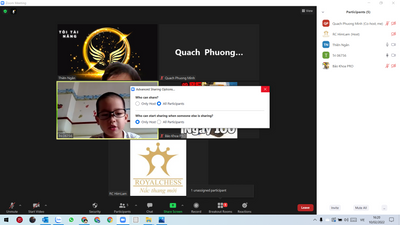
Hi, everybody. Some months ago, I could use multiple sharing option when I click on the arrow beside the button "Share". There would be a line "allow multiple sharing...". But now, when I lick on it, just a window appears without this function - mult... Show more

Hi, everybody.


Some months ago, I could use multiple sharing option when I click on the arrow beside the button "Share". There would be a line "allow multiple sharing...". But now, when I lick on it, just a window appears without this function - multiple sharing simultaneously. Could someone tell me why and how to fix it? Thanks.

fuchouin88_0-1644485363118.png

(picture of losing function - multiple sharing)

Minh.


Show less
reply-icon Latest Reply - 

Webhook notifications

I have 2 zoom accounts and am using same webhook notification url for both. This webhook is for meetings issues event. Now when there is issue in meeting like audio quality dropped in any account, notification comes to notification url.My doubt is ho... Show more

I have 2 zoom accounts and am using same webhook notification url for both.


This webhook is for meetings issues event.


Now when there is issue in meeting like audio quality dropped in any account, notification comes to notification url.

My doubt is how do i differentiate after receiving this notification whether the problem was in account1 or account2.


Thanks,
Neema


Show less

Meeting webhook notification

I have set up a notification for zoom meeting issues event and am receiving notifications from zoom . There is account id present in notification coming from zoom. I wanted to understand whether it is individual's account id or is it organization lev... Show more

I have set up a notification for zoom meeting issues event and am receiving notifications from zoom .


There is account id present in notification coming from zoom. I wanted to understand whether it is individual's account id or is it organization level account id ?

https://marketplace.zoom.us/docs/api-reference/zoom-api/events/#/paths/meeting.alert/post 


Show less

Account owner fired; no email access. Frustrated by inability to get help via support.

Hello! The owner of our university departmental account was terminated due to serious egregious behavior and his email was deactivated as a result. No one has access to that email. I am an admin on the account and the account is paid through my assig... Show more

Hello!


The  owner of our university departmental account was terminated due to serious egregious behavior and his email was deactivated as a result. No one has access to that email. I am an admin on the account and the account is paid through my assigned credit card. I need to have ownership changed to me.


Bolt does not work because it keeps giving me the directions to change ownership via the owner no matter how I rephrase my issue. Apparently we do not get telephone support with our plan, so I filled out a ticket as per the CSR who took my call.


Today my ticket was closed without resolution with this message:

Unfortunately, we are unable to respond to your open ticket at this time. If you are a part of a corporate account, and need advanced technical support beyond our Online Resources, please contact your Zoom account administrators.


I have no idea who my "account administrators" are other than myself.  Any suggestions on where to go from here?

Thank you!


Show less

reply-icon Latest Reply - 

shortcut for my desktop on my laptop.....


how do I create a shortcut on my desktop for easy connection to ZOOM?

reply-icon Latest Reply - 

I don't come up on screen when I'm talking when I'm hosting

Hi Guys & Gals, I'm having a very odd experience with the latest version 5.9.3. When I'm hosting a meeting with multiple people on and in speaker view, I don't pop up on my own screen when I'm talking, but I do show up on others screens. Is this some... Show more

Hi Guys & Gals,


I'm having a very odd experience with the latest version 5.9.3. When I'm hosting a meeting with multiple people on and in speaker view, I don't pop up on my own screen when I'm talking, but I do show up on others screens. Is this something new and is this something that can be fixed. I'd appreciate any direction, thank you.


Show less

reply-icon Latest Reply - 

How to work the breakout rooms

How do you work a breakout room?

reply-icon Latest Reply - 

Resolved! Feature Request: grouping audio/video devices

I frequently switch my laptop between locations. In each location there may be a different audio/video device configuration. For example: headset + internal camera speaker from laptop's audio out + mic on camera + external video camera When I use mee... Show more

I frequently switch my laptop between locations.

In each location there may be a different audio/video device configuration. For example:

  1. headset + internal camera 
  2. speaker from laptop's audio out + mic on camera + external video camera

When I use meetings from a new location, I have to change the Audio-in, the audio-out, and sometimes the video device.

Since the locations/device groupings rarely change, it would be nice to have user-defined sets of devices to choose from, rather than me having to change all 3 devices individually.


thanks for reading.


Show less

reply-icon Latest Reply - 

Long meetings

If I wanted to have a meeting of 3 hours with 1-2 persons, is that possible?

If so, which pro plan would be best? (I don't like the idea of having to stop and start every 40 min.)

reply-icon Latest Reply - 

use of material from a website

I want to show some material from a website to enhance a discussion. Is there a way to do that on zoom, Specifically I'd like to show two of the videos from that site.

reply-icon Latest Reply -

