Zoomtopia is here. Unlock the transformative power of generative AI, helping you connect, collaborate, and Work Happy with AI Companion.
Register nowEmpowering you to increase productivity, improve team effectiveness, and enhance skills.
Learn moreKeep your Zoom app up to date to access the latest features.
Download Center Download the Zoom appDownload hi-res images and animations to elevate your next Zoom meeting.
Browse Backgrounds Zoom Virtual BackgroundsEmpowering you to increase productivity, improve team effectiveness, and enhance skills.
Zoom AI CompanionUser groups are unique spaces where community members can collaborate, network, and exchange knowledge on similar interests and expertise.

Help & Resources is your place to discover helpful Zoom support resources, browse Zoom Community how-to documentation, and stay updated on community announcements.
The Events page is your destination for upcoming webinars, platform training sessions, targeted user events, and more. Stay updated on opportunities to enhance your skills and connect with fellow Zoom users.
Zoom Meetings are a simplified video conferencing solution for an optimized virtual meeting experience. Explore the Zoom Community's Recent Activity below to join the Meetings conversation and connect with other members. If you're still looking for support, browse our Zoom Meetings support articles or start a new discussion below!
I'm so mad. It's my first time to use zoom and I was the one assigned to do the minutes and record the whole meeting. I was using my phone, clicked the record on cloud button to start recording. After the meeting, I was trying to find where the recording was saved. Can't find it. Searched for it everywhere, only for me to find out that phone users can only record the meeting when they paid (I'm a free user, btw). I am so dissapointed. I expected that the meeting was recorded and saved because they gave me an option of recording it on cloud even if I'm a free user. I hope no one can be a victim of this again... If you're a free user and can't record using mobile devices, I hope there will be no option for it to be able to record. Giving false hopes. Now, all I'm gonna receive is bad mouth from my boss.
Show less
After a number of minutes and people who usually come to the meetings not showing up, I checked emails. Oh boy, all saying couldnpt get in as "Different Meeting was already in progress" Note that I was able to "start meeting, share screen of content that was to be used in beginning etc." After receiving messages, I checked the settings. At first I thought it was just that somehow the passcode had been changed. However, then I discovered that the "meeting" was entiltles #Success" - some wierd titale that had nothing to do with any meetings I hold. To see my regular meetings, I had to 1. Sign out, sign back in 2. Notice that my regular scheduled meetings were not showing. 3. Go into 4. GO FIGURE... Totally frustrating and a number of attendees also quite frustrated.
"past meetings, look at yesterday's meeting" click on that to "edit" and THEN all upcoming meetings re-appeared.
Show less
Does anyone know with certainty exactly what is required for the host to provide an HD video to the audience from the Zoom Meeting product? I've read confusing statements at https://support.zoom.us/hc/en-us/articles/207347086-Group-HD and gotten similarly confusing statements from Zoom support about under what conditions HD video is achieved. As best I can determine, the participating host machine must be a Quad Core CPU (although can't determine if i3, i4, i5 type etc is required) and of course the usual upload bandwidth (I think 2.5Mbps) etc. But it is unclear whether if having checked the Group HD option in account settings and if hardware is up-to-snuff, that HD video is sent from the host as long as there are more than 3 people in the meeting.... or is it just if 2 people are meeting? Very confusing. Does anyone have any experience with this?
Show less
I recorded a zoom session. On playback, I only have video and no audio. I have checked my mic and speakers, and they are fine. What is going on?
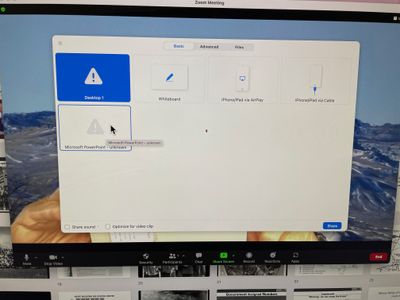
I am trying to use PowerPoint file. As soon as I open Screen Share, I get this window. The PPT file does not show. Anyone have a suggestion to fix? Thanks, Sam
Quick question: In hosting a meeting, I'm concerned that if I have an interruption with my internet that the active meeting will drop(my internet is unstable at times and freezes). If I assign a Co-Host will this ensure that the meeting will continue without interruption with the Co-Host becoming the Host during my drop? Or should I assign an alternative host?
Show less
Hello. I have purchased an enterprise edition through an affiliate. Does the affiliate have access to my recordings? thanks
Ever since I upgraded Zoom last Saturday, there have been PROBLEMS. Things disappear (the live chat button on the dashboard) then freeze (audio, chat, screen share…). Today, during two Zoom meetings, both hosts experienced things freezing. Same with multiple participants. Myself… I used control-alt-del at least 5 times to unfreeze my meeting (did task manager/end… and VOILA! The meeting was back, working. I need to host a Sunday church service… and need to get this resolved. I have uninstalled, reinstalled between Sunday and today. NADA. ZIP. Someone suggested a 64 bit Zoom. Huh? When I clicked Task Manager to end the Zoom, each time it said Zoom 32 bit. Any ideas what I can do to stay on zoom?
Show less
Problem : Clicked on Zoom website footer "Feedback" https://explore.zoom.us/en/404/ resulting in broken link. Why not remove "feedback" link from website footer to avoid unpleasant customer experience?