screen sharing
I can't share my screen. I've got a message "you can't share your screen in this conference". I could do it earlier. But this problem appeared last week and i can't fix it. I checked my settings and it didn't help.

Zoomtopia is here. Unlock the transformative power of generative AI, helping you connect, collaborate, and Work Happy with AI Companion.
Register nowEmpowering you to increase productivity, improve team effectiveness, and enhance skills.
Learn moreKeep your Zoom app up to date to access the latest features.
Download Center Download the Zoom appDownload hi-res images and animations to elevate your next Zoom meeting.
Browse Backgrounds Zoom Virtual BackgroundsEmpowering you to increase productivity, improve team effectiveness, and enhance skills.
Zoom AI CompanionUser groups are unique spaces where community members can collaborate, network, and exchange knowledge on similar interests and expertise.
Help & Resources is your place to discover helpful Zoom support resources, browse Zoom Community how-to documentation, and stay updated on community announcements.
The Events page is your destination for upcoming webinars, platform training sessions, targeted user events, and more. Stay updated on opportunities to enhance your skills and connect with fellow Zoom users.
Zoom Meetings are a simplified video conferencing solution for an optimized virtual meeting experience. Explore the Zoom Community's Recent Activity below to join the Meetings conversation and connect with other members. If you're still looking for support, browse our Zoom Meetings support articles or start a new discussion below!
I can't share my screen. I've got a message "you can't share your screen in this conference". I could do it earlier. But this problem appeared last week and i can't fix it. I checked my settings and it didn't help.

We create registration links for all of our recurring meetings. Each meeting has at least 2 alternate hosts. Before alternate hosts were able to start the meeting before the host, but recently, one of our alternate host was not able to see the waiting room to admit the participants. They shared that there was a message informing that they are a co-host until the host joins. When the host joined, their alternate host privilege was gone. The host had to manually add them again as a co-host. This had never been an issue before. The alternate hosts were able to let people in from the waiting room and they automatically became the co-hosts after the host joined the meeting. Any thoughts?
Show less
I forgot to end my call and the recording continued for hours. The resulting file is too large for upload to YouTube. How do I trim the Zoom video to have a smaller file for download (one that I can then upload to YouTube).
Are you able to use the slide control? I enable the feature, and I gave control to a participant nothing happens.
Hello! I can only assume there was a recent update, but it has made me unable to record, change background (it put my head in a circle??), or any of the features I use as host. This is a paid account. Please advise. Thank you!
Hey all, I recorded a zoom meeting that saved to the local drive. Will the other participants have access already or do I need to manually save and share it? I’ve not used Zoom before so really confused on if I do it or the system will already give them access. Any help appreciated 🙂
Show less
All- Good day- I am host of multiple meetings and need to customize the waiting room as per each meeting- It appears that I am only able to create one waiting. As each meeting is launched all meetings are currently seeing the same waiting room landing page. Any help would be greatly appreciated. Thank you'
Show less
When the zoom meeting starts my video feed will not show a live video of me.
During the test however I can see myself. The meeting only shows a black screen with my name.
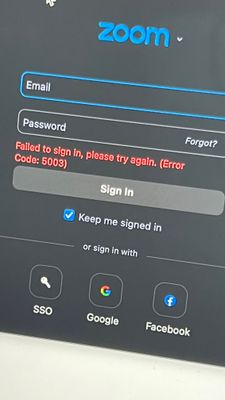
I tried to log into a different account on zoom (which I’ve done multiple times). And when I tried to do it this time this message appears every time.
We have an upcoming meeting that was organised by a user, and that user has since been accidentally deleted too early. I understand there is no way to recover the users data once they are deleted, but is it possible to recover the list of participants that would have registered to the meeting our deleted user had organised?
Show less