Welcome to the Zoom Community

cancel
Showing results for 
Search instead for 
Did you mean: 
447961members
214336posts
Weekly Leaderboard

Recent Activity

IVR Flow API

I am new to Zoom Contact Center. When I design an IVR Flow and try to send data to a CRM system using the HTTP Call widget, I face an issue.When I send Digit input collected from the caller, the data is sent successfully. However, when I try to send ... Show more

I am new to Zoom Contact Center. When I design an IVR Flow and try to send data to a CRM system using the HTTP Call widget, I face an issue.

When I send Digit input collected from the caller, the data is sent successfully. However, when I try to send other values such as Caller ID, Caller Number, or Callee Number, the data is empty and not passed to the CRM.

This usually happens because those call-related values are not automatically available to the HTTP Call widget unless they are explicitly mapped or stored in variables earlier in the flow.


Show less

reply-icon Latest Reply - 

Spamming

It seems there is no way to stop spammers from just adding you to their webinar. I get added nearly every week to some spammer's zoom meeting trying to sell some product. There is no spam option on the invite or way to report them. There is only a ca... Show more

It seems there is no way to stop spammers from just adding you to their webinar. I get added nearly every week to some spammer's zoom meeting trying to sell some product. There is no spam option on the invite or way to report them. There is only a cancel meeting option and contact organizer.  Why doesn't zoom add in a feature to report them or remove the option to just upload a list they purchased of names and emails??


Show less

reply-icon Latest Reply - 

Photo Issues

I host Photo Competions for our club and have for a long time. Just recently we noticed on Zoom that on certain mages that have darker backgrounds that the dark colors can look brighter, muddy or washed out, especially where the tonality changes a li... Show more

I host Photo Competions for our club and have for a long time.    Just recently we noticed on Zoom that on certain mages that have darker backgrounds that the dark colors can look brighter, muddy or washed out, especially where the tonality changes a little.   We have run several tests on this and it is not an issue in the image and all my setttings appear to be fine.    Anyone else having these issues?   Thanks for any replies in advance.


Show less

reply-icon Latest Reply - 

Resolved! Need to trim 2 minutes from middle of recording

Can anyone tell me how to do this?


I know how to trim from start or end, but not how to cut out a few minutes from the middle of the recording. 


Thank you! 

reply-icon Latest Reply - 

HTTP Call widget not sending caller metadata in Zoom Contact Center IVR

Hi everyone,I’m working with Zoom Contact Center and building an IVR flow that sends data to an external CRM using the HTTP Call widget.Digit input collected from the caller is sent successfully, but I’m having trouble passing caller-related details ... Show more

Hi everyone,

I’m working with Zoom Contact Center and building an IVR flow that sends data to an external CRM using the HTTP Call widget.

Digit input collected from the caller is sent successfully, but I’m having trouble passing caller-related details like caller ID, ANI, or called number. These values either come through empty or are not included in the payload.

I wanted to ask:

  • Are caller metadata fields available by default in the HTTP Call widget?

  • Do they see explicit mapping or assignment to variables earlier in the flow?

  • Is there a recommended way to capture and pass these values reliably?

If anyone has handled this before or can point me to the right approach, I’d appreciate the guidance.

Thanks in advance.


Show less

reply-icon Latest Reply - 

Zoom whiteboard keeps eating penstrokes

I've been using the Zoom Whiteboard (not the physical whiteboard) on my computer with a Wacom drawing tablet. Unfortunately, something has changed and now my penstrokes are being eaten and replaced with dots. I believe this is some kind of double cli... Show more

I've been using the Zoom Whiteboard (not the physical whiteboard) on my computer with a Wacom drawing tablet.  Unfortunately, something has changed and now my penstrokes are being eaten and replaced with dots.  I believe this is some kind of double click detection or some other gesture.


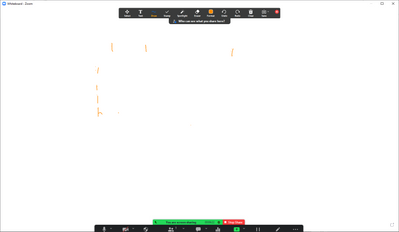
Here I try to write the especially problematic letter "F" 7 times.  It failed each time.

Josh_314_0-1663616109414.png

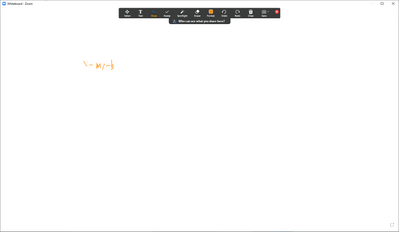
Here I tried to write the simple equation "y = mx + b"

Josh_314_1-1663616181981.png

And here I wrote the alphabet and "The quick brown fox jumped over the lazy dog" without corrections.

Josh_314_2-1663616225572.png

Each of these was done with Windows Ink active and has a little Windows Ink ripple effect whenever it happens.  When I disable Windows Ink, it still happens, but without the ripple and less frequently. 


Is this a known problem with a known fix?  It makes it pretty much impossible to use the whiteboard.


EDIT:  I accidentally added this discussion to the wrong place, but I don't see how to move or delete it.


Show less

reply-icon Latest Reply - 

Resolved! Can't get rid of blue background

I have none checked for background and it's still blue. I've deleted the app from all of my devices and it is still showing up. 


Any help is appreciated 

reply-icon Latest Reply - 

Resolved! Delete cloud recordings

Hi,

I would like to remove some cloud recordings but I can't because I don't find any "delete" button or icon on the windows page.


Could someone help me with that ?

Thank you

reply-icon Latest Reply - 

Community Champion Program

Zoom Community Champions are leaders within the Community who provide thoughtful contributions to fellow community members. They provide helpful solutions, showcase product expertise, and share success stories.
Become a Champion