


Zoom Rooms and Workspaces
cancel
Showing results for 
Search instead for 
Did you mean: 

What are Zoom Rooms and Workspaces?

Zoom Rooms are modern workspaces that enable in-person and remote participants to interact in real-time in a hybrid setting. Explore the Zoom Community's Recent Activity below to join the Rooms and Workspaces conversation and connect with other members. If you're still looking for support, browse our Zoom Rooms and Workspaces support articles or start a new discussion below!

Recent Activity

Zoom and Teams on Polycom Group 500

I am trying to get Teams and Zoom to both work on a RealPresence Group 500. I can set up Teams and Teams works fine without any issues. I set up Zoom and Zoom seems to take over the Polycom. Zoom then works but Microsoft Teams does not.Here is our se... Show more

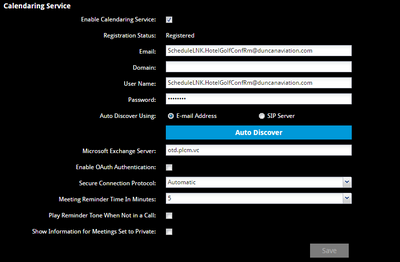
I am trying to get Teams and Zoom to both work on a RealPresence Group 500. I can set up Teams and Teams works fine without any issues.


I set up Zoom and Zoom seems to take over the Polycom. Zoom then works but Microsoft Teams does not.

Here is our settings when Teams is set up and working but the second that I enable the room in Zoom, it removes these settings and uses the Provision server instead.

DuncanTech_0-1650385967617.png


We use the API connector with our 3 rooms and calendar integration.


Any thoughts?


Show less
reply-icon Latest Reply - 

Resolved! Zoom Room connection timeout

Hi, Wondering if anyone has experienced this, we have 5 zoom rooms and came in yesterday morning to all of them saying connection timeout. We have done a ton of troubleshooting and have even deleted and re added.We even connected them to a hotspot to... Show more

Hi,


Wondering if anyone has experienced this, we have 5 zoom rooms and came in yesterday morning to all of them saying connection timeout. We have done a ton of troubleshooting and have even deleted and re added.

We even connected them to a hotspot to make sure it wasnt anything on our network causing this and the same issue.


Any help would be great.


Show less

reply-icon Latest Reply - 

Multiple Zoom Room Meetings Using a Single Licensed User Account

Hi, We have licensed four Zoom rooms and would like each room to serve as its own Host, apart from the scheduler's Zoom account. We were told by a Zoom technician that each Zoom Room, if integrated to a Google calendar, could serve as its own host ap... Show more

Hi, 

We have licensed four Zoom rooms and would like each room to serve as its own Host, apart from the scheduler's Zoom account.  We were told by a Zoom technician that each Zoom Room, if integrated to a Google calendar, could serve as its own host apart from the scheduler's account. As proof, he noted how the Google Calendar email is shown on the Zoom Room Controller as the host instead of the scheduler's account email. When we try to use more than one Zoom Room, however, we get a message saying the host is in another meeting.  Again, the meetings for each Zoom Room are scheduled using different Google calendar emails integrated to each specific Zoom room. Everything else works fine. We just can't have two meetings at the same time, though we have four Zoom rooms with each integrated to a different Google Calendar email.


Essentially, we have four Zoom Rooms, integrated to four different Google calendars, but get a message "the host is in another meeting" whenever we try to start more than one meeting. How can we schedule a meeting in each room and have the Room be its own Host, allowing us to have multiple Zoom Room meetings?


Show less

reply-icon Latest Reply - 

Android User

Being on an Android device during a Zoom meeting yesterday, I had to dial in on one of their long-distance phone numbers in order to hear and speak then when I was assigned to a breakout room I couldn't hear nothing from any of the participants excep... Show more

Being on an Android device during a Zoom meeting yesterday, I had to dial in on one of their long-distance phone numbers in order to hear and speak then when I was assigned to a breakout room I couldn't hear nothing from any of the participants except just watching mouths moving. But the whole entire time while I was in the assigned breakout room I could hear others from the main room still. The main room was overriding the room that I was in and on my phone or device. What went wrong?


Show less

Multiple screen shares in grid view - Zoom Room

Is it possible to view multiple screen shares simultaneously?I have multiple people screen sharing with a Zoom Room so the content of their screens can be displayed on a TV for the whole room. They can all share their screen but I have to manually pi... Show more

Is it possible to view multiple screen shares simultaneously?

I have multiple people screen sharing with a Zoom Room so the content of their screens can be displayed on a TV for the whole room. They can all share their screen but I have to manually pick which screen to display with the Zoom Room. And I can only show one at a time. What I want is to be able to see all of the shared screens in grid view like you can with people's cameras. I don't know if this is currently possible in Zoom but it would certainly be helpful if there was a way.


Show less

reply-icon Latest Reply - 

Assigning participants to a breakout not working

Hello Zoom Community!I work for a school and we were having our registration process with multiple breakout rooms opened in Zoom. At one point, we couldn’t send anyone to a breakout room, and we had to end the meeting and open it again. Is there any ... Show more

Hello Zoom Community!
I work for a school and we were having our registration process with multiple breakout rooms opened in Zoom. At one point, we couldn’t send anyone to a breakout room, and we had to end the meeting and open it again. Is there any explanation for this to happen? I would like to know how to fix this problem in the future.
Thanks for your help.


Show less

reply-icon Latest Reply - 

Remote Desktop Protocol (RDP) issue

We recently Zoom Rooms to one of our east coast offices. Has anyone experienced loss of RDP to the Zoom Room PC? 

reply-icon Latest Reply - 

Syncing Zoom Room with Google Calendar

I'm setting up new Zoom Rooms with our GSuite Room Resource Calendars. I've successfully connected the room calendar to the Zoom Room, but when I do a test meeting (add the room to my meeting, create Zoom meeting) the meeting never appears in my cont... Show more

I'm setting up new Zoom Rooms with our GSuite Room Resource Calendars.  I've successfully connected the room calendar to the Zoom Room, but when I do a test meeting (add the room to my meeting, create Zoom meeting) the meeting never appears in my controller.


But if I do an instant meeting from the controller itself, the instant meeting syncs with the Calendar.  Does anyone have any insight on this issue? 


Show less

Zoom Community

I have two accounts in the Zoom Community. I signed out my first account, but when I tried to sign in my second account, it opens the page to my first account. I tried opening another tab, but it’s the same result. How can I sign in my second account... Show more

I have two accounts in the Zoom Community. I signed out my first account, but when I tried to sign in my second account, it opens the page to my first account. I tried opening another tab, but it’s the same result. How can I sign in my second account after going in the first? 


Show less

reply-icon Latest Reply - 

Download link for Zoom Room 5.10.0 (1233)

Hi there,


I can see the release note for Zoom Room 5.10.0 was already out and I can't seem to find the download location for this version.


Can someone point me the right direction please?


Cheers

reply-icon Latest Reply -

