Zoom Phone System
cancel
Showing results for 
Search instead for 
Did you mean: 
Effective January 9th, 2026 through January 22nd, 2026: The Zoom Community is currently in read-only mode with login disabled, to deliver you a new and improved community experience!

The site is still accessible to view, however, the ability to login, create content, or access your community account is temporarily unavailable. We appreciate your patience during this time. If seeking support, please browse existing community content or ask our Zoom Virtual Agent.

Weekly Leaderboard

What is the Zoom Phone System?

Zoom's enterprise phone software is the scalable cloud phone solution for businesses of all sizes. Explore the Zoom Community's Recent Activity below to join the Phone System conversation and connect with other members. If you're still looking for support, browse our Zoom Phone System support articles or start a new discussion below!

Recent Activity

Call disposition (results)

When looking at analytics of the calls.  Is there a list of what the dispositions mean?   I can figure most, but what is the difference between call cancelled and call denied?   

 

reply-icon Latest Reply - 

Cell phone porting to Zoom from Verizon

Hi All,I currently have Verizon cell service. I need to be able to record calls and it seems like Zoom might be a good option. BUT, I want to keep my phone numbers so I don't have to train clients on a new number, buy new business cards, etc. Who has... Show more

Hi All,

I currently have Verizon cell service.  I need to be able to record calls and it seems like Zoom might be a good option.  BUT, I want to keep my phone numbers so I don't have to train clients on a new number, buy new business cards, etc.


Who has done this (with cell phone) and what pitfalls do I need to watch out for?  For example, will all calls be via Zoom?  Any service issues (bad areas with poor cell/data service?)  Anything else you discovered that was disappointing?


Thanks,

Dave White


Show less

By
Newcomer
This thread is read-only
reply-icon Latest Reply - 

Phantom missed call, constantly reappearing?

Hello All! Has anyone else been getting a recurring missed call badge in the Phone -> History section that, when cleared, comes back? I have several users in my company who have a missed call badge showing up and then reappearing seconds or minutes l... Show more

Hello All!


Has anyone else been getting a recurring missed call badge in the Phone -> History section that, when cleared, comes back?  I have several users in my company who have a missed call  badge showing up and then reappearing seconds or minutes later.  I'm trying to gauge if this is system wide.


Thanks!

John


Show less

reply-icon Latest Reply - 

Zoom Phone SMS URI Scheme

Is there a way I can go to an SMS conversation using deeplinking for Zoom desktop app?


I would like to click a link on my CRM and take me to the SMS conversation.

By
Newcomer
This thread is read-only

Newbie

Am new here. How can I benefit from the product?

Thanks

reply-icon Latest Reply - 

Can zoom phone calls be recorded automatically?

We are a small team but we do need to be able to record calls of our team for training and quality improvement purposes, is that possible, if yes under which plan and a guide on doing that? Please advise. 

reply-icon Latest Reply - 

Resolved! Seems so simple - urrrrh! why do incoming calls 'ring' in Queue when we are all logged out?

Hi! We are new to zoom phone. The 'call queue' phones ring for the allocated time eg 45 seconds - despite all users being logged out. Is this how the system is supposed to work? Or does this mean that someone has accidentally still logged in from eg.... Show more

Hi!


We are new to zoom phone.


The 'call queue' phones ring for the allocated time eg 45 seconds - despite all users being logged out.


Is this how the system is supposed to work? Or does this mean that someone has accidentally still logged in from eg. home?


I thought that calls go to 'overflow' (Eg voicemail) if all users are logged out, but it doesn't seem to work like that.


Thank you very much for any comments greatly appreciated.


Richard


Show less

reply-icon Latest Reply - 

Hosting a Zoom meeting - NEW computer same account but others cannot join

Hello All, I am using a new computer with my original company zoom account. I have logged out of my zoom on my old computer. My original zoom links and login are used on continuous meetings. On my new computer no one can enter my room, as it says a m... Show more

Hello All, I am using a new computer with my original company zoom account. I have logged out of my zoom on my old computer. My original zoom links and login are used on continuous meetings. On my new computer no one can enter my room, as it says a meeting is already going. If I click the link sent to my email that someone is waiting it will stop my current open meeting and then restart on its own. Then I can let others in. How do I avoid this?


Show less

reply-icon Latest Reply - 

Rauland Telecenter U

Hello. I was wondering if anyone out there has integrated with a Rauland Telecenter U (TCU)? Rauland specs state that it does not support Secure SIP or Secure RTP. Would the TCU be able to place SIP calls without any authentication or be able to page... Show more

Hello. I was wondering if anyone out there has integrated with a Rauland Telecenter U (TCU)?  Rauland specs state that it does not support Secure SIP or Secure RTP.  Would the TCU be able to place SIP calls without any authentication or be able to page through the SIP Trunk of their Controller? Unfortunately, Rauland has very little SIP settings that can be changed so it's pretty much set it up their way. Any help is much appreciated! Thanks in advance! 


Show less

Resolved! Add Phone Number to App from Commandline

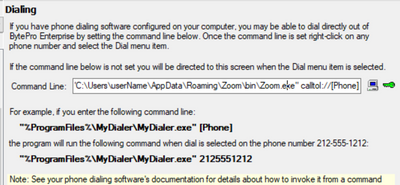
I use Enterpirse software that allows me to click on a phone link and it will open the app and add whatever commandline is needed to insert a phone number, example:From what I've read, via Zoom docs, "callto:" and "tel:" should work, but when entered... Show more

I use Enterpirse software that allows me to click on a phone link and it will open the app and add whatever commandline is needed to insert a phone number, example:

DrewRuss_0-1658333380548.png

From what I've read, via Zoom docs, "callto:" and "tel:" should work, but when entered, even from cmd, the phone number does not get added to the zoom app. It does, however, open the app or brings it to the front window if already open.

Any ideas? TIA


Thoughts: After lots of testing and doc skimming I was able to come up with "tel:[Phone]".  This adds to zoom dialer, but does not start the call. Any ideas ona  command to also start the call?


Show less

reply-icon Latest Reply -