Zoom Events
cancel
Showing results for 
Search instead for 
Did you mean: 

What are Zoom Events?

Market and host interactive experiences with the Zoom Events all-in-one virtual event platform. Explore the Zoom Community's Recent Activity below to join the Events conversation and connect with other members. If you're still looking for support, browse our Zoom Events support articles or start a new discussion below!

Recent Activity

unable to switch to Stereo mode

When connected to a Bluetooth speaker or headset, I cannot switch the audio to Stereo mode even after checking the stereo options under settings. The AG/ Realtek audio output is very loud even after turning down the volume under zoom settings and on ... Show more

When connected to a Bluetooth speaker or headset, I cannot switch the audio to Stereo mode even after checking the stereo options under settings. 


The AG/ Realtek audio output is very loud even after turning down the volume under zoom settings and on my laptop. 


May I know how I can switch to the stereo mode to control audio from my headset and have a better sound quality? 


Show less

reply-icon Latest Reply - 

Urgent: Event Setup with 5 Breakout Rooms & event registration with CV Upload Feature

Hello everyone,I hope you're all doing well.I’ve been trying to set up a Zoom event with a fairly specific structure and have reached out to support multiple times. While I appreciate the links and resources provided, I’m still feeling quite lost and... Show more

Hello everyone,

I hope you're all doing well.

I’ve been trying to set up a Zoom event with a fairly specific structure and have reached out to support multiple times. While I appreciate the links and resources provided, I’m still feeling quite lost and would really appreciate clearer guidance from someone who has experience with this setup.

Here’s what I’m trying to achieve:

  • One main stage for general presentations

  • Three breakout rooms, each with the ability to present documents and videos

  • Each room will have a dedicated host to manage the session, while someone else runs the main stage

  • I also need to create a registration form that allows attendees to upload their CVs at the time of registration

I’m struggling to piece everything together, and I’m feeling a bit overwhelmed with the options and unclear instructions. If anyone can walk me through this step by step or point me to a clear and specific resource (or better yet, share your experience if you’ve done something similar), I’d be incredibly grateful.

Thank you so much in advance for your help!


Show less

reply-icon Latest Reply - 

feature request: show Meetings for which I am an alternative host

When someone adds me as an alternative host to a meeting, I would like that meeting to show up in my Meetings panel. Otherwise, to actually join in the host role, I need to find the email that I got and use that link. (I think this is the case, thoug... Show more

When someone adds me as an alternative host to a meeting, I would like that meeting to show up in my Meetings panel. Otherwise, to actually join in the host role, I need to find the email that I got and use that link.  (I think this is the case, though I am not 100% sure.) It would be much easier if I could just go to Meetings and click there.


This has been bugging me for a while. I don't really expect a reply; just putting it out there as a nice feature to add.


Show less

reply-icon Latest Reply - 

Resolved! Recording session in 2 files : why ?

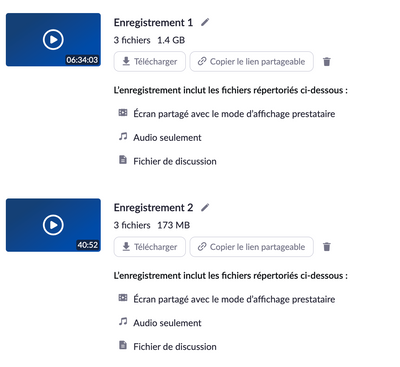
Hello, When i record my events (>7 hours), it is split in 2 files (06:34:03 + 40:52) instead of one.Do you know why ? And is it possible to do something to have only one file ? Because, some of my old events recordings are also > 7h but are in only o... Show more

Hello, 

When i record my events (>7 hours), it is split in 2 files (06:34:03 + 40:52) instead of one.

Do you know why ? 

And is it possible to do something to have only one file ?


Because, some of my old events recordings are also > 7h but are in only one file video so i do not understand...


Thank you for your help.


David 

Capture d’écran 2022-09-19 à 12.19.40.png


Show less

reply-icon Latest Reply - 

Big meetings

I changed the currency I use to pay my bill to make it more affordable for large gatherings. However, now the change won't let me buy anything because it says the payment hasn't been updated yet, but I've already paid my monthly bill. Does anyone kno... Show more

I changed the currency I use to pay my bill to make it more affordable for large gatherings. However, now the change won't let me buy anything because it says the payment hasn't been updated yet, but I've already paid my monthly bill. Does anyone know what I can do?


Show less

reply-icon Latest Reply - 

Session image default (Zoom conference)

I'm trying to find out how to set a default image when setting up a conference with multiple session. Although Zoom creates a 'default image' I apparently can't publish the event until I have set my own image (seems a bit daft). I will have hundreds ... Show more

I'm trying to find out how to set a default image when setting up a conference with multiple session. Although Zoom creates a 'default image' I apparently can't publish the event until I have set my own image (seems a bit daft). I will have hundreds of sessions in an upcoming event so I need to be able to set my own default image. Can anyone help?


Show less

reply-icon Latest Reply - 

Resolved! Reporting Zoom Bomb

These registered names and accounts zoom bombed 


TyroneJames***********Los AngelesUSCAEmployee


JackHeely***********MemphisUSTNFreelance


reply-icon Latest Reply - 

Resolved! Where is the session customization for the Join button timing?

In the June 16, 2025 Zoom Events Release Notes (as of this posting), there is the following entry:I can't find any other reference to this anywhere. Where can one configure this setting? I also looked for the similar Zoom Sessions functionality menti... Show more

In the June 16, 2025 Zoom Events Release Notes (as of this posting), there is the following entry:

Ray_Harwood_0-1750739173634.png

I can't find any other reference to this anywhere.  Where can one configure this setting?


I also looked for the similar Zoom Sessions functionality mentioned in that note, but can't see any place in Zoom Sessions where the Join button timing can be configured.


If you find it, please let me know... maybe with a screen shot.  Thanks!


Show less

reply-icon Latest Reply - 

Webinerの仕様について

Webiner500→Webiner1000へのアップグレード前段階での500を超えるお申し込みのご登録は可能です。
(登録数が500を超える場合は、7/1からアップグレード予定Webiner1000に移行して登録する必要があるということでございます。

Resolved! Zoom Sessions Pay Per Attendee Plan - Add More Attendees

The organization I work for purchased the Zoom Sessions (Pay Per Attendee) plan for up to 50 attendees. I misunderstood the plan and thought it would allow for 50 attendees per session, not per year. We have already used 45 attendees, so we will need... Show more

The organization I work for purchased the Zoom Sessions (Pay Per Attendee) plan for up to 50 attendees. I misunderstood the plan and thought it would allow for 50 attendees per session, not per year. We have already used 45 attendees, so we will need to purchase more. When I go to 'Manage Plan' and 'Add More Attendees', you can select a plan for 50, 100, 600, etc. If we purchase one of these plans, is that 50/100/600 attendees in addition to the original 50 we had purchased? Thank you.


Show less

reply-icon Latest Reply -