

Zoomtopia is here. Unlock the transformative power of generative AI, helping you connect, collaborate, and Work Happy with AI Companion.
Register nowEmpowering you to increase productivity, improve team effectiveness, and enhance skills.
Learn moreKeep your Zoom app up to date to access the latest features.
Download Center Download the Zoom appDownload hi-res images and animations to elevate your next Zoom meeting.
Browse Backgrounds Zoom Virtual BackgroundsEmpowering you to increase productivity, improve team effectiveness, and enhance skills.
Zoom AI CompanionUser groups are unique spaces where community members can collaborate, network, and exchange knowledge on similar interests and expertise.
Help & Resources is your place to discover helpful Zoom support resources, browse Zoom Community how-to documentation, and stay updated on community announcements.
The Events page is your destination for upcoming webinars, platform training sessions, targeted user events, and more. Stay updated on opportunities to enhance your skills and connect with fellow Zoom users.
2025-09-03 09:21 AM
I’ve had a couple of conversations with other Events producers about the recent change to the appearance of the Track Filter on the Events Sessions tab. The one on Zoomtopia for example:
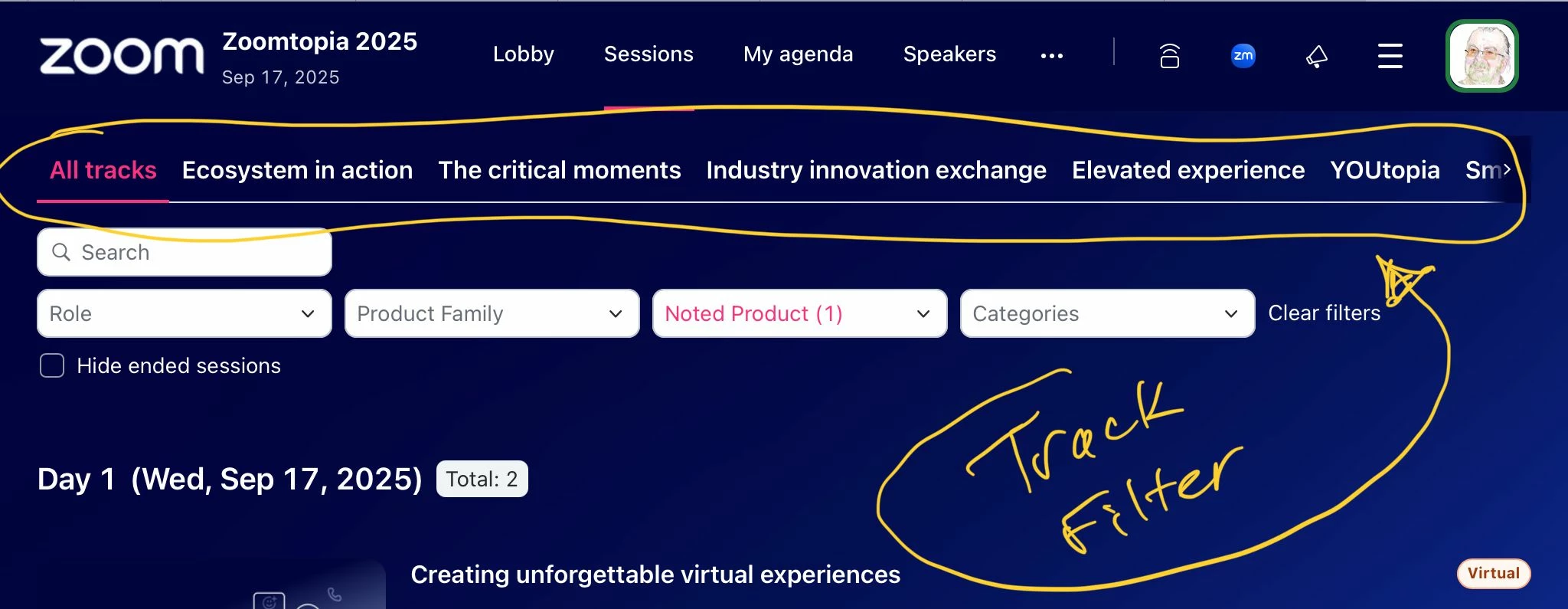
One producer had originally created their upcoming event with a number of tracks to indicate topic areas of their 200+ sessions. As you can see from the Zoomtopia example, the “sliding tab bar” quickly fills up, and you can’t see the rest without sliding. Okay, I get it.
But what order are the tracks listed in?
(A) We haven’t been able to figure it out, and…
(B) There don’t appear to be any way for the Host to control the order.
Alphabetical would be a nice start. Allowing the Host to manage an orderable list would be better.
Any thoughts?
2025-09-04 06:54 AM
Similar problem here. I don't seem able to upload a screenshot but ours shows
All Tracks - Plenary - Track C - Track D - Track E - Track B - Track A
I even tried clearing the tracks from all the session, and then adding them back in a sensible order, but this did not help.
2025-09-04 09:48 AM - edited 2025-09-04 09:49 AM
Thanks for hopping on the thread, @SamT.
Another issue that this new Track Filter presents, is that you can't filter on more than one track simultaneously (that I can tell).
I've had a couple of clients that used a more complex set of Track names that create more of a "track matrix". One set of tracks for Novice-Level, Mid-Level, and Professional-Level presentations, and one set of topic-based tracks like AI, Cloud Computing, DevOps, and Security. Someone may want to select sessions that are Novice-Level DevOps, which doesn't seem possible with the new horizontal "pick one" approach.
2025-09-04 08:24 AM