Zoom Rooms and Workspaces
cancel
Showing results for 
Search instead for 
Did you mean: 
Effective January 9th, 2026 through January 22nd, 2026: The Zoom Community is currently in read-only mode with login disabled, to deliver you a new and improved community experience!

The site is still accessible to view, however, the ability to login, create content, or access your community account is temporarily unavailable. We appreciate your patience during this time. If seeking support, please browse existing community content or ask our Zoom Virtual Agent.

What are Zoom Rooms and Workspaces?

Zoom Rooms are modern workspaces that enable in-person and remote participants to interact in real-time in a hybrid setting. Explore the Zoom Community's Recent Activity below to join the Rooms and Workspaces conversation and connect with other members. If you're still looking for support, browse our Zoom Rooms and Workspaces support articles or start a new discussion below!

Recent Activity

Resolved! Multiple participants on one screen

I never used Zoom beforeI want to set up a meeting with overseas relatives using my laptop with a speaker instead of headphones.There will be three of us sitting side by side acting as one participant (not separate participants) so we will have to sh... Show more

I never used Zoom before

I want to set up a meeting with overseas relatives using my laptop with a speaker instead of headphones.

There will be three of us sitting side by side acting as one participant (not separate participants) so we will have to shift the laptop some distance away so all three of us will be visible on overseas party's screen.

Will laptop mic be able to pick up our voices from some distance away?

We will be unable to reach the laptop to mute our mic when overseas party is talking. Can we just leave our mic un-muted all the time? Won't our mic pick up other party's voice on our speaker and transmit it back to him, and then back to us even louder, and then back to him even louder still, in other words setting up a vicious circle?


Show less

By
Explorer
This thread is read-only
reply-icon Latest Reply - 

Workspaces DTEN not refreshing quickly

Hello, We are launching zoom workspaces and also have the DTEN virtual kiosk setup. What we are seeing is when a user books a station the kiosk wont reflect this for up to 10 minutes. Is there any way to increase the refresh rate of the kiosk with wo... Show more

Hello,


We are launching zoom workspaces and also have the DTEN virtual kiosk setup.  What we are seeing is when a user books a station the kiosk wont reflect this for up to 10 minutes.  Is there any way to increase the refresh rate of the kiosk with workspaces enabled?  Has anyone else seen this issue?  Not so great when multiple people are trying to book a spot at the front desk. 


Thank you


Show less

reply-icon Latest Reply - 

2 Yealink A20's only showing one room?


Issue fixed. Can't find out how to close/delete


reply-icon Latest Reply - 

Zoom Room - Haas licenses

Hello,I rent Neat bars from Zoom with 2 zoom room licenses.Haas licenses have been cut off to me and nothing works anymore.I opened 2 tickets on the support but no one at Zoom is interested.Has anyone had this problem before?Thank you Do you know how... Show more

Hello,
I rent Neat bars from Zoom with 2 zoom room licenses.

Haas licenses have been cut off to me and nothing works anymore.

I opened 2 tickets on the support but no one at Zoom is interested.

Has anyone had this problem before?
Thank you


Do you know how to terminate an equipment rental? because the sales people in France no longer respond


Show less

By
Newcomer
This thread is read-only
reply-icon Latest Reply - 

Zoom spiegeln auf Tv

Ist es möglich ein vom MacBook Zoom Meeting auf den TV zu streamen und gleichzeitig am MacBook zu arbeiten? 

reply-icon Latest Reply - 

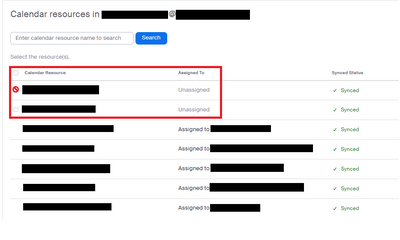
Calendar Integration unable to delete unassigned resources

I need to delete 2 Calendar Resources from the Calendar Integration but the portal doesn't allow me. When I hover my mouse over the checkbox, it gives me a prohibition sign and I am not able to remove them. I am not sure if I should be removing them ... Show more

I need to delete 2 Calendar Resources from the Calendar Integration but the portal doesn't allow me. When I hover my mouse over the checkbox, it gives me a prohibition sign and I am not able to remove them. I am not sure if I should be removing them from another option instead of Calendar Integration.

Here is a print screen. Thank you.

TTJP_0-1666814781775.png


Show less

By
Newcomer
This thread is read-only
reply-icon Latest Reply - 

Resolved! Poly X50 Zoom Room is having issues connecting to meetings

The X50 has had issues recently with connecting to our video conference provider, whether it be Zoom or Teams. We've had this device up and running since mid-May and these issues just started happening. This isn't happening with any of our other X50s... Show more

The X50 has had issues recently with connecting to our video conference provider, whether it be Zoom or Teams. We've had this device up and running since mid-May and these issues just started happening. This isn't happening with any of our other X50s at our other locations though. Has anyone else experienced this?


Show less

reply-icon Latest Reply - 

SCHEDULE MEETING NOT WORKING PROPERLY

I keep having issues with clients joining the meeting I've scheduled for them. I send them the invite link via email, but when they go to join the meeting it will say "host is in another meeting" and they can't join. Any insight as to why this is hap... Show more

I keep having issues with clients joining the meeting I've scheduled for them. I send them the invite link via email, but when they go to join the meeting it will say "host is in another meeting" and they can't join. Any insight as to why this is happening?


Show less

reply-icon Latest Reply - 

How To Disable & Delete a Zoom 1 Room in order to Free Up Paid-For License

I have a Room that is showing up under my Users (e.g. Admin -> User Management -> Users).This is showing as a Licensed User. I would like to (1) remove this room from our Zoom account and (2) free up this License. There is no option to disable or del... Show more

I have a Room that is showing up under my Users (e.g. Admin -> User Management -> Users).

This is showing as a Licensed User.


I would like to (1) remove this room from our Zoom account and (2) free up this License.


There is no option to disable or delete this from the location I described above or Room Management -> Zoom Rooms -> Rooms


Can someone please point me in the right direction to delete this room and then free up that License?


Thanks!


Show less

By
Explorer
This thread is read-only
reply-icon Latest Reply - 

Можно ли убрать логотип zoom в конференции

Можно ли убрать логотип zoom, чтобы при конференции его не было на видео.

reply-icon Latest Reply -