Zoomtopia is here. Unlock the transformative power of generative AI, helping you connect, collaborate, and Work Happy with AI Companion.
Register nowEmpowering you to increase productivity, improve team effectiveness, and enhance skills.
Learn moreKeep your Zoom app up to date to access the latest features.
Download Center Download the Zoom appDownload hi-res images and animations to elevate your next Zoom meeting.
Browse Backgrounds Zoom Virtual BackgroundsEmpowering you to increase productivity, improve team effectiveness, and enhance skills.
Zoom AI CompanionUser groups are unique spaces where community members can collaborate, network, and exchange knowledge on similar interests and expertise.

Help & Resources is your place to discover helpful Zoom support resources, browse Zoom Community how-to documentation, and stay updated on community announcements.
The Events page is your destination for upcoming webinars, platform training sessions, targeted user events, and more. Stay updated on opportunities to enhance your skills and connect with fellow Zoom users.
Hi everyone, I’m working with Zoom Contact Center and building an IVR flow that sends data to an external CRM using the HTTP Call widget. Digit input collected from the caller is sent successfully, but I’m having trouble passing caller-related details like caller ID, ANI, or called number. These values either come through empty or are not included in the payload. I wanted to ask: Are caller metadata fields available by default in the HTTP Call widget? Do they see explicit mapping or assignment to variables earlier in the flow? Is there a recommended way to capture and pass these values reliably? If anyone has handled this before or can point me to the right approach, I’d appreciate the guidance. Thanks in advance.
Show less
I am new to Zoom Contact Center. When I design an IVR Flow and try to send data to a CRM system using the HTTP Call widget, I face an issue. When I send Digit input collected from the caller, the data is sent successfully. However, when I try to send other values such as Caller ID, Caller Number, or Callee Number, the data is empty and not passed to the CRM. This usually happens because those call-related values are not automatically available to the HTTP Call widget unless they are explicitly mapped or stored in variables earlier in the flow.
Show less
No me sirve zoom para lo que necesito
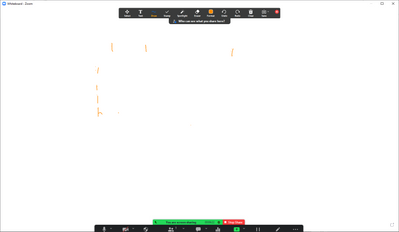
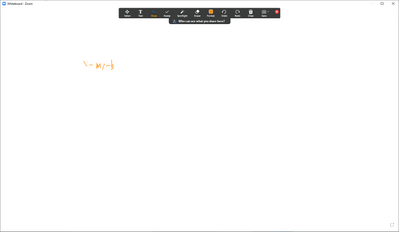
I've been using the Zoom Whiteboard (not the physical whiteboard) on my computer with a Wacom drawing tablet. Unfortunately, something has changed and now my penstrokes are being eaten and replaced with dots. I believe this is some kind of double click detection or some other gesture. Here I try to write the especially problematic letter "F" 7 times. It failed each time. Here I tried to write the simple equation "y = mx + b" And here I wrote the alphabet and "The quick brown fox jumped over the lazy dog" without corrections. Each of these was done with Windows Ink active and has a little Windows Ink ripple effect whenever it happens. When I disable Windows Ink, it still happens, but without the ripple and less frequently. Is this a known problem with a known fix? It makes it pretty much impossible to use the whiteboard. EDIT: I accidentally added this discussion to the wrong place, but I don't see how to move or delete it.
Show less
I have none checked for background and it's still blue. I've deleted the app from all of my devices and it is still showing up.
Any help is appreciated
Hi,
I would like to remove some cloud recordings but I can't because I don't find any "delete" button or icon on the windows page.
Could someone help me with that ?
Thank you
Zoom video and sound freezes intermittently so often that my clients are giving up on the meetings. After all, they have better things to do. Zoom version is6.6.10.2831 (1222). Using Safari on a MacBook Pro. WiFi signal is strong. All apps are up-to-date. My location is Texas. This is happening consistently on video calls with people in Colorado. What can be causing this? What is the solution?
Show less
Hello,
I work for an MSP that supports both Windows and Mac devices. Over the last month, we've noticed that users of specifically LENOVO devices (laptops) are experiencing an issue where their devices crash whenever they enter meetings. The devices lock up and need to be hard shut down and rebooted to operate again. We've tried reinstalling zoom, turning off hardware acceleration, making sure the device is up to date etc.
This seems to be something related to how Zoom and Lenovo are interacting at the software level, but we need a solution ASAP, as this behavior is spreading across all client using Lenovo devices!
Show less
ver 6.7
Mac os tahoe 26.3
The last time you opened zoom.us, it unexpectedly quit while reopening windows. Do you want to try to reopen its windows again?
and then nothing happnes no matter how much i try
One recording has been stuck in a "Trimming in Progress" state. It's been like that for more than a year. Want to delete it to claim some space, but there is no option to delete it. How can I get it done? There is no option anywhere to submit a ticket or something. Thank you for any suggestions.
Show less