Zoom Team Chat
cancel
Showing results for 
Search instead for 
Did you mean: 
Weekly Leaderboard

What is Zoom Team Chat?

Zoom Team Chat connects teams and streamlines communication through securely integrated messaging software. Explore the Zoom Community's Recent Activity below to join the Team Chat conversation and connect with other members. If you're still looking for support, browse our Zoom Team Chat support articles or start a new discussion below!

Recent Activity

Zoom API Integration

Hi there, we are trying to integrate zoom API into our VB.NET-based application. There is a problem that while joining the meeting via the API URL, it requires a redirect login to the zoom login page. We require the behaviour of API such that we pass... Show more

Hi there, we are trying to integrate zoom API into our VB.NET-based application. There is a problem that while joining the meeting via the API URL, it requires a redirect login to the zoom login page. We require the behaviour of API such that we pass the login credentials programmatically and the API logs in programmatically and call back URL redirects the user to our domain's redirect URI. I have read on forums that this can't be done for some reason. Please explain this behaviour.  


Show less

reply-icon Latest Reply - 

Disfunctional chat on Windows 10 and user folder with UTF8 character

Hello, I'm writing here after spending several hours trying to narrow the problem I'm currently facing after switching on new laptop running Windows 10. For some reasons the new installation for my user is including a UTF char (ș more exactly) and I'... Show more

Hello,


I'm writing here after spending several hours trying to narrow the problem I'm currently facing after switching on new laptop running Windows 10.


For some reasons the new installation for my user is including a UTF char (ș more exactly) and I'm blaming this for the following side-effects I've observed:


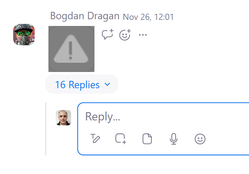
1/ channel's chat is displaying only first message from each thread. If I'm trying to press on the "%d Replies" link nothing happens

indreias_0-1638221421049.png


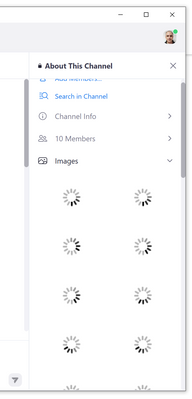
2/ images could not be displayed - interesting enough them could be manually downloaded

indreias_1-1638221539145.png


I've tried to use even the MSI installer but without any luck.


Some data are saved in C:\Users\MyUserFolderWithș\AppData\Roaming\Zoom but most probably something is not working 100% normally in my installation.


Is somebody able to confirm my findings or point me on how to solve it from my end?


Thx,

Ioan


PS: all of the above are observed when using 64-bit Version: 5.8.6 (2048)


Show less

reply-icon Latest Reply - 

Camera is showing me horzontal instead of vertical! It used to be ok!

SO my macbook air was working just fine.. Camera and zoom all fine. After I loaded Chrome so that I could USE my camera to go live on facebook....... now on zoom app only... my camera displays me sideways. On all other apps the orientation is fine. H... Show more

SO my macbook air was working just fine.. Camera and zoom all fine. After I loaded Chrome so that I could USE my camera to go live on facebook....... now on zoom app only... my camera displays me sideways. On all other apps the orientation is fine. HELP! I have a meeting at 7 pm!


Show less

reply-icon Latest Reply - 

Local Recording Not Showing Under Recordings

I had two meetings that I selected the record option for and they aren't even appearing in my recordings tab for the local recordings. I think the convert failed after the meeting ended. There also isn't the double-click file to do a manual conversio... Show more

I had two meetings that I selected the record option for and they aren't even appearing in my recordings tab for the local recordings. I think the convert failed after the meeting ended. There also isn't the double-click file to do a manual conversion in my files on my computer. I think my zoom version was older than the 4.3.0 version. Can these still be retrieved? Please help.


Show less

reply-icon Latest Reply - 

I can't recall my recordings

Hello, I was the videographer also co-host on an important meeting, and was supposed to record my entire zoom screen based on my settings, which I did that several times so far. But after finishing the meeting (about 8 hours) Zoom did not give me opt... Show more

Hello, I was the videographer also co-host on an important meeting, and was supposed to record my entire zoom screen based on my settings, which I did that several times so far. But after finishing the meeting (about 8 hours) Zoom did not give me options to process and download video recordings.  So I asked the host to search and find the files, she found them but strangely I found out that the timing was exactly my timing (in terms of pauses on the file), BUT Zoom recorded the host's screen, not mine.  


My question is how can I find and recall my video recordings from that session with my screen settings?


Thanks a lot,

Ali


Show less

reply-icon Latest Reply - 

New Expanded Emojis

I have the latest updated (5.8.6) I'm on a Mac and my settings are set appropriately according to the instructions. The expanded emojis do not appear. Thoughts? They did appear when they were first introduced but disappeared with the last two upgrade... Show more

I have the latest updated (5.8.6) I'm on a Mac and my settings are set appropriately according to the instructions.   The expanded emojis do not appear.   Thoughts?   They did appear when they were first introduced but disappeared with the last two upgrades.


Show less

reply-icon Latest Reply - 

Computer restarting

Hello, I am sorry for bothering, I have a problem with my zoom account, every time I have a meeting, my computer restarts, at least two times, especially when I share my screen. My computer works properly when I don't use Zoom and it has a pretty goo... Show more

Hello, I am sorry for bothering, I have a problem with my zoom account, every time I have a meeting, my computer restarts, at least two times, especially when I share my screen. My computer works properly when I don't use Zoom and it has a pretty good system, all applications work well.


Show less

reply-icon Latest Reply - 

Gravação processando

Estou com uma gravação processando. E não atualiza.

como fazer para acessá-la?

reply-icon Latest Reply - 

Enable Participant to See Only Their Own Questions

As a webinar organiser, is there a way for me to allow each participant to see only his question(s), but not the questions posed by other participants?

reply-icon Latest Reply - 

Se desconfiguró la computadora y ahora no puedo recuperar cuenta Zoom

Hola se desconfiguró mi computadora, tengo cuenta Prepago por un año y cuando me volví a dar de alta con mi correo me enió a una cuenta gratis, ahora no sé como recuperar mi cuenta de pago, tengo mi Passcode y mi ID.Traté de cambiar en el perfil Free... Show more

Hola se desconfiguró mi computadora, tengo cuenta Prepago por un año y cuando me volví a dar de alta con mi correo me enió a una cuenta gratis, ahora no sé como recuperar mi cuenta de pago, tengo mi Passcode y mi ID.

Traté de cambiar en el perfil Free el personal Meeting, pero no me lo permite.

Las opciones a las que me envían las páginas de ayuda de Zoom no me sirvieron o no les entendí, no hablo inglés muy bien. 

Como que no hay mucho soporte para mi caso y solo contesta una máquina que te envía a Menú sobre Menú.

Alguien que me de una idea de que hacer? O de plano cancelo el plan, había pagado  anualmente hasta septiembre de 2022

Gracias si llegaste a leer hasta aquí, saludos


Show less

reply-icon Latest Reply -