Zoom Rooms and Workspaces
cancel
Showing results for 
Search instead for 
Did you mean: 

What are Zoom Rooms and Workspaces?

Zoom Rooms are modern workspaces that enable in-person and remote participants to interact in real-time in a hybrid setting. Explore the Zoom Community's Recent Activity below to join the Rooms and Workspaces conversation and connect with other members. If you're still looking for support, browse our Zoom Rooms and Workspaces support articles or start a new discussion below!


Recent Activity

Zoom Break Out Rooms

Can you limit the amount of participants for a break out room when they are not preassigned and they select the room themselves.  


reply-icon Latest Reply - 

Digital Signage

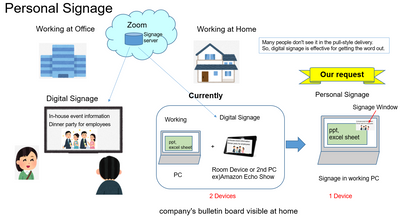
Hi, everyone Zoom has a digital signage service. See belowZoom Rooms Digital Signage | ZoomThis is a very advanced service that combines meeting participation and signage.This is a very advanced service that combines the functions of meeting particip... Show more

Hi, everyone


Zoom has a digital signage service.  See below

Zoom Rooms Digital Signage | Zoom


This is a very advanced service that combines meeting participation and signage.
This is a very advanced service that combines the functions of meeting participation and signage, and we have started to actively promote it in our company.
We requested personal signage as a new signage for the telework era through Zoom's Japanese subsidiary.

In other words, the idea was to display the company's bulletin on a PC while working at home.

Zoom's digital signage runs on a Windows PC, but as soon as you move the mouse, the display stops.
We need to display the signage in a small window so that the display does not stop when the mouse is used, which seemed to be possible with a few changes.
However, unfortunately, Zoom headquarters did not accept our request.


I would like to have your thumbs up or suggestions to agree with my idea.


Ohkawa_0-1630625347662.png


Show less

By
Community Champion | Customer
This thread is read-only
reply-icon Latest Reply - 

Getting kicked out of breakout rooms

Lately whenever I've been assigned to a breakout after about 10 minutes I get kicked off of Zoom entirely. I have upgraded to the most recent version. I don't know what else to do. 


reply-icon Latest Reply - 

NDI is set to on for all rooms, but Change View button does not have 'add output' option

I would like to begin testing the NDI output options in Zoom. The Zoom Room is up to day with 5.8.0 but the change view button on the interface does not have a Add Output option as discussed in the getting started with NDI guide. Any guidance would b... Show more

I would like to begin testing the NDI output options in Zoom.  The Zoom Room is up to day with 5.8.0 but the change view button on the interface does not have a Add Output option as discussed in the getting started with NDI guide.  Any guidance would be appreciated.


Thanks!


Show less

reply-icon Latest Reply - 

Investigating NDI

I have updated Rooms to 5.8.0 and enabled NDI in the Room configuration and confirmed that it is set for the particular room we're using for testing. According to the NDI setup guide we should see a Live On NDI tab on the Change View button on the co... Show more

I have updated Rooms to 5.8.0 and enabled NDI in the Room configuration and confirmed that it is set for the particular room we're using for testing.


According to the NDI setup guide we should see a Live On NDI tab on the Change View button on the controller for the room, but we don't.  Any help would be appreciated!


Show less

reply-icon Latest Reply - 

Changing break out rooms once open

Hello Is there a way to access and amend the options for break-out rooms once you have opened them? For example, I allocated these this morning and sent everyone off, then realised a setting from the day before had been applied to "automatically clos... Show more

Hello


Is there a way to access and amend the options for break-out rooms once you have opened them?  For example, I allocated these this morning and sent everyone off, then realised a setting from the day before had been applied to "automatically close" within 20 mins.  I couldn't see a way to override this so simply had to wait for them to shut and then reallocate and remove this option.


Also it would be good to be able to apply some settings to some rooms but not to all, perhaps that is a separate question...  


Thanks

Sue


Show less

reply-icon Latest Reply - 

Please help. I lost my Zoom recordings

Please help. I lost my Zoom recordings after replacing the host email and returning it. I deleted all the recordings from me and the host, please help, all the recordings are lost

reply-icon Latest Reply - 

Polycom GP500 update to current firmware release

Since updating the Polycom Group Series 500 to the current firmware release of their code (Release - 6.2.2.7-660023), the GP500 is no longer 'Registering' to Zoom.  Is anyone else seeing this?

reply-icon Latest Reply - 

Updating the iOS on ZoomRoom Controller iPads

We use Mobile Iron to place into and out of Kiosk (Device Management) When we update the iOS on the iPads they always come to a screen where you have to (Physically) press the 'Home' Button on the front of the iPad, and then 'Continue' like 3 times b... Show more

We use Mobile Iron to place into and out of Kiosk (Device Management)


When we update the iOS on the iPads they always come to a screen where you have to (Physically) press the 'Home' Button on the front of the iPad, and then 'Continue' like 3 times before it will proceed to Kiosk-mode and run the ZoomRoom Controller Application.


Is there a way to bypass those three screens on updating the iOS so we do not have to physically touch each iPad in our organization? (like 67 of them)


Show less

reply-icon Latest Reply - 

Allow participants to join before host

Allow participants to join before host.

I have this option selected. 

We have a pro plan.

If I do not log in first, anyone trying the url are asked to sign in.

I appreciate any help. 

reply-icon Latest Reply -