Zoom Events
cancel
Showing results for 
Search instead for 
Did you mean: 
The Zoom Community will be placed in read-only mode January 9th, 2026 through January 22nd, 2026 to deliver you a new and improved community experience!

The community will still be accessible, however, the creation of any new discussions or replies will be temporarily unavailable. We appreciate your patience during this time.

Weekly Leaderboard

What are Zoom Events?

Market and host interactive experiences with the Zoom Events all-in-one virtual event platform. Explore the Zoom Community's Recent Activity below to join the Events conversation and connect with other members. If you're still looking for support, browse our Zoom Events support articles or start a new discussion below!

Recent Activity

Screen sharing

Hello Dear Admin,Warm greetings.Please I would like to know why I’ve not been able to use the screen share option on my account as soon as my participate log into the meeting.I(the Host) observed that when I’m the only one in the meeting room, the sc... Show more

Hello Dear Admin,
Warm greetings.
Please I would like to know why I’ve not been able to use the screen share option on my account as soon as my participate log into the meeting.
I(the Host) observed that when I’m the only one in the meeting room, the screen share option is active but the moment a participate logged in, the screen share option will show “you have been restricted from using the screen share”.
Please I will like this to be resolved as soon as possible. I have a meeting in the next 5 hours and I will like to be able to use the share screen option.
Thank you so very much.


Show less

reply-icon Latest Reply - 

Gaining Access to OnZoom

With a paid Zoom license, and a billing address within the United States, you can become an OnZoom Host and begin publishing events! Make sure you follow these instructions in order to grant OnZoom permissions within your Zoom account: https://suppor... Show more

With a paid Zoom license, and a billing address within the United States, you can become an OnZoom Host and begin publishing events! 


Make sure you follow these instructions in order to grant OnZoom permissions within your Zoom account: https://support.zoom.us/hc/en-us/articles/360052678671-Authorizing-group-level-OnZoom-permission


Show less

reply-icon Latest Reply - 

Zoom Events

So who is already using Zoom Events - and what are your positive experiences?


Rupert! 

By
Community Champion | Customer
reply-icon Latest Reply - 

Securing your OnZoom Events

You know what they say: Safety First! This applies to virtual events just as much as in-person events. So here are a few suggestions on how to manage security parameters as you host your virtual events through OnZoom. Event Discoverability Make sure ... Show more

You know what they say: Safety First! This applies to virtual events just as much as in-person events. So here are a few suggestions on how to manage security parameters as you host your virtual events through OnZoom.


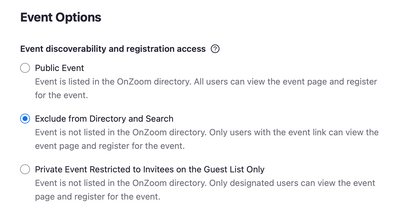
Event Discoverability

Make sure you've selected one of the appropriate options during the event creation process:

  1. Public Event – Event is listed in the OnZoom directory. All users can view the event page and register for the event.

  2. Exclude from Directory and Search – Event is not listed in the OnZoom directory. Only users with the event link can view the event page and register for the event.

  3. Private Event Restricted to Invitees on the Guest List Only – Event is not listed in the OnZoom directory. Only designated users can view the event page and register for the event.

Screen Shot 2021-09-22 at 10.04.17 AM.png


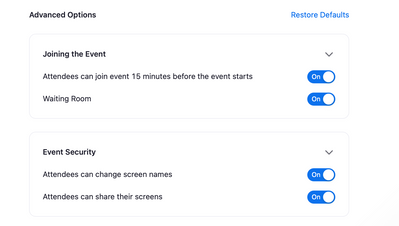
Advanced Options

  • Control how your attendees will join the event by enabling 'Join 15-min Early' and/or 'Waiting Room'.
  • Allow attendees to change their screen names or share their screens, or disable this entirely.  

Screen Shot 2021-09-22 at 10.16.43 AM.png

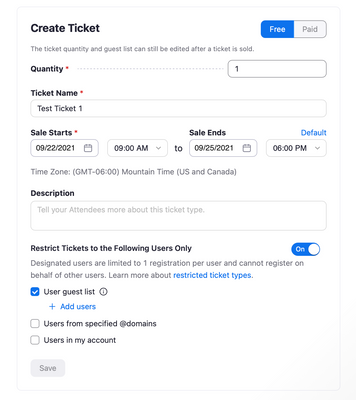
Ticket Options

  • Choose ticket type(s) that best fit your event. 
  • Select a quantity that matches your desired number of attendees.
  • Customize your 'Sale Start/End' dates for each ticket type. 
  • Restrict Tickets to certain users if you already have email addresses that are associated with a Zoom account of guests expected to register.

Screen Shot 2021-09-22 at 10.20.26 AM.png


Here's some more helpful resources:


What other best practices have you used to take control over securing your OnZoom Events? 


Show less

Test case for Zoom Events

Hello all, I am considering purchasing Zoom Events, purely to get acquainted with it at this stage - I do not have a live use-case at the moment. Does anyone have a non-profit, non-chargeable, or community event they'd like to collaborate on using Zo... Show more

Hello all,


I am considering purchasing Zoom Events, purely to get acquainted with it at this stage - I do not have a live use-case at the moment.


Does anyone have a non-profit, non-chargeable, or community event they'd like to collaborate on using Zoom Events - as a test event. Up to 500 Attendees, preferably in a timezone that is practical to work on from US/CST


Thanks,


Rupert


Show less

By
Community Champion | Customer

blamssn

We are not receiving the webhooks properly. Either there is considerable delay or there is no webhook request at all.

reply-icon Latest Reply - 

ウェビナーの定員について

現在、定員100人のウェビナーを使用しています。

500人まで使えるようになったと聞きましたが、ブラウザ上での表示は100人までです。

今登録中のウェビナーも定員を見ると100人までと記載されていますが、100人以上登録が入っています。

500名まで使える状態になっているのかが、知りたいです。

reply-icon Latest Reply - 

Indonesia Online Independence Day Ceremony with Zoom!!

Hi,Just wanted to share an amazing experience while supporting our beloved President Joko Widodo using Zoom for Indonesia's Independence day ceremony.This is our second year (PT. Kayreach System) in collaboration with Telkom Indonesia and also all re... Show more

Hi,
Just wanted to share an amazing experience while supporting our beloved President Joko Widodo using Zoom for Indonesia's Independence day ceremony.

This is our second year (PT. Kayreach System) in collaboration with Telkom Indonesia and also all related parties to make events like this successful.

+- Detailed events :
1. 20+ Large Meeting 1000.
2. 20+ Hosted Meetings.
3. Lots of PCs and small and large screens are used.
4. Cooperation with many TV stations for broadcast.
5. Studio and More


Although I'm happy to be able to support Indonesia's independence day ceremony using Zoom, I hope this pandemic ends quickly so that we can run many offline events again.

Maybe you have the same experience regarding events like this? I would be very happy if anyone could share their experiences.


Here is some footage that maybe you wanna see : https://www.linkedin.com/posts/kayreach-system-94713591_hutri76-zoom-kayreach-activity-6833985797411213312-5ihD 


Thanks Zoom! From Us PT. Kayreach system


Show less

By
Community Champion | Zoom Partner
reply-icon Latest Reply - 

Office Hours

Feel free to join "Office Hours" every day on Zoom at https://zoom.us/j/844989302 for all kinds of help and discussion around Zoom, video, media and virtual and production. An expert panel answer questions live, on almost any technical subject. More ... Show more


Feel free to join "Office Hours" every day on Zoom at https://zoom.us/j/844989302 for all kinds of help and discussion around Zoom, video, media and virtual and production. An expert panel answer questions live, on almost any technical subject.


More info at https://officehours.global/schedule/


Note: Office Hours is an external community, not unaffiliated with Zoom - but does contain Zoom experts and specialists.


Past meetings are back-cataloged here:  https://www.youtube.com/channel/UCS2NeR7i1YWiaxZDX7ihFyA


Show less

By
Community Champion | Customer

Zoom Test Kitchen - Zoom Events

There was a great discussion today in Zoom Test Kitchen with Sam Kokajko from Zoom regarding Zoom Events.


https://youtu.be/z-zBhchlApA


By
Community Champion | Customer