Zoom Events
cancel
Showing results for 
Search instead for 
Did you mean: 

What are Zoom Events?

Market and host interactive experiences with the Zoom Events all-in-one virtual event platform. Explore the Zoom Community's Recent Activity below to join the Events conversation and connect with other members. If you're still looking for support, browse our Zoom Events support articles or start a new discussion below!

Recent Activity

Event registration buttons when listed on Host Profile page

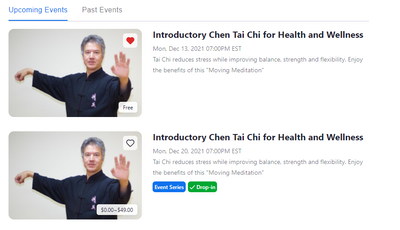
Having some people review events listed on my host profile page, I got feedback that it was confusing that a pay event had buttons to register for "Series" or "Drop-in", but there was no button for the free event (I would assume probably also not for... Show more

Having some people review events listed on my host profile page, I got feedback that it was confusing that a pay event had buttons to register for "Series" or "Drop-in", but there was no button for the free event (I would assume probably also not for a single event that required payment). The user complained that it was confusing looking for a button to click on to register for the free event and it was not clear that you needed to click anywhere on the event to go to registration.


I would propose that for consistency, all events have a button to register. Probably 3 versions: "Register" for single events that require payment or are free, and the current "Drop-in" and "Series" buttons

JingYingDad_0-1639404513026.png


Show less

reply-icon Latest Reply - 

Sending alert/notificaiton to a participant during a meeting

Hi all, Is it possible to send an alert or notification of some sort to a participant during a meeting? For instance, in a conference, is it possible to send an alert to a specific participant who is speaking letting him/her know the time is up? Some... Show more

Hi all,


Is it possible to send an alert or notification of some sort to a participant during a meeting? For instance, in a conference, is it possible to send an alert to a specific participant who is speaking letting him/her know the time is up? Something more visible than sending a direct text via chat that may not be seen by the said participant?

Thanks!


Show less

reply-icon Latest Reply - 

Zoom meeting report is not generated.

HI,


I checked the meeting records in Zoom Room to generate a report after the meeting.

There is no response even if you click the meeting ID as below, and you cannot check the participant information.

Can we see why this phenomenon occurs?


reply-icon Latest Reply - 

SHARING RECORDING EXPORTING

Dear Community,


How do a share a recorded meeting file with authenticated participants without deleting it?

I recorded the session to the cloud, and stopped recording and ended call.   I have found the recording - 

now what?   

reply-icon Latest Reply - 

'Share' Button on Private Event

Is there anyway to take the 'Share' button off my private event page. The whole point of it being Private is that I don't want it shared. I realize that I can't completely prevent people from sharing the link, but having a 'Share' button with 5 diffe... Show more

Is there anyway to take the 'Share' button off my private event page.   The whole point of it being Private is that I don't want it shared.  I realize that I can't completely prevent people from sharing the link, but having a 'Share' button with 5 different ways to share the link IS NOT HELPING. 


I realize that I can create specific settings to only allow certain people into the meeting, but I need people to be able to register for the event (access the link) as soon as they join my private website community.   (They join, they can see the community, they can see the link). 


I thought I had finally found a solution to host a zoom meeting that prevented  unwanted people from joining.  Clearly I have not.


Show less

reply-icon Latest Reply - 

Why can't I...

Why can't I have an OnZoom meeting with paid tickets going on one tablet and on a separate tablet have a regular Zoom meeting going? My initial meeting id is different than the one that generates for OnZoom paid customer tickets. Or is there a way to... Show more

Why can't I have an OnZoom meeting with paid tickets going on one tablet and on a separate tablet have a regular Zoom meeting going?  My initial meeting id is different than the one that generates for OnZoom paid customer tickets.  Or is there a way to do this that I don't know about?  I teach a dance fitness class on Zoom and on OnZoom and some of my clients either don't want to pay over the internet or don't have a way to.  Would be nice if I could make having to use Zoom easier for them and better for myself.  Even being able to do a split screen on one tablet with just Zoom and OnZoom people would be awesome and even better.  Thanks for any help. 


Show less

reply-icon Latest Reply - 

Resolved! Security

Greetings!
It does not allow me to cancel the authentication required of the entrants ..

Know why?
How can you cancel?

reply-icon Latest Reply - 

como contratar zoom interpretation

necesito contratar zoom interpretation o a que numero tengo que llamar para contratarlo... gracias

reply-icon Latest Reply - 

Overlay

Hello everyone,I have had this black bar on my overlay in the view of the participants for about 1 week. I see the participants, but they see me and this black bar. I didn't have this problem before. Is this possibly due to a new software version?Tha... Show more

Jochen_0-1637831794139.png

Hello everyone,
I have had this black bar on my overlay in the view of the participants for about 1 week. I see the participants, but they see me and this black bar. I didn't have this problem before. Is this possibly due to a new software version?

Thanks for your support.


Show less

reply-icon Latest Reply -