Introducing Zoom AI Companion 3.0: Turn Conversations into Outcomes
Experience the next generation of AI Companion today.
Show less

Zoomtopia is here. Unlock the transformative power of generative AI, helping you connect, collaborate, and Work Happy with AI Companion.
Register nowEmpowering you to increase productivity, improve team effectiveness, and enhance skills.
Learn moreKeep your Zoom app up to date to access the latest features.
Download Center Download the Zoom appDownload hi-res images and animations to elevate your next Zoom meeting.
Browse Backgrounds Zoom Virtual BackgroundsEmpowering you to increase productivity, improve team effectiveness, and enhance skills.
Zoom AI CompanionUser groups are unique spaces where community members can collaborate, network, and exchange knowledge on similar interests and expertise.
Help & Resources is your place to discover helpful Zoom support resources, browse Zoom Community how-to documentation, and stay updated on community announcements.
The Events page is your destination for upcoming webinars, platform training sessions, targeted user events, and more. Stay updated on opportunities to enhance your skills and connect with fellow Zoom users.
Zoom AI Companion is an AI assistant that works across the Zoom platform, facilitating higher individual productivity and better team collaboration. Explore the Zoom Community's Recent Activity below to join the AI Companion conversation and connect with other members. If you're still looking for support, browse our Zoom AI Companion support articles or start a new discussion below!
Experience the next generation of AI Companion today.
Show less

Hi Guys,
Do you know the IP range for Zoom AI service? There are some users want to access it by proxy.
So they need open the IP rang in their firewall.
Thanks!
Due to opperator error I have ended up with a number of AI Summary files that seen but not accesses (selection button is not available. Thus it is not possible to delete these files. I have now learnt how to aviod this problem (don't close session just after oping the summary option. I can live with these redundant files but it is just annoying. Thanks Daryl
Show less
Is it possible to disable the AI features on Zoom? The buttons take up space on the toolbar, pushing both the Participants and Chat button into the "View More" section, which is super inconvenient.
Hi, Does anyone know what it means when the AI Summaries are greyed out? Today I had 2 meetings where I used the AI Companion. When I go to the My Summaries tab I see entries for them but they are not clickable/viewable. I was able to access the AI Summaries for meetings I had last week. But today I cannot. I didn't do anything different today than last week, so I am stumped as to why I cannot access today's summaries. UPDATE: My issue was resolved. The summaries became available a few hours after the meeting ended.
Show less
I was just updating my Meeting Summary. I went to Save and it said I was logged out. I logged in and now when I go to the Summaries it is listed but there is no longer content. It now says it was not generated. Does anyone know how I can restore my summary with an ID number?
Show less
I am curious about the way that the consent is set up for Zoom AI Companion for the summaries and how companies are getting buy-in from internal Legal and Privacy teams. When cloud recording is enabled for a meeting, participants must acknowledge the disclaimer or leave the call. Being based in the US, I believe states that have a two-party consent, this would be a challenge because while not being recorded, the meeting is being transcribed to summarize...or am I missing something?
When the meeting summary is enabled for a call, the pop-up appears at the top of the meeting to raise awareness that the feature is enabled, but that is it.
Show less
Hello, my zoom has had no issues until I installed the following app directly from zoom: By Read AI Instant meeting recaps, transcripts, recordings, and automated real-time tools to help you have better Zoom meetings." It corrupted my zoom and computer. I uninstalled zoom but when I went to reinstall through zoom.us, it refused to reinstall. I can only use it through a browser which means the camera quality is poor (no option for HD). I went through all the trouble shooting, restarted PC, checked internet, cleared cache and cookies, checked permissions..... Any ideas?
Show less
My AI Companion summary is cutting off after about 2 hours I believe of a 3 hour meeting, is there a way to get more time/summary?
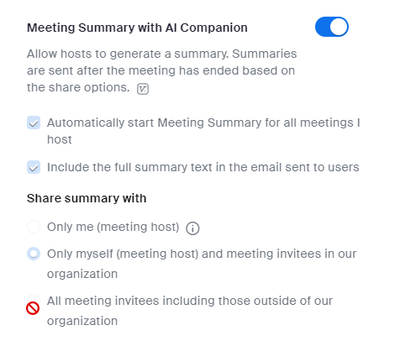
The admin for our account unlocked the toggle options for AI Companion - so everyone can update their own settings, but the sub options under the toggle are unlocked but none of us can update them. But the ones for Recording are editable.