Zoom AI Companion
cancel
Showing results for 
Search instead for 
Did you mean: 

What is Zoom AI Companion?

Zoom AI Companion is an AI assistant that works across the Zoom platform, facilitating higher individual productivity and better team collaboration. Explore the Zoom Community's Recent Activity below to join the AI Companion conversation and connect with other members. If you're still looking for support, browse our Zoom AI Companion support articles or start a new discussion below!


Recent Activity

Zoom User Group in Bangalore

We are in the midst of planning our First Zoom User Group in Bangalore in May! If you are interested in joining us at our first User Group in Bangalore, please do leave us a comment and we will invite you to our first User Group! We look forward to h... Show more

We are in the midst of planning our First Zoom User Group in Bangalore in May! If you are interested in joining us at our first User Group in Bangalore, please do leave us a comment and we will invite you to our first User Group! We look forward to hosting you! We will be covering topics of latest updates and also AIC! 


Show less

Meeting Summary with AI Companion set by default language to English

Hi Team,


Currently post zoom meeting, I am getting the meeting summary AI with Hindi regional language,


Can any one please let me know how to set the AI summary language to English by default.


Thank you.


reply-icon Latest Reply - 

Getting Started

I've used zoom meetings since 2014 but never got anything more. I'm interested in starting to use it's other features. Reading instructions does nor work for me. Ant suggestions and links to demo videos that will help to clarify things for me? Show more

I've used zoom meetings since 2014 but never got anything more.  I'm interested in starting to use it's other features.  Reading instructions does nor work for me.  Ant suggestions and links to demo videos that will help to clarify things for me?


Show less

reply-icon Latest Reply - 

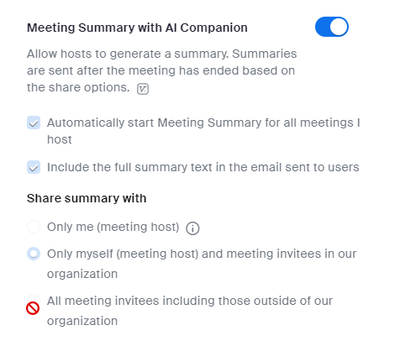
Meeting summary going to all participants instead of only me

Hi, we've just started trialling the meeting summary with AI companion however, one of our early users has found that even though Share Summary with only me (Meeting host) is selected, the summary has been shared with all participants.Is there some o... Show more

Hi, we've just started trialling the meeting summary with AI companion however, one of our early users has found that even though Share Summary with only me (Meeting host) is selected, the summary has been shared with all participants.

Is there some other setting that overrides the share settings or is this a fault?


Show less

reply-icon Latest Reply - 

Help Us With One Critical Question Zoom AI Can’t Answer

How is Zoom AI Companion helping you with your job? We want to understand how Zoom AI Companion makes our users more effective in their work week. Please help us out by filling out this short survey. If you can get other Zoom AI Companion users in yo... Show more

How is Zoom AI Companion helping you with your job?


We want to understand how Zoom AI Companion makes our users more effective in their work week. Please help us out by filling out this short survey

If you can get other Zoom AI Companion users in your company to respond, that will only give us more insight. Please share the survey link.


And, as a thank you for submitting your responses and encouraging other users to do the same, we will make a $5 USD donation through our Zoom Cares program to one of three nonprofits for each completed survey (up to a total donation amount of $5,000).

You can take the survey here!


Show less

Why didn't AI Companion save notes?

Hey all - I turned on AI Companion for a group call and it never sent me notes and I don't see them in my Zoom AI Companion tab. This has happened a few times before. Am I missing a step I should have done to have AI Companion save the notes and emai... Show more

Hey all - I turned on AI Companion for a group call and it never sent me notes and I don't see them in my Zoom AI Companion tab. This has happened a few times before. Am I missing a step I should have done to have AI Companion save the notes and email them to me? Thanks!


Show less

AI Summaries Matched with Incorrect Date

I use Zoom AI Summaries for all my meetings and have found them really helpful. However, when I log into Zoom and look at the Zoom AI Companion tab for my list of summaries, many are matched with the wrong date. For example, I click on the summary in... Show more

I use Zoom AI Summaries for all my meetings and have found them really helpful. However, when I log into Zoom and look at the Zoom AI Companion tab for my list of summaries, many are matched with the wrong date. For example, I click on the summary in my list that is supposed to be for Feb 25, but when I open it, I get the summary from Jan 26. Is there a fix for this? It makes it really challenging to find the correct meeting summary easily. 

Thanks


Show less

reply-icon Latest Reply - 

Resolved! HIPPA compliance & New AI Terms & Condition

I see there is new AI language in the terms & agreements. How does that impact the HIPPA compliance considerations? How does the AI ignore the PHI? I haven't been able to get int touch with actual support, but would need a legal answer on this from Z... Show more

I see there is new AI language in the terms & agreements. How does that impact the HIPPA compliance considerations? How does the AI ignore the PHI? I haven't been able to get int touch with actual support, but would need a legal answer on this from Zoom.


Show less

reply-icon Latest Reply - 

AI Companion

I Have the Ai companion enabled on my web base account. I hosted a recorded meeting yesterday that the Ai companion was not enabled and did not do the summary. The only thing I can think that happened was that this meeting time and date had to be mov... Show more

I Have the Ai companion enabled on my  web base account. I hosted a recorded meeting yesterday that the Ai companion was not enabled and did not do the summary. 

The only thing I can think that happened was that this meeting time and date had to be moved. I use Microsoft outlook to do this,  

Has anyone else had this happen and if so how did you prevent and fix it 


Show less