Zoom Rooms and Workspaces
cancel
Showing results for 
Search instead for 
Did you mean: 
Effective January 9th, 2026 through January 22nd, 2026: The Zoom Community is currently in read-only mode with login disabled, to deliver you a new and improved community experience!

The site is still accessible to view, however, the ability to login, create content, or access your community account is temporarily unavailable. We appreciate your patience during this time. If seeking support, please browse existing community content or ask our Zoom Virtual Agent.

What are Zoom Rooms and Workspaces?

Zoom Rooms are modern workspaces that enable in-person and remote participants to interact in real-time in a hybrid setting. Explore the Zoom Community's Recent Activity below to join the Rooms and Workspaces conversation and connect with other members. If you're still looking for support, browse our Zoom Rooms and Workspaces support articles or start a new discussion below!

Recent Activity

Digital Signage

On the Zoom Digital Signage Platform we recently starting experiencing that we cannot upload any Videos anymore as it shows Upload storage limit reached. We deleted all the previous content and still we cannot upload videos. We did not get any feedba... Show more

On the Zoom Digital Signage Platform we recently starting experiencing that we cannot upload any Videos anymore as it shows Upload storage limit reached. We deleted all the previous content and still we cannot upload videos. We did not get any feedback from Zoom local support  or Zoom.us and was forced to use a different account that worked for a month and same error is back on a different account


Show less

By
Newcomer
This thread is read-only
reply-icon Latest Reply - 

Set up sessions and presenters ahead of time?

I'm setting up a small-scale training event. I want people to be together in the main space for a short time, then move to breakout rooms (participant choice, 2 rooms), then come back together again, 3 times over a day of training.I would like to be ... Show more

I'm setting up a small-scale training event. I want people to be together in the main space for a short time, then move to breakout rooms (participant choice, 2 rooms), then come back together again, 3 times over a day of training.

I would like to be able to set up as much ahead of time as I can, so that there's less scramble on the day. But it seems Zoom limits most admin to be done once the meeting has started, which seems absolutely nonsensical to me. I may be missing something though. Here's what I'd like to do:

- Name the rooms throughout the day (eg, for the 9:00 am session, Room 1 might be "Basics" and Room 2 might be "Intermediate"; for the 12pm session, Room 1 might be "Communications" and Room 2 might be "Program Evaluation", and so on. It doesn't look like I can set my room "schedule" ahead of time, correct?

- Enable screen sharing within each room for the person who will present in each session. Again, it looks like I can only do that once the session has started and people are already in the rooms, is that correct?


Thank you for any help anyone can give me! I have been reading Zoom articles for the last 40 min and just getting more frustrated as none of them address my questions.


Show less

Where does Zoom save my Organization

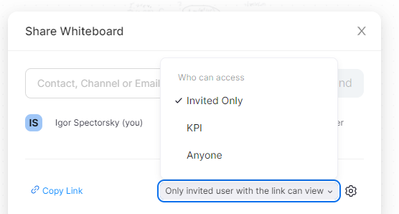
Hello,Recently I faced such a problem. When I try to share whiteboard (new), the system asked me who should have access: However, I cannot find neither in profile nor in settings where my organization KPI (Kyiiv Politechnic Institute) is pointed. E. ... Show more

Hello,

Recently I faced such a problem. When I try to share whiteboard (new), the system asked me who should have access:

 
spectorsky_2-1668426855735.png


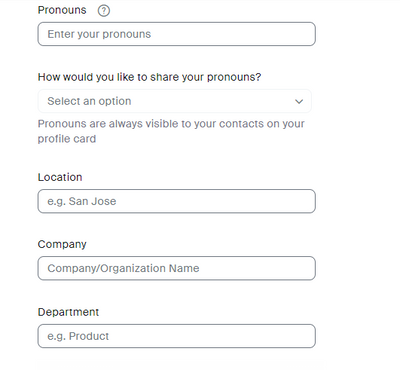
However, I cannot find neither in profile nor in settings where my organization KPI (Kyiiv Politechnic Institute) is pointed. E. g. , Company and Department field in profile are empty:

spectorsky_3-1668426966887.png

Thanks for any idea.


Show less

BOR - move several people at the same time from ne BOR to another

Hello guys, I need your helo  I'm organising an event on Zoom in three weeks. I'd like to know if it's possible to move several (10 at least) attendees at the same time from one BOR to another one without going back to plenary? Thx for your help and... Show more

Hello guys, 


I need your helo 🙂 I'm organising an event on Zoom in three weeks.  

I'd like to know if it's possible to move several (10 at least) attendees at the same time from one BOR to another one without going back to plenary? 


Thx for your help and have a beautiful day 🙂 
Kmï


Show less

reply-icon Latest Reply - 

ZOOMROOM et MXL AC-360-Z

Bonjour,J'utilise les microphones MXL AC-360-Z dans mes installations de zoomroom.Donc 3 micro MXL AC-360 au plafond, se rendent a mon ordinateur PC (zoomroom) a l'aide d'extender USB (intelix DIGI-USB2). Tout fonctionne bien je réussi a linker les 3... Show more

Bonjour,

J'utilise les microphones MXL AC-360-Z dans mes installations de zoomroom.

Donc 3 micro MXL AC-360 au plafond, se rendent a mon ordinateur PC (zoomroom) a l'aide d'extender USB  (intelix DIGI-USB2). Tout fonctionne bien je réussi a linker les 3 micro ensemble. Soudainement sans raison les micros ne fonctionnent plus.  Mais je les voit quand meme actif dans les accessoires de zoomroom.

Avez-vous une solution ? merci


Show less

By
Newcomer
This thread is read-only
reply-icon Latest Reply - 

Best practice - Zoom Room

We have two approved Zoom Room configurations (Neat Bar Pro, Neat controller). We have in-person and online participants. Speakers vary so the speakers' equipment varies. We ask speakers to ensure they can connect to an HDMI cable. We also have a lav... Show more

We have two approved Zoom Room configurations (Neat Bar Pro, Neat controller). We have in-person and online participants. Speakers vary so the speakers' equipment varies. We ask speakers to ensure they can connect to an HDMI cable. We also have a lav mic EVEN THOUGH the Neat bar has great voice reinforcement (and sound canceling). 


What is the best practice to ensure a speaker can share their content (including any audio from their computer) with participants both in-person and in the zoom room session? 


Currently, I'm testing these config instructions:

Speaker must have zoom desktop app installed.

Speaker must have a zoom login (I guess this could be provided by us).

Speaker must have HDMI connection.

Speaker enters sharing key and meeting password.


What audio checkboxes are needed to ensure computer playback is heard by online participants?


Thanks!


Show less

By
Newcomer
This thread is read-only

companion whiteboard Release 5.12.2

Hi, I am testing the release 5.12.2 for my customer and I see that, when sharing the whiteboard, the icons at the left disappeared. It is not possible anymore to write. There is no issue when the whiteboard is not shared. Also the anoation on top of ... Show more

Hi, 


I am testing the release 5.12.2 for my customer and I see that, when sharing the whiteboard, the icons at the left disappeared. It is not possible anymore to write. 

There is no issue when the whiteboard is not shared. Also the anoation on top of the shared content is working. 


Show less

By
Zoom Partner
This thread is read-only

Cours de Réseaux

Soyez concentrer pendant le cours 

Upgraded to Zoom Rooms 5.12 Calendar Sync issue

I upgraded my Zoom Rooms PC to 5.12, and it broke the calendar sync to Exchange 2016. I reached out to Zoom support, and they provided me with version 5.9 to fix the issue. I noticed that the Zoom Desktop client 5.13 release note mentions the calenda... Show more

I upgraded my Zoom Rooms PC to 5.12, and it broke the calendar sync to Exchange 2016. I reached out to Zoom support, and they provided me with version 5.9 to fix the issue.


I noticed that the Zoom Desktop client 5.13 release note mentions the calendar sync fix. Will the same fix be applied to the latest Zoom Rooms client?  


Show less

Make Workspace Available after a certain time

Hey, We have certain desks in our workspace that can only be reserved by members of our Client Accounting team. Our COO noticed that, sometimes, they are not being used and are empty for several days. To get the most of these limited hot desks, I'd l... Show more

Hey,


We have certain desks in our workspace that can only be reserved by members of our Client Accounting team. Our COO noticed that, sometimes, they are not being used and are empty for several days. To get the most of these limited hot desks, I'd like to be able to open the workspaces up for anyone to reserve after a certain time, 10am for example.


Can this be done currently or is this by any chance in the pipeline of things to come?


Show less